> ## Documentation Index
> Fetch the complete documentation index at: https://docs.cloosphere.ai/llms.txt
> Use this file to discover all available pages before exploring further.
# Code Gateway
> LLM API proxy gateway for AI coding tools (Claude Code, Codex CLI, Gemini CLI, Cursor) — setup and management
Admin › Settings › Code Gateway
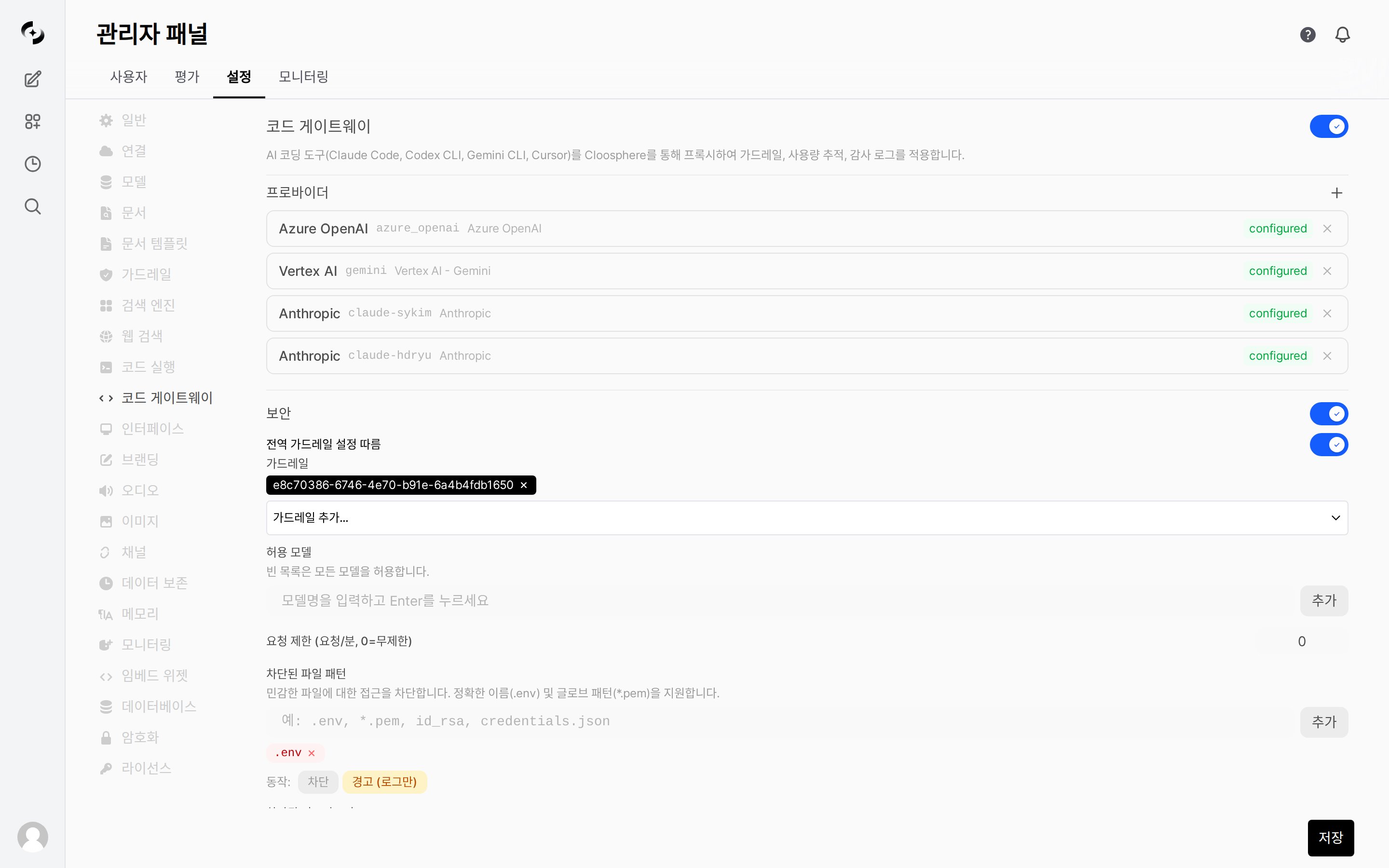
Code Gateway is an enterprise proxy gateway that routes LLM API requests from AI coding CLI tools (Claude Code, Codex CLI, Gemini CLI, Cursor) through Cloosphere.
* GitHub Copilot CLI and other OpenAI-compatible clients can also connect via the OpenAI endpoint.
Centralize the management of AI coding tool usage with guardrails, usage tracking, audit logs, and rate limits.
 ***
## Concept
```mermaid theme={null}
flowchart LR
subgraph Developers
A[Claude Code]
B[Cursor]
C[Codex CLI]
D[Gemini CLI]
D2[GitHub Copilot]
end
subgraph Cloosphere
E[Code Gateway]
E --> F[Authentication]
E --> G[Guardrails]
E --> H[Rate Limit]
E --> I[Usage Tracking]
E --> J[Audit Log]
end
subgraph LLM_Provider
K[OpenAI]
L[Anthropic]
M[Azure OpenAI]
N[Google Gemini]
O[Vertex AI]
P[Azure AI Foundry]
end
A --> E
B --> E
C --> E
D --> E
D2 --> E
E --> K
E --> L
E --> M
E --> N
E --> O
E --> P
```
| Component | Description |
| ---------------- | ----------------------------------------------------------------------------------------------------- |
| **Developers** | Set Cloosphere Code Gateway as BASE\_URL in AI coding tools |
| **Code Gateway** | Performs authentication, guardrails, rate limiting, usage tracking, then proxies to upstream provider |
| **LLM Provider** | Service that actually provides the LLM API (OpenAI, Anthropic, Azure, etc.) |
Code Gateway is backend-API-dedicated and operates separately from chat in the Cloosphere web UI. Configure only in admin settings — users set Cloosphere API keys in their coding tools.
***
## Activation and Setup
### Enabling Code Gateway
Navigate to the **Code Gateway** settings page in the admin panel.
Toggle on **Enable Code Gateway**.
Click **+ Add Provider** to register an LLM Provider.
Configure allowed models, rate limits, guardrails, file pattern blocks.
***
## Concept
```mermaid theme={null}
flowchart LR
subgraph Developers
A[Claude Code]
B[Cursor]
C[Codex CLI]
D[Gemini CLI]
D2[GitHub Copilot]
end
subgraph Cloosphere
E[Code Gateway]
E --> F[Authentication]
E --> G[Guardrails]
E --> H[Rate Limit]
E --> I[Usage Tracking]
E --> J[Audit Log]
end
subgraph LLM_Provider
K[OpenAI]
L[Anthropic]
M[Azure OpenAI]
N[Google Gemini]
O[Vertex AI]
P[Azure AI Foundry]
end
A --> E
B --> E
C --> E
D --> E
D2 --> E
E --> K
E --> L
E --> M
E --> N
E --> O
E --> P
```
| Component | Description |
| ---------------- | ----------------------------------------------------------------------------------------------------- |
| **Developers** | Set Cloosphere Code Gateway as BASE\_URL in AI coding tools |
| **Code Gateway** | Performs authentication, guardrails, rate limiting, usage tracking, then proxies to upstream provider |
| **LLM Provider** | Service that actually provides the LLM API (OpenAI, Anthropic, Azure, etc.) |
Code Gateway is backend-API-dedicated and operates separately from chat in the Cloosphere web UI. Configure only in admin settings — users set Cloosphere API keys in their coding tools.
***
## Activation and Setup
### Enabling Code Gateway
Navigate to the **Code Gateway** settings page in the admin panel.
Toggle on **Enable Code Gateway**.
Click **+ Add Provider** to register an LLM Provider.
Configure allowed models, rate limits, guardrails, file pattern blocks.
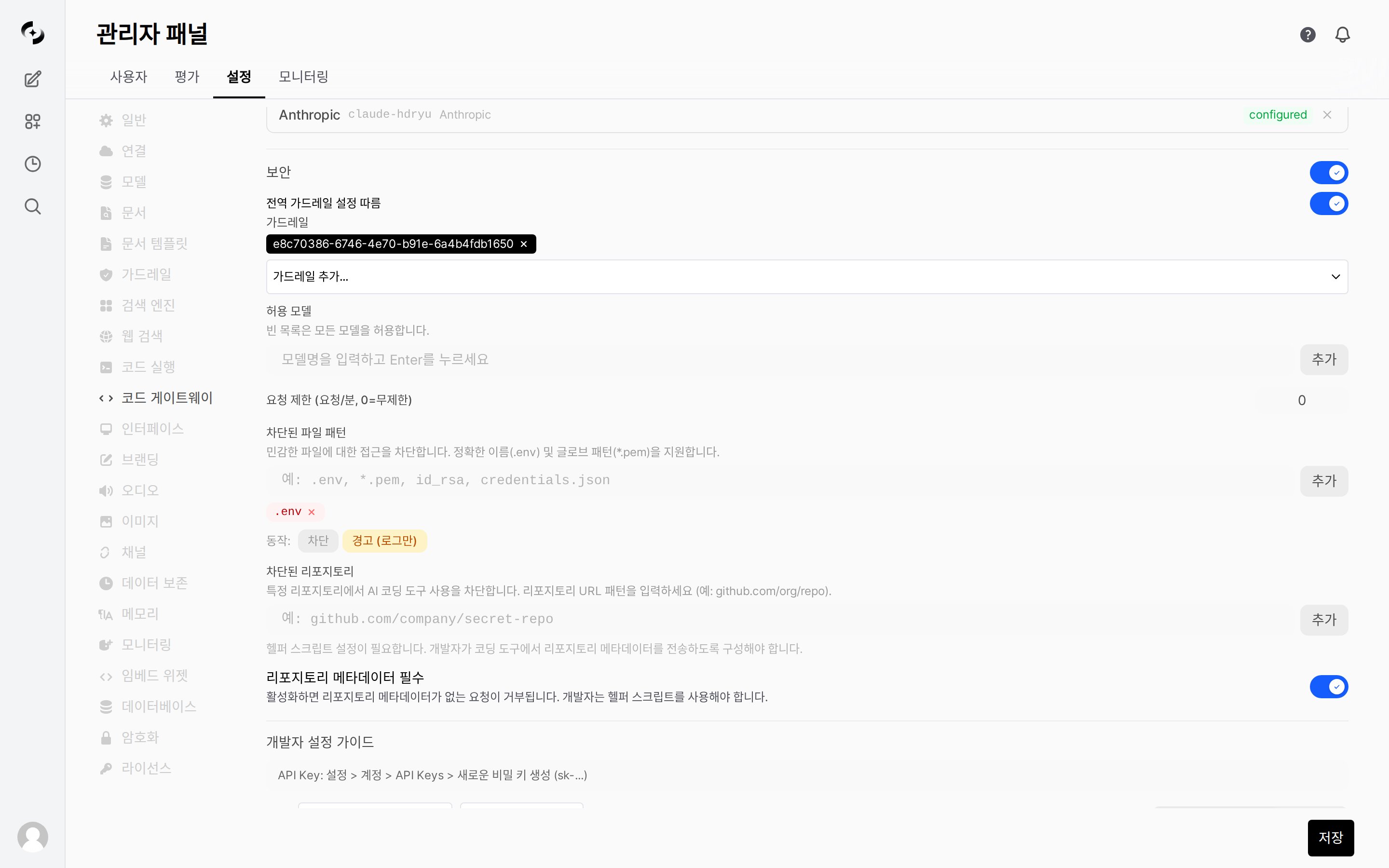 ### Global Settings
| Setting | Description | Default |
| ------------------------------------ | -------------------------------------------------------------------------------------------------------- | :-----: |
| **Enabled** | Code Gateway ON/OFF | OFF |
| **Allowed models** | List of usable models (empty = allow all) | All |
| **Rate limit** | Max requests per minute per user (0 = unlimited) | 0 |
| **Security** | Master toggle to enable/disable security checks (guardrails, file patterns, repository blocking) in bulk | ON |
| **Follow global guardrail settings** | Apply global guardrail settings directly to Code Gateway | ON |
| **Guardrails** | List of guardrail IDs to apply | None |
| **File pattern block** | File patterns to block (glob format) | None |
| **File block action** | Behavior on block (block / warn) | block |
| **Blocked repositories** | Repository patterns to block AI coding tool usage | None |
| **Require repository metadata** | Block requests without helper script setup | OFF |
***
## Provider Settings
A Provider is the upstream LLM service Code Gateway forwards requests to.
* Multiple Providers can be registered simultaneously, each identified by a unique `provider_id`.
### Supported Providers
| Type | Service | Auth Method |
| ---------------------- | ----------------------------------- | --------------------- |
| **openai** | OpenAI, OpenAI-compatible endpoints | Bearer token |
| **anthropic** | Anthropic API | x-api-key header |
| **gemini** | Google Gemini API | x-goog-api-key header |
| **azure\_openai** | Azure OpenAI Service | api-key header |
| **azure\_ai\_foundry** | Azure AI Foundry | api-key header |
| **vertex\_ai** | Google Vertex AI (native) | GCP Service Account |
### Provider Presets
Picking a preset when adding a Provider auto-sets the type and base URL.
**Azure AI Foundry** has two sub-presets:
* **Azure AI Foundry - OpenAI**: For OpenAI-compatible models (`openai` type). Use with Cursor, Codex CLI, GitHub Copilot.
* **Azure AI Foundry - Claude**: For Claude models (`azure_ai_foundry` type). Use with Claude Code, Cursor.
For the same AI Foundry endpoint, pick the appropriate preset based on the models you're using.
### Adding a Provider
### Global Settings
| Setting | Description | Default |
| ------------------------------------ | -------------------------------------------------------------------------------------------------------- | :-----: |
| **Enabled** | Code Gateway ON/OFF | OFF |
| **Allowed models** | List of usable models (empty = allow all) | All |
| **Rate limit** | Max requests per minute per user (0 = unlimited) | 0 |
| **Security** | Master toggle to enable/disable security checks (guardrails, file patterns, repository blocking) in bulk | ON |
| **Follow global guardrail settings** | Apply global guardrail settings directly to Code Gateway | ON |
| **Guardrails** | List of guardrail IDs to apply | None |
| **File pattern block** | File patterns to block (glob format) | None |
| **File block action** | Behavior on block (block / warn) | block |
| **Blocked repositories** | Repository patterns to block AI coding tool usage | None |
| **Require repository metadata** | Block requests without helper script setup | OFF |
***
## Provider Settings
A Provider is the upstream LLM service Code Gateway forwards requests to.
* Multiple Providers can be registered simultaneously, each identified by a unique `provider_id`.
### Supported Providers
| Type | Service | Auth Method |
| ---------------------- | ----------------------------------- | --------------------- |
| **openai** | OpenAI, OpenAI-compatible endpoints | Bearer token |
| **anthropic** | Anthropic API | x-api-key header |
| **gemini** | Google Gemini API | x-goog-api-key header |
| **azure\_openai** | Azure OpenAI Service | api-key header |
| **azure\_ai\_foundry** | Azure AI Foundry | api-key header |
| **vertex\_ai** | Google Vertex AI (native) | GCP Service Account |
### Provider Presets
Picking a preset when adding a Provider auto-sets the type and base URL.
**Azure AI Foundry** has two sub-presets:
* **Azure AI Foundry - OpenAI**: For OpenAI-compatible models (`openai` type). Use with Cursor, Codex CLI, GitHub Copilot.
* **Azure AI Foundry - Claude**: For Claude models (`azure_ai_foundry` type). Use with Claude Code, Cursor.
For the same AI Foundry endpoint, pick the appropriate preset based on the models you're using.
### Adding a Provider
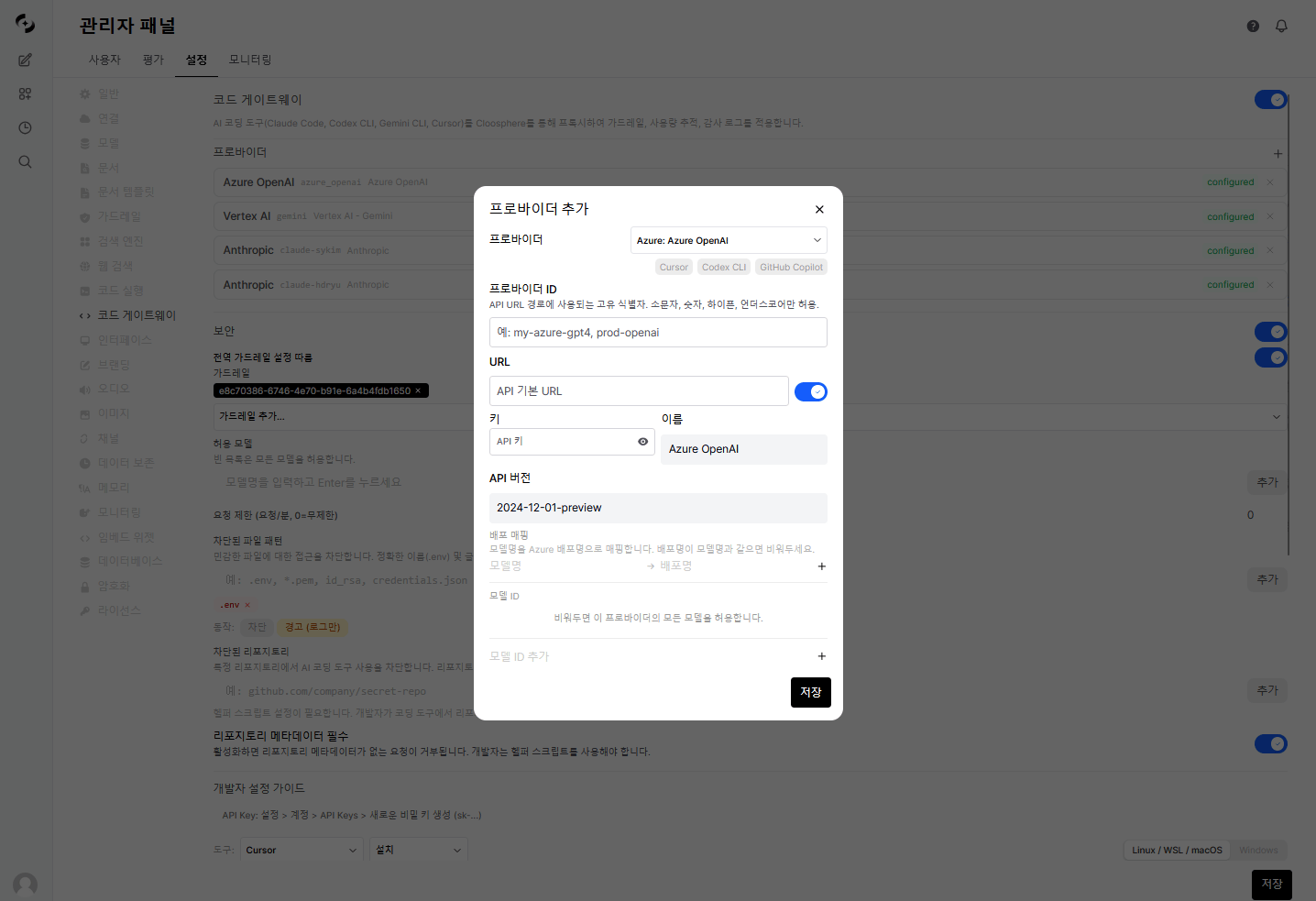 | Setting | Description |
| --------------- | ------------------------------------------------------ |
| **Provider ID** | Unique identifier (used in URL path) |
| **Type** | openai / anthropic / gemini |
| **API URL** | Provider API endpoint |
| **API Key** | Authentication key |
| **Model IDs** | List of allowed models for this Provider (empty = all) |
| **Enabled** | Provider ON/OFF |
| Setting | Description |
| ------------------ | -------------------------------------------------- |
| **Provider ID** | Unique identifier |
| **Type** | azure\_openai |
| **API URL** | Azure endpoint (`https://{name}.openai.azure.com`) |
| **API Key** | Azure API key |
| **API Version** | API version (e.g., `2024-12-01-preview`) |
| **Deployment Map** | Model name → deployment name mapping (optional) |
| Setting | Description |
| ----------------------- | --------------------------------------- |
| **Provider ID** | Unique identifier |
| **Type** | vertex\_ai |
| **Project ID** | GCP project ID |
| **Location** | GCP region (default: us-central1) |
| **Service Account Key** | GCP service account JSON key |
| **Use global GCP Key** | Use server's global GCP key as fallback |
***
## Developer Usage
Developers set the BASE\_URL of their AI coding tools to Cloosphere Code Gateway and use a Cloosphere API key.
| Setting | Description |
| --------------- | ------------------------------------------------------ |
| **Provider ID** | Unique identifier (used in URL path) |
| **Type** | openai / anthropic / gemini |
| **API URL** | Provider API endpoint |
| **API Key** | Authentication key |
| **Model IDs** | List of allowed models for this Provider (empty = all) |
| **Enabled** | Provider ON/OFF |
| Setting | Description |
| ------------------ | -------------------------------------------------- |
| **Provider ID** | Unique identifier |
| **Type** | azure\_openai |
| **API URL** | Azure endpoint (`https://{name}.openai.azure.com`) |
| **API Key** | Azure API key |
| **API Version** | API version (e.g., `2024-12-01-preview`) |
| **Deployment Map** | Model name → deployment name mapping (optional) |
| Setting | Description |
| ----------------------- | --------------------------------------- |
| **Provider ID** | Unique identifier |
| **Type** | vertex\_ai |
| **Project ID** | GCP project ID |
| **Location** | GCP region (default: us-central1) |
| **Service Account Key** | GCP service account JSON key |
| **Use global GCP Key** | Use server's global GCP key as fallback |
***
## Developer Usage
Developers set the BASE\_URL of their AI coding tools to Cloosphere Code Gateway and use a Cloosphere API key.
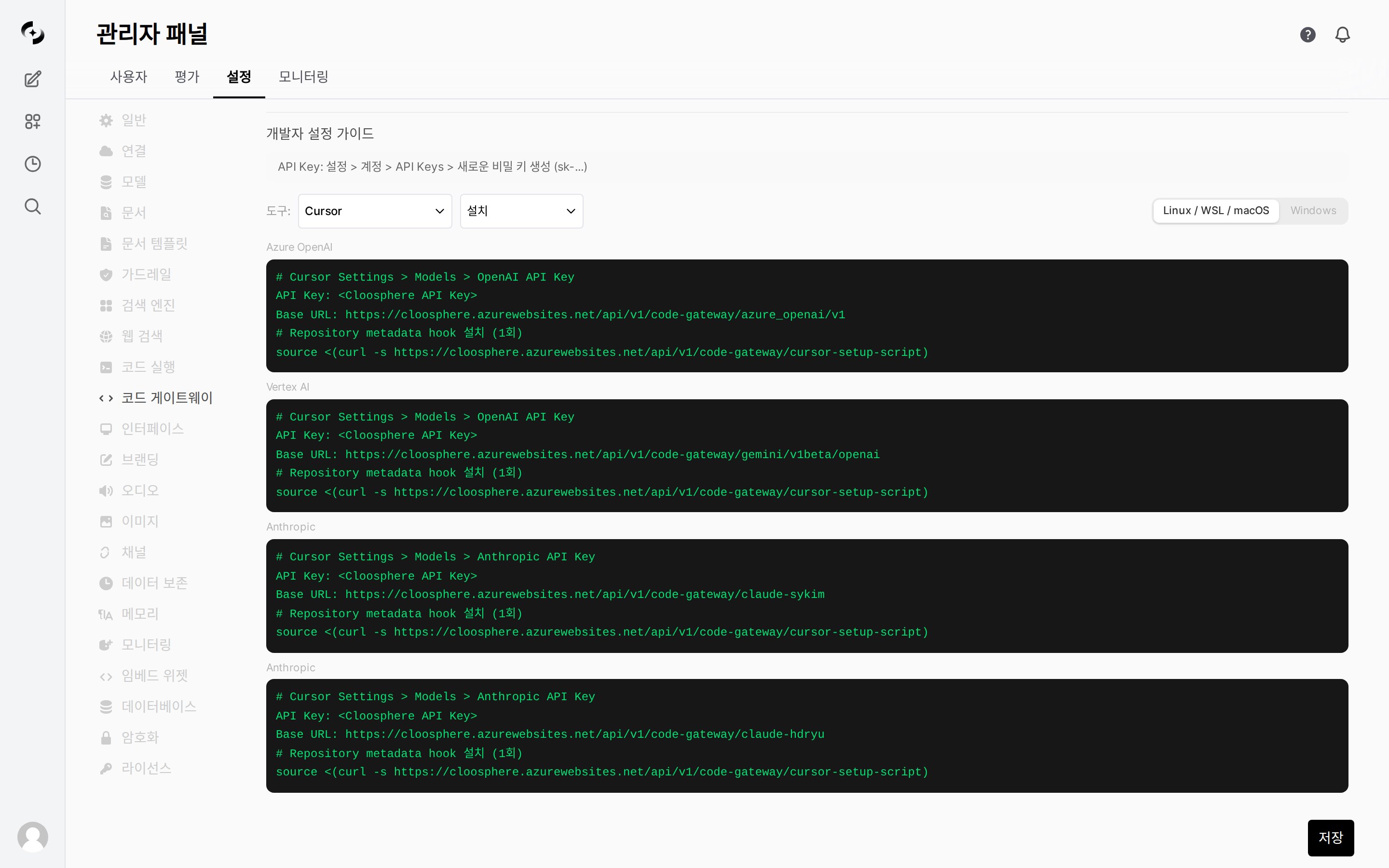 ### Endpoint Structure
```
{CLOOSPHERE_URL}/api/v1/code-gateway/{provider_id}/{path}
```
**Examples:**
* OpenAI Provider: `https://cloosphere.company.com/api/v1/code-gateway/openai/v1/chat/completions`
* Anthropic Provider: `https://cloosphere.company.com/api/v1/code-gateway/anthropic/v1/messages`
### Authentication
Code Gateway accepts API keys in four ways (in priority order).
| Method | Header/Parameter | Tools |
| ------------------- | --------------------------------- | --------------------------------- |
| **Bearer Token** | `Authorization: Bearer {api_key}` | Cursor, Codex CLI, GitHub Copilot |
| **x-api-key** | `x-api-key: {api_key}` | Claude Code (Anthropic SDK) |
| **x-goog-api-key** | `x-goog-api-key: {api_key}` | Gemini CLI |
| **Query Parameter** | `?key={api_key}` | Fallback |
Generate API keys under **Settings › Account › API Keys › Create new secret key** in Cloosphere. Use the Cloosphere API key, not the Provider's original API key.
### Per-Tool Setup Examples
```bash theme={null}
# .bashrc or .zshrc
export ANTHROPIC_BASE_URL="https://cloosphere.company.com/api/v1/code-gateway/anthropic"
export ANTHROPIC_API_KEY="sk-cloosphere-..."
```
In Cursor settings, set **Override OpenAI Base URL** to:
```
https://cloosphere.company.com/api/v1/code-gateway/openai/v1
```
Set API Key to your Cloosphere API key.
```bash theme={null}
export OPENAI_BASE_URL="https://cloosphere.company.com/api/v1/code-gateway/openai/v1"
export OPENAI_API_KEY="sk-cloosphere-..."
```
```bash theme={null}
export GOOGLE_GEMINI_BASE_URL="https://cloosphere.company.com/api/v1/code-gateway/gemini"
export GEMINI_API_KEY="sk-cloosphere-..."
```
GitHub Copilot CLI connects via the OpenAI-compatible endpoint:
```bash theme={null}
export OPENAI_BASE_URL="https://cloosphere.company.com/api/v1/code-gateway/openai/v1"
export OPENAI_API_KEY="sk-cloosphere-..."
# Start GitHub Copilot CLI
gh copilot
```
### Claude Code Setup Script
An auto-setup script is provided for Claude Code users.
* It auto-installs the helper script and configures `~/.claude/settings.json`.
```bash theme={null}
# 1. Set environment variables
export ANTHROPIC_AUTH_TOKEN="sk-cloosphere-..."
export ANTHROPIC_BASE_URL="https://cloosphere.company.com/api/v1/code-gateway/anthropic"
# 2. Run setup script
curl -s https://cloosphere.company.com/api/v1/code-gateway/setup-script | bash
```
```powershell theme={null}
# 1. Set environment variables
$env:ANTHROPIC_AUTH_TOKEN = "sk-cloosphere-..."
$env:ANTHROPIC_BASE_URL = "https://cloosphere.company.com/api/v1/code-gateway/anthropic"
# 2. Run setup script
irm "https://cloosphere.company.com/api/v1/code-gateway/setup-script?os=powershell" | iex
```
What the setup script does:
1. **Install helper script** (`~/cloosphere-helper.sh` or `~/cloosphere-helper.ps1`): Auto-attach repository metadata (Git remote URL, working directory) to API keys
2. **Configure `~/.claude/settings.json`**: Auto-set `ANTHROPIC_AUTH_TOKEN`, `ANTHROPIC_BASE_URL`, `apiKeyHelper`
The helper script is required in environments with repository metadata-based blocking policies (`blocked_repos`, `require_repo_metadata`) enabled.
***
## Security Features
The **Security** master toggle enables or disables the security checks below (guardrails, allowed models, file patterns, repository blocking) in bulk.
* Turning on **Follow global guardrail settings** applies the global guardrail settings directly to Code Gateway without separate configuration.
### Guardrails
Apply guardrails to Code Gateway for PII detection, content filtering, etc., on coding tool inputs.
* Specify guardrail IDs created in [Guardrail Management](/en/workspace/guardrails).
Guardrail violations, file pattern blocks, repository blocks, and other events are all viewable in the **Monitoring > Guardrail Logs** tab.
### Allowed Models
Restrict to specific models.
* Configurable at both global and Provider levels.
| Level | Setting Field | Description |
| ------------------------- | ---------------- | ------------------------------------------------------------- |
| **Global allowed models** | `allowed_models` | Models usable across the entire Code Gateway (global setting) |
| **Provider model IDs** | `model_ids` | Models allowed per Provider (per-Provider setting) |
When both `allowed_models` (global) and `model_ids` (per Provider) are set, only models allowed by both are usable. `allowed_models` is the Code Gateway-wide policy; `model_ids` adds per-Provider restriction.
### Rate Limit
Limit max requests per minute per user.
* Operates on a 60-second sliding window.
Rate limits are in-memory, so they reset on server restart.
### File Pattern Block
Block files matching specific patterns in coding tool requests.
* Specify patterns in glob format.
| Setting | Description | Example |
| ----------- | ---------------------------------------- | --------------------------------- |
| **Pattern** | File path patterns to block | `*.env`, `*credentials*`, `*.pem` |
| **Action** | block (block request) or warn (log only) | block |
### Blocked Repositories
Block AI coding tool usage in specific Git repositories.
* Matching is based on repository metadata (repo URL, working directory) passed via the helper script.
| Setting | Description | Example |
| ------------------ | ------------------------------------------------------------- | ----------------------------------------------- |
| **Block patterns** | Repository URL or path patterns to block (substring matching) | `secret-project`, `github.com/org/private-repo` |
Patterns are case-insensitive substring matched against repository URL and working directory path. Git SSH URLs (`git@github.com:org/repo.git`) are auto-normalized for matching.
Blocked repository access is auto-recorded in the **guardrail log**.
### Require Repository Metadata
Enabling `require_repo_metadata` blocks requests without repository metadata via the helper script.
* This forces all Code Gateway users to set up the helper script.
Enabling this option blocks all requests from users without the helper script. Inform users to set up the helper script before enabling.
***
## Usage Tracking
All requests through Code Gateway are auto-logged for usage.
* Admins can review usage logs to see per-team, per-user, per-model usage.
| Item | Description |
| ----------------------- | ----------------------------- |
| **User** | Requesting user |
| **Model** | LLM model used |
| **Provider** | Provider used |
| **Input/output tokens** | Request/response token counts |
| **Time** | Request time |
### Usage Statistics
View per-period usage statistics to analyze cost and trends.
### Filters
| Filter | Description |
| ---------- | ------------------------ |
| **User** | Filter by specific user |
| **Model** | Filter by specific model |
| **Period** | Start \~ end date |
***
## Proxy Processing Flow
The full flow Code Gateway uses to process requests:
```mermaid theme={null}
flowchart TD
A[Request received] --> B[Verify authentication]
B --> C{Gateway enabled?}
C -->|No| X[403 Forbidden]
C -->|Yes| D{Verify feature permission}
D -->|No| X
D -->|Yes| E[Verify Provider config]
E --> F[Verify rate limit]
F --> F2[Verify blocked repository]
F2 --> G[Verify allowed model]
G --> H[Verify file pattern block]
H --> I[Apply guardrails]
I --> J{Streaming?}
J -->|Yes| K[Streaming proxy]
J -->|No| L[Standard proxy]
K --> M[Log usage]
L --> M
M --> N[Return response]
```
***
## Troubleshooting
Code Gateway is disabled in admin settings. Ask an admin to enable it.
The user's feature permissions don't include Code Gateway access. Admin must enable `features.code_gateway` in group permission settings.
The `provider_id` in the request URL doesn't match a registered Provider. Verify Provider ID.
The requested model isn't in the global allowed models or the Provider's allowed models list. Ask an admin to add the model.
You've exceeded the per-minute request limit. Wait briefly and retry.
`require_repo_metadata` is enabled but the helper script isn't configured. Run the Claude Code setup script to install the helper script.
The request's repository URL or working directory matches a `blocked_repos` pattern. Ask an admin for unblock.
### Endpoint Structure
```
{CLOOSPHERE_URL}/api/v1/code-gateway/{provider_id}/{path}
```
**Examples:**
* OpenAI Provider: `https://cloosphere.company.com/api/v1/code-gateway/openai/v1/chat/completions`
* Anthropic Provider: `https://cloosphere.company.com/api/v1/code-gateway/anthropic/v1/messages`
### Authentication
Code Gateway accepts API keys in four ways (in priority order).
| Method | Header/Parameter | Tools |
| ------------------- | --------------------------------- | --------------------------------- |
| **Bearer Token** | `Authorization: Bearer {api_key}` | Cursor, Codex CLI, GitHub Copilot |
| **x-api-key** | `x-api-key: {api_key}` | Claude Code (Anthropic SDK) |
| **x-goog-api-key** | `x-goog-api-key: {api_key}` | Gemini CLI |
| **Query Parameter** | `?key={api_key}` | Fallback |
Generate API keys under **Settings › Account › API Keys › Create new secret key** in Cloosphere. Use the Cloosphere API key, not the Provider's original API key.
### Per-Tool Setup Examples
```bash theme={null}
# .bashrc or .zshrc
export ANTHROPIC_BASE_URL="https://cloosphere.company.com/api/v1/code-gateway/anthropic"
export ANTHROPIC_API_KEY="sk-cloosphere-..."
```
In Cursor settings, set **Override OpenAI Base URL** to:
```
https://cloosphere.company.com/api/v1/code-gateway/openai/v1
```
Set API Key to your Cloosphere API key.
```bash theme={null}
export OPENAI_BASE_URL="https://cloosphere.company.com/api/v1/code-gateway/openai/v1"
export OPENAI_API_KEY="sk-cloosphere-..."
```
```bash theme={null}
export GOOGLE_GEMINI_BASE_URL="https://cloosphere.company.com/api/v1/code-gateway/gemini"
export GEMINI_API_KEY="sk-cloosphere-..."
```
GitHub Copilot CLI connects via the OpenAI-compatible endpoint:
```bash theme={null}
export OPENAI_BASE_URL="https://cloosphere.company.com/api/v1/code-gateway/openai/v1"
export OPENAI_API_KEY="sk-cloosphere-..."
# Start GitHub Copilot CLI
gh copilot
```
### Claude Code Setup Script
An auto-setup script is provided for Claude Code users.
* It auto-installs the helper script and configures `~/.claude/settings.json`.
```bash theme={null}
# 1. Set environment variables
export ANTHROPIC_AUTH_TOKEN="sk-cloosphere-..."
export ANTHROPIC_BASE_URL="https://cloosphere.company.com/api/v1/code-gateway/anthropic"
# 2. Run setup script
curl -s https://cloosphere.company.com/api/v1/code-gateway/setup-script | bash
```
```powershell theme={null}
# 1. Set environment variables
$env:ANTHROPIC_AUTH_TOKEN = "sk-cloosphere-..."
$env:ANTHROPIC_BASE_URL = "https://cloosphere.company.com/api/v1/code-gateway/anthropic"
# 2. Run setup script
irm "https://cloosphere.company.com/api/v1/code-gateway/setup-script?os=powershell" | iex
```
What the setup script does:
1. **Install helper script** (`~/cloosphere-helper.sh` or `~/cloosphere-helper.ps1`): Auto-attach repository metadata (Git remote URL, working directory) to API keys
2. **Configure `~/.claude/settings.json`**: Auto-set `ANTHROPIC_AUTH_TOKEN`, `ANTHROPIC_BASE_URL`, `apiKeyHelper`
The helper script is required in environments with repository metadata-based blocking policies (`blocked_repos`, `require_repo_metadata`) enabled.
***
## Security Features
The **Security** master toggle enables or disables the security checks below (guardrails, allowed models, file patterns, repository blocking) in bulk.
* Turning on **Follow global guardrail settings** applies the global guardrail settings directly to Code Gateway without separate configuration.
### Guardrails
Apply guardrails to Code Gateway for PII detection, content filtering, etc., on coding tool inputs.
* Specify guardrail IDs created in [Guardrail Management](/en/workspace/guardrails).
Guardrail violations, file pattern blocks, repository blocks, and other events are all viewable in the **Monitoring > Guardrail Logs** tab.
### Allowed Models
Restrict to specific models.
* Configurable at both global and Provider levels.
| Level | Setting Field | Description |
| ------------------------- | ---------------- | ------------------------------------------------------------- |
| **Global allowed models** | `allowed_models` | Models usable across the entire Code Gateway (global setting) |
| **Provider model IDs** | `model_ids` | Models allowed per Provider (per-Provider setting) |
When both `allowed_models` (global) and `model_ids` (per Provider) are set, only models allowed by both are usable. `allowed_models` is the Code Gateway-wide policy; `model_ids` adds per-Provider restriction.
### Rate Limit
Limit max requests per minute per user.
* Operates on a 60-second sliding window.
Rate limits are in-memory, so they reset on server restart.
### File Pattern Block
Block files matching specific patterns in coding tool requests.
* Specify patterns in glob format.
| Setting | Description | Example |
| ----------- | ---------------------------------------- | --------------------------------- |
| **Pattern** | File path patterns to block | `*.env`, `*credentials*`, `*.pem` |
| **Action** | block (block request) or warn (log only) | block |
### Blocked Repositories
Block AI coding tool usage in specific Git repositories.
* Matching is based on repository metadata (repo URL, working directory) passed via the helper script.
| Setting | Description | Example |
| ------------------ | ------------------------------------------------------------- | ----------------------------------------------- |
| **Block patterns** | Repository URL or path patterns to block (substring matching) | `secret-project`, `github.com/org/private-repo` |
Patterns are case-insensitive substring matched against repository URL and working directory path. Git SSH URLs (`git@github.com:org/repo.git`) are auto-normalized for matching.
Blocked repository access is auto-recorded in the **guardrail log**.
### Require Repository Metadata
Enabling `require_repo_metadata` blocks requests without repository metadata via the helper script.
* This forces all Code Gateway users to set up the helper script.
Enabling this option blocks all requests from users without the helper script. Inform users to set up the helper script before enabling.
***
## Usage Tracking
All requests through Code Gateway are auto-logged for usage.
* Admins can review usage logs to see per-team, per-user, per-model usage.
| Item | Description |
| ----------------------- | ----------------------------- |
| **User** | Requesting user |
| **Model** | LLM model used |
| **Provider** | Provider used |
| **Input/output tokens** | Request/response token counts |
| **Time** | Request time |
### Usage Statistics
View per-period usage statistics to analyze cost and trends.
### Filters
| Filter | Description |
| ---------- | ------------------------ |
| **User** | Filter by specific user |
| **Model** | Filter by specific model |
| **Period** | Start \~ end date |
***
## Proxy Processing Flow
The full flow Code Gateway uses to process requests:
```mermaid theme={null}
flowchart TD
A[Request received] --> B[Verify authentication]
B --> C{Gateway enabled?}
C -->|No| X[403 Forbidden]
C -->|Yes| D{Verify feature permission}
D -->|No| X
D -->|Yes| E[Verify Provider config]
E --> F[Verify rate limit]
F --> F2[Verify blocked repository]
F2 --> G[Verify allowed model]
G --> H[Verify file pattern block]
H --> I[Apply guardrails]
I --> J{Streaming?}
J -->|Yes| K[Streaming proxy]
J -->|No| L[Standard proxy]
K --> M[Log usage]
L --> M
M --> N[Return response]
```
***
## Troubleshooting
Code Gateway is disabled in admin settings. Ask an admin to enable it.
The user's feature permissions don't include Code Gateway access. Admin must enable `features.code_gateway` in group permission settings.
The `provider_id` in the request URL doesn't match a registered Provider. Verify Provider ID.
The requested model isn't in the global allowed models or the Provider's allowed models list. Ask an admin to add the model.
You've exceeded the per-minute request limit. Wait briefly and retry.
`require_repo_metadata` is enabled but the helper script isn't configured. Run the Claude Code setup script to install the helper script.
The request's repository URL or working directory matches a `blocked_repos` pattern. Ask an admin for unblock.