> ## Documentation Index
> Fetch the complete documentation index at: https://docs.cloosphere.ai/llms.txt
> Use this file to discover all available pages before exploring further.
# Groups & Permissions
> Create permission groups, 4-level permission tiers, default permissions, and OU mapping
Admin › Users › Groups
Groups bundle users for unified permission management. Design groups by department, role, project, etc., to match your organization.
## Why Groups?
| Per-user | Per-group |
| ------------------------------------- | ------------------------------------------ |
| Set permissions per user individually | Set once on the group, applies to everyone |
| Edit one by one when changing | Edit only the group setting |
| Becomes complex as users grow | Scales systematically |
## Creating a Group
Pick the **Groups** tab in user management.
Click the **+** icon (tooltip: "Create group").
Enter group name (e.g., "Marketing Team") and description.
Search for users in the **Members** tab and add to the group.
In the **Organization Assignment** area, link this group to a specific organizational unit. All users in the linked OU automatically get the group's permissions — useful for applying the same permission set to an entire department.
Linking the "Marketing Team" group to "Company / Marketing Division" OU automatically grants permission to new employees as IdP sync adds them to Marketing Division.
## Group Permission Settings
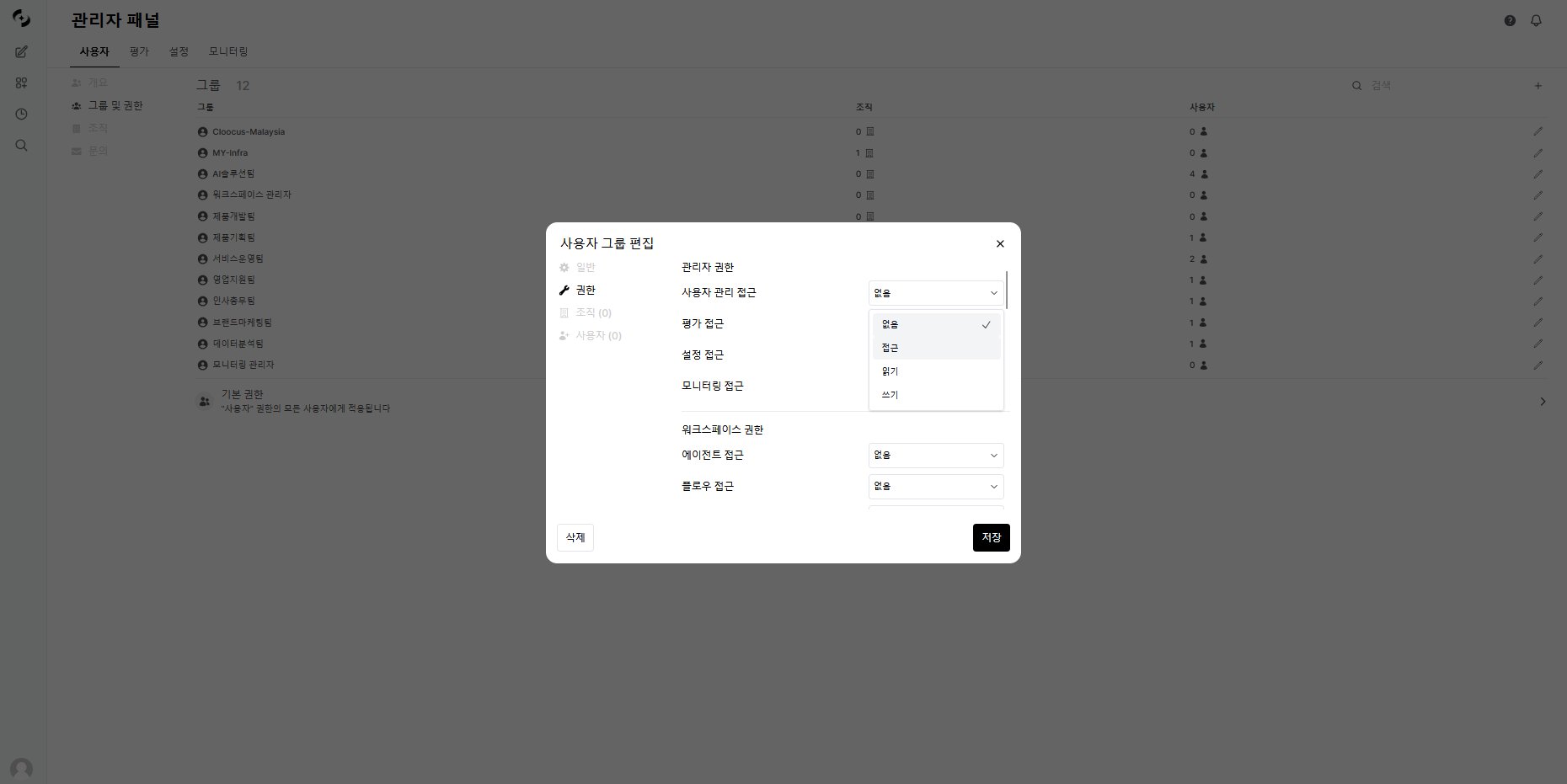
Configure detailed permissions per group. All permissions are split into **4 levels**.
 ### Permission Levels
| Level | Description |
| ---------- | ---------------------------- |
| **None** | Cannot access the feature |
| **Access** | View list (no detail access) |
| **Read** | View list + view details |
| **Write** | View + create/edit/delete |
| Permission | None | Access | Read | Write |
| ------------------ | --------- | --------- | ----------- | ----------- |
| **Agents** | No access | List only | View detail | Create/edit |
| **Knowledge Base** | No access | List only | View detail | Create/edit |
| **Prompts** | No access | List only | View detail | Create/edit |
| **Tools** | No access | List only | View detail | Create/edit |
| **Database** | No access | List only | View detail | Create/edit |
| **Glossary** | No access | List only | View detail | Create/edit |
| **Guardrails** | No access | List only | View detail | Create/edit |
| **Flow access** | No access | List only | View detail | Create/edit |
You can delegate parts of admin features to regular users.
| Permission | None | Access | Read | Write |
| ------------------- | --------- | -------------------- | ------------------- | ------------------ |
| **User management** | No access | View user list | View detail | Create/edit/delete |
| **Settings access** | No access | View settings list | View setting values | Change settings |
| **Evaluations** | No access | View evaluation list | View detail | Change settings |
| **Monitoring** | No access | View monitoring | View detail | — |
**Sharing permissions** (ON/OFF):
* Share agents, KBs, prompts, tools, databases, glossaries
**Chat permissions** (ON/OFF):
* File upload, chat deletion, message editing, chat controls
* Voice input (STT), voice output (TTS), voice calls
* Multi-model concurrent use, temporary chat
**Feature permissions** (ON/OFF):
* Direct tool server connection, web search, image generation, code execution
## Default Permissions
Set default permissions applied to users not in any group. Click **Default Permissions** at the top of the Groups tab.
Default permissions are the initial permissions for users not in any group. Per least-privilege principle, set defaults restrictively and grant additional permissions through groups as needed.
## Group ↔ Organizational Unit Mapping
In the **Organizations** tab of the group edit modal, you can map this group to one or more organizational units (OUs). All members of mapped OUs automatically inherit the group's permissions, so when IdP sync adds a new employee to an OU, permissions apply without any manual action.
| Field | Description |
| ---------------------- | ---------------------------------------------------------------------------------------------------------------------------- |
| **Tab location** | Group edit modal → `General / Permissions / Organizations / Users` |
| **Selection** | Multi-select checkboxes. Search box filters OUs by name, display name, or description |
| **Mutual exclusivity** | **Each OU can be assigned to only one group**. OUs already claimed by another group are automatically excluded from the list |
| **Displayed info** | OU display name + internal name, member count, `Assigned` badge for OUs already attached to the current group |
| **Save behavior** | On group save, persisted to `group.meta.org_unit_ids` |
OUs themselves are imported via IdP sync (Entra/Google Workspace OIDC) or created manually under **Admin > Organizations**. See [Organization Management](/en/admin/organizations) for OU creation and sync.
Mapping the "Marketing" group to the "Company / Marketing" OU means that the moment IdP adds a new hire to the Marketing OU, they receive the group's permission set automatically — eliminating the operational overhead of adding/removing users from groups one by one.
***
## Related Pages
User list, roles, add/edit, usage limits
Organization/OU hierarchy, Entra ID sync, organization-based access control
Receive and handle user inquiries
### Permission Levels
| Level | Description |
| ---------- | ---------------------------- |
| **None** | Cannot access the feature |
| **Access** | View list (no detail access) |
| **Read** | View list + view details |
| **Write** | View + create/edit/delete |
| Permission | None | Access | Read | Write |
| ------------------ | --------- | --------- | ----------- | ----------- |
| **Agents** | No access | List only | View detail | Create/edit |
| **Knowledge Base** | No access | List only | View detail | Create/edit |
| **Prompts** | No access | List only | View detail | Create/edit |
| **Tools** | No access | List only | View detail | Create/edit |
| **Database** | No access | List only | View detail | Create/edit |
| **Glossary** | No access | List only | View detail | Create/edit |
| **Guardrails** | No access | List only | View detail | Create/edit |
| **Flow access** | No access | List only | View detail | Create/edit |
You can delegate parts of admin features to regular users.
| Permission | None | Access | Read | Write |
| ------------------- | --------- | -------------------- | ------------------- | ------------------ |
| **User management** | No access | View user list | View detail | Create/edit/delete |
| **Settings access** | No access | View settings list | View setting values | Change settings |
| **Evaluations** | No access | View evaluation list | View detail | Change settings |
| **Monitoring** | No access | View monitoring | View detail | — |
**Sharing permissions** (ON/OFF):
* Share agents, KBs, prompts, tools, databases, glossaries
**Chat permissions** (ON/OFF):
* File upload, chat deletion, message editing, chat controls
* Voice input (STT), voice output (TTS), voice calls
* Multi-model concurrent use, temporary chat
**Feature permissions** (ON/OFF):
* Direct tool server connection, web search, image generation, code execution
## Default Permissions
Set default permissions applied to users not in any group. Click **Default Permissions** at the top of the Groups tab.
Default permissions are the initial permissions for users not in any group. Per least-privilege principle, set defaults restrictively and grant additional permissions through groups as needed.
## Group ↔ Organizational Unit Mapping
In the **Organizations** tab of the group edit modal, you can map this group to one or more organizational units (OUs). All members of mapped OUs automatically inherit the group's permissions, so when IdP sync adds a new employee to an OU, permissions apply without any manual action.
| Field | Description |
| ---------------------- | ---------------------------------------------------------------------------------------------------------------------------- |
| **Tab location** | Group edit modal → `General / Permissions / Organizations / Users` |
| **Selection** | Multi-select checkboxes. Search box filters OUs by name, display name, or description |
| **Mutual exclusivity** | **Each OU can be assigned to only one group**. OUs already claimed by another group are automatically excluded from the list |
| **Displayed info** | OU display name + internal name, member count, `Assigned` badge for OUs already attached to the current group |
| **Save behavior** | On group save, persisted to `group.meta.org_unit_ids` |
OUs themselves are imported via IdP sync (Entra/Google Workspace OIDC) or created manually under **Admin > Organizations**. See [Organization Management](/en/admin/organizations) for OU creation and sync.
Mapping the "Marketing" group to the "Company / Marketing" OU means that the moment IdP adds a new hire to the Marketing OU, they receive the group's permission set automatically — eliminating the operational overhead of adding/removing users from groups one by one.
***
## Related Pages
User list, roles, add/edit, usage limits
Organization/OU hierarchy, Entra ID sync, organization-based access control
Receive and handle user inquiries