> ## Documentation Index
> Fetch the complete documentation index at: https://docs.cloosphere.ai/llms.txt
> Use this file to discover all available pages before exploring further.
# Inquiries
> Receive user inquiries, handle via Kanban/list, and manage status flow
Admin › Users › Inquiries
Receive and respond to user inquiries to admins.
## Sending User Inquiries
Regular users click **Contact Admin** in the bottom sidebar menu to send inquiries.
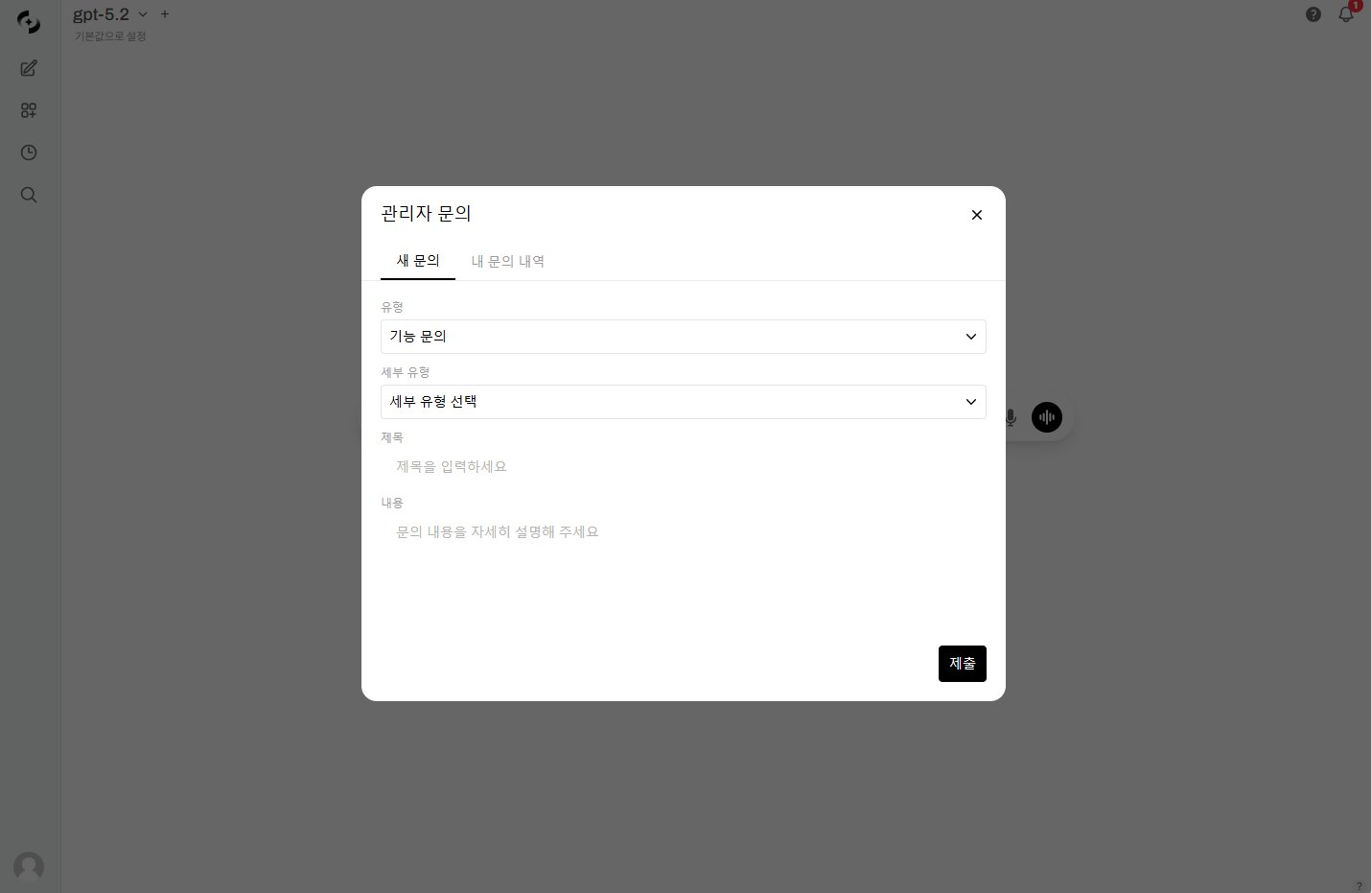 | Type | Subtype | Description |
| --------------- | ------------------------------------------- | -------------------------- |
| **Usage limit** | Limit increase, limit check | Token limit related |
| **Feature** | Chat, agents, KBs, databases, tools | Feature usage |
| **Bug** | Chat error, agent error, upload error, etc. | Error reports |
| **Account** | Permission request, account issue | Account/permission related |
| **Other** | Improvement, others | Other inquiries |
## Handling Admin Inquiries
Manage received inquiries in **Admin > Users > Inquiries** tab.
| Type | Subtype | Description |
| --------------- | ------------------------------------------- | -------------------------- |
| **Usage limit** | Limit increase, limit check | Token limit related |
| **Feature** | Chat, agents, KBs, databases, tools | Feature usage |
| **Bug** | Chat error, agent error, upload error, etc. | Error reports |
| **Account** | Permission request, account issue | Account/permission related |
| **Other** | Improvement, others | Other inquiries |
## Handling Admin Inquiries
Manage received inquiries in **Admin > Users > Inquiries** tab.
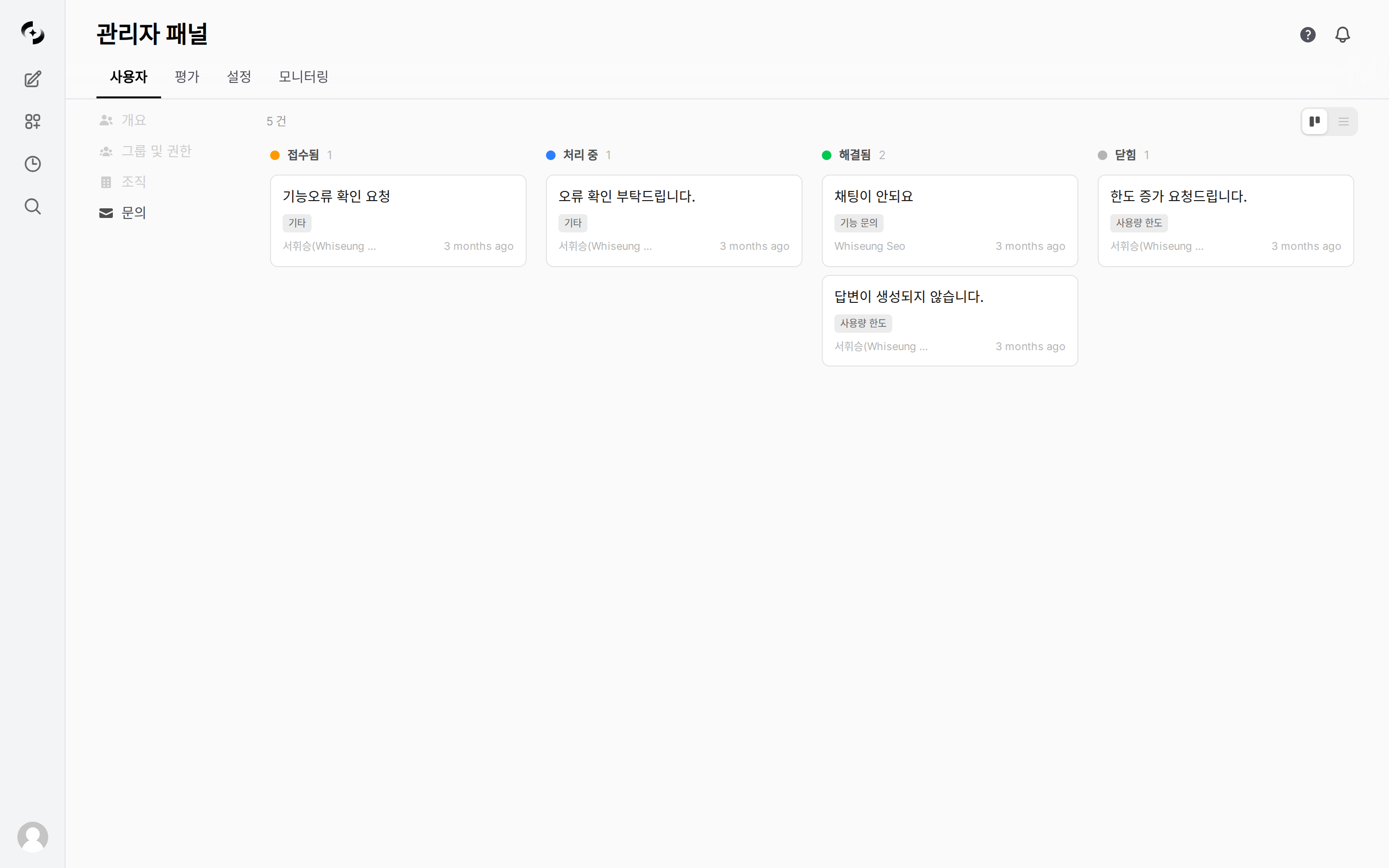 Drag cards across status columns (Open, In Progress, Resolved, Closed) to change status.
View all inquiries as rows with filters and sorting.
**Status flow:**
```mermaid theme={null}
flowchart LR
A[Open] --> B[In Progress]
B --> C[Resolved]
C --> D["Closed (user confirms)"]
```
Admins can't change directly to Closed. Only users can close their inquiries. Admins set **Resolved** so users can confirm and close themselves.
***
## Related Pages
User list, roles, add/edit, usage limits
Permission groups, 4-level tiers, OU mapping
Service requests admins send to the operations team
Drag cards across status columns (Open, In Progress, Resolved, Closed) to change status.
View all inquiries as rows with filters and sorting.
**Status flow:**
```mermaid theme={null}
flowchart LR
A[Open] --> B[In Progress]
B --> C[Resolved]
C --> D["Closed (user confirms)"]
```
Admins can't change directly to Closed. Only users can close their inquiries. Admins set **Resolved** so users can confirm and close themselves.
***
## Related Pages
User list, roles, add/edit, usage limits
Permission groups, 4-level tiers, OU mapping
Service requests admins send to the operations team