> ## Documentation Index
> Fetch the complete documentation index at: https://docs.cloosphere.ai/llms.txt
> Use this file to discover all available pages before exploring further.
# Admin Panel
> Complete guide to admin features — users, organizations, settings, channels, monitoring, and evaluation
User Profile › Admin Panel
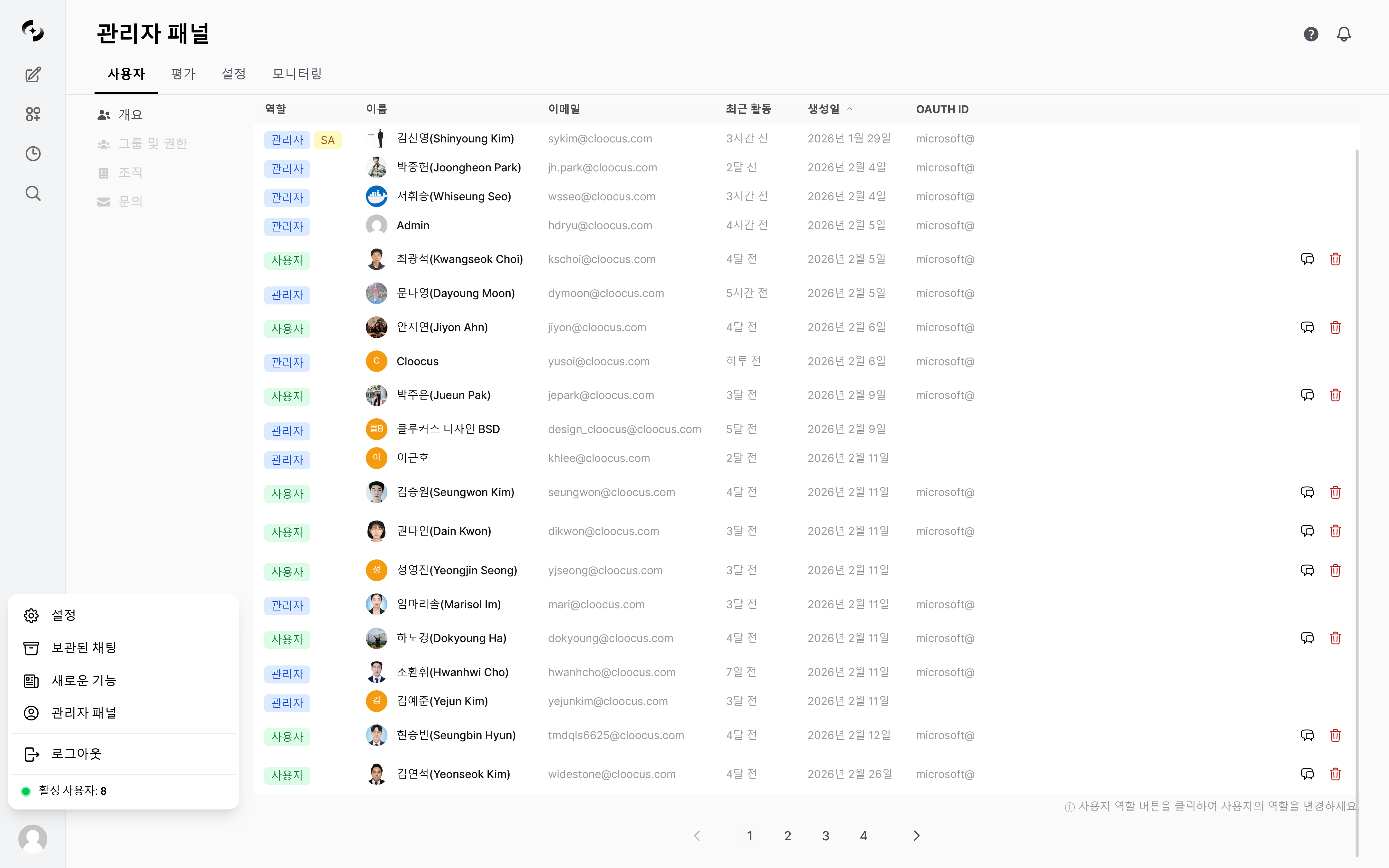
The admin panel is the central management interface for operating the Cloosphere platform.
* Control all platform settings: user management, organizational structure, LLM connections, security policies, notification channels, and more.
 User list · role assignment, group permissions, organization management, inquiry handling
LLM connections · documents · search · guardrails · channels · code gateway · license, and other Settings tabs
Dashboard · usage · audit · guardrail · conversation · file logs
Arena · leaderboard · feedback · auto-evaluation · tracing
***
## Accessing the Admin Panel
Only users with the **Admin** role can access the admin panel. Regular users (User role) won't see the admin menu.
Click your user name at the bottom of the sidebar to reveal the **Admin Panel** menu. Click it to navigate to the admin dashboard.
***
## Per-Role Access
Cloosphere has three user roles.
* Admin panel access is determined by role.
| Role | Admin Panel | Workspace | Chat |
| ----------- | :-----------------: | :------------------: | :------------------: |
| **Admin** | Full access | Full access | Full access |
| **User** | No access (default) | Per group permission | Per group permission |
| **Pending** | No access | No access | No access |
Through group permission settings, you can delegate parts of admin features (user management, monitoring, etc.) to regular users at read or write level. See the [Groups & Permissions](/en/admin/groups) page.
***
## Admin Panel Navigation
The admin panel switches between feature areas via top-tab navigation.
```mermaid theme={null}
flowchart LR
A[Admin Panel] --> B["Users
User list · role assignment, group permissions, organization management, inquiry handling
LLM connections · documents · search · guardrails · channels · code gateway · license, and other Settings tabs
Dashboard · usage · audit · guardrail · conversation · file logs
Arena · leaderboard · feedback · auto-evaluation · tracing
***
## Accessing the Admin Panel
Only users with the **Admin** role can access the admin panel. Regular users (User role) won't see the admin menu.
Click your user name at the bottom of the sidebar to reveal the **Admin Panel** menu. Click it to navigate to the admin dashboard.
***
## Per-Role Access
Cloosphere has three user roles.
* Admin panel access is determined by role.
| Role | Admin Panel | Workspace | Chat |
| ----------- | :-----------------: | :------------------: | :------------------: |
| **Admin** | Full access | Full access | Full access |
| **User** | No access (default) | Per group permission | Per group permission |
| **Pending** | No access | No access | No access |
Through group permission settings, you can delegate parts of admin features (user management, monitoring, etc.) to regular users at read or write level. See the [Groups & Permissions](/en/admin/groups) page.
***
## Admin Panel Navigation
The admin panel switches between feature areas via top-tab navigation.
```mermaid theme={null}
flowchart LR
A[Admin Panel] --> B["Users
Users · Groups · Organizations · Inquiries"]
A --> C["Settings
General·Connections·Models · Knowledge·Documents·Search · AI · Safety
UI·Channels · Data·Operational Security"]
A --> F["Monitoring
Dashboard·Usage · Audit·KMS·Guardrail · Conversation·File Logs"]
A --> G["Evaluation
Evaluation·Auto-Evaluation · Arena·Leaderboard · Feedback·Tracing"]
```
***
## Settings Tabs
Settings split into the **four areas** in the diagram above. Each tab shows the navigation path (`Admin › Settings › …`) and the settings it contains.
**Navigate** — Admin › Settings › General (Connections, Models, and other tabs)
Platform basics — LLM connections, documents, search, guardrails, interface, etc.
| Tab | Description |
| --------------------------------------------------------------- | ------------------------------------------------------- |
| [**General**](/en/admin/settings/general) | Authentication, default role, log level, usage limits |
| [**Connections**](/en/admin/settings/connections) | OpenAI, Ollama, and other LLM Provider connections |
| [**Models**](/en/admin/settings/models) | Model list management, default model, model filters |
| [**Documents**](/en/admin/settings/documents) | Embedding engine/model, chunk size, Vector DB |
| [**Document Templates**](/en/admin/settings/document-templates) | PPT·Word·Excel master templates for document generation |
| [**Guardrails**](/en/admin/settings/guardrails) | Global guardrails, file upload security checks |
| [**Search Engine**](/en/admin/settings/search-engine) | Azure Search, Elasticsearch, etc. |
| [**Web Search**](/en/admin/settings/web-search) | SearXNG, Google PSE, Bing, and other web search engines |
| [**Code Execution**](/en/admin/settings/code-execution) | Code interpreter (Jupyter/Sandbox) settings |
| [**Interface**](/en/admin/settings/interface) | UI customization, default prompts, landing page |
| [**Branding**](/en/admin/settings/branding) | Customize logo, favicon, colors, sign-in screen |
| [**Audio**](/en/admin/settings/audio) | STT/TTS engine and model |
| [**Images**](/en/admin/settings/images) | Image generation engines (DALL-E, Stable Diffusion) |
| [**Data Retention**](/en/admin/settings/data-retention) | Auto-cleanup retention periods for logs/traces |
| [**Memory**](/en/admin/settings/memory) | Memory extraction model, confidence, retention policy |
| [**Monitoring**](/en/admin/settings/monitoring) | OpenTelemetry and observability stack deployment |
| [**Database**](/en/admin/settings/database) | Config/DB backup/migration, chat export |
| [**Encryption**](/en/admin/settings/encryption) | KMS encryption of sensitive settings, integrity audit |
| [**License**](/en/admin/settings/license) | License key management, feature activation |
**Navigate** — Admin › Settings › Channels
Configure scheduled-task notification channels and Microsoft Teams bot integration.
| Item | Description | Location |
| ----------------------------------------- | ----------------------------------------------------------------------------------------------------------------- | -------------------------------------------- |
| [**Channels**](/en/admin/notifications) | Email (SMTP·SendGrid·Azure·MS Graph) and webhook (Slack·Teams·Discord·Telegram·Google Chat) notification channels | Admin › Settings › Channels |
| [**Bot Connection**](/en/admin/teams-bot) | Microsoft Teams bot — two-way conversation across 1:1, team channels, and group chats | Admin › Settings › Channels (Bot Connection) |
**Navigate** — Admin › Settings › Code Gateway
[**Code Gateway**](/en/admin/code-gateway) — Configure the API proxy gateway that connects in-house LLMs to AI coding tools (Claude Code · Cursor · Codex CLI · GitHub Copilot, etc.).
**Navigate** — Admin › Settings › Embed Widgets
[**Embed Widgets**](/en/admin/settings/embed-widgets) — Register and manage chat widgets embedded in external websites.
***
## Quick Start
Register OpenAI API keys or Ollama server URLs in [Connections](/en/admin/settings/connections).
Add users and assign roles in [User Management](/en/admin/users). Create groups for organized permission management.
Set authentication methods, JWT expiration, and signup permission in [General](/en/admin/settings/general).
Register email or webhook channels in [Channels](/en/admin/notifications) to enable scheduled task notifications.
***
## Service Request (SR)
A feature for admins to directly submit **service requests (usage increases, feature inquiries, bug reports, etc.)** to the Cloosphere operations team.
### Activation Conditions
Activated when **both** the `SR_KEY` and `CLOOCUS_PUBLIC_URL` environment variables are set.
* Without them, the menu doesn't appear.
### How to Use
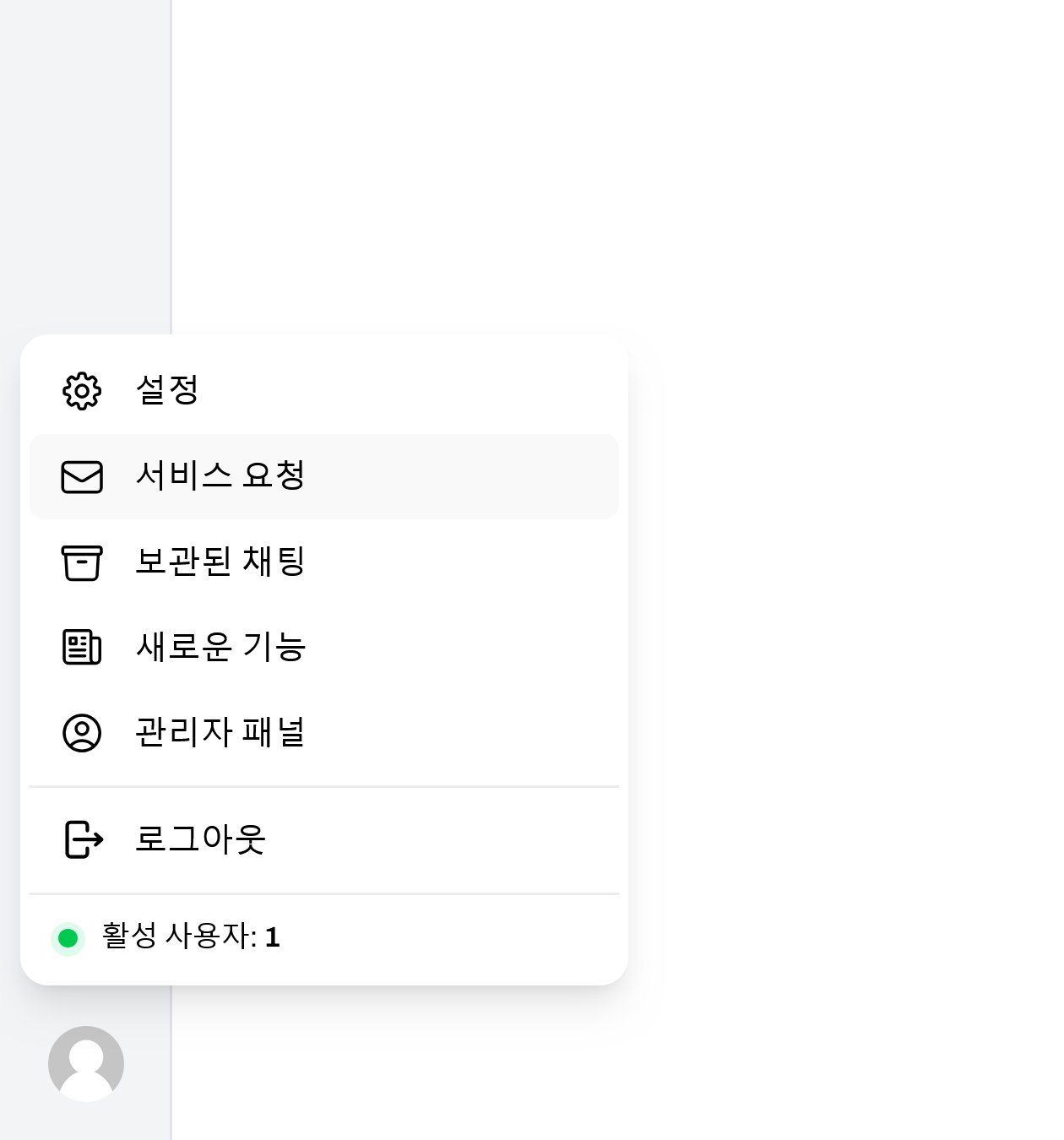
Click your **user avatar** at the bottom of the sidebar, then pick **Service Request** from the dropdown.
 Enter the type, title, and content in the modal, then click **Submit**.
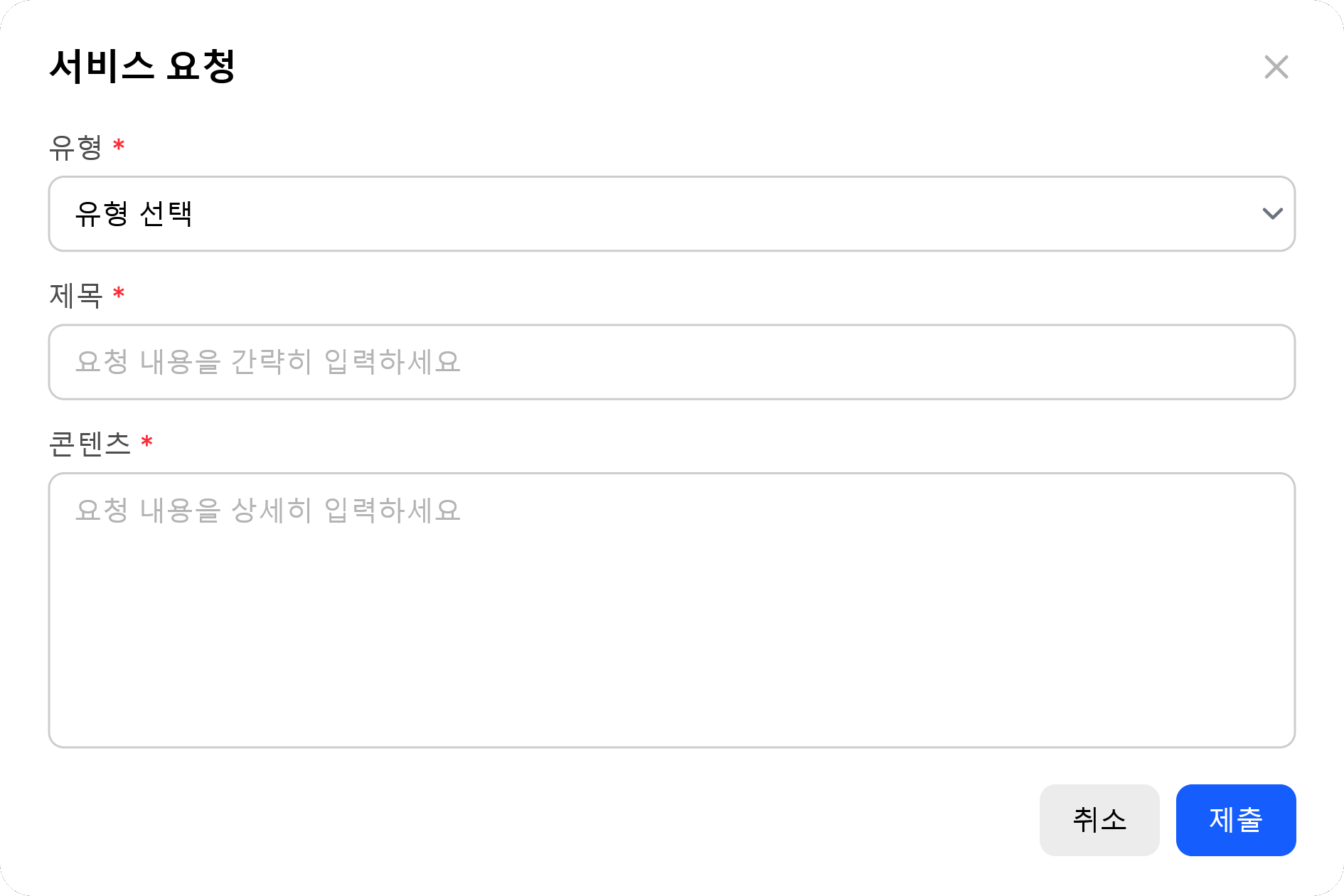 | Field | Description |
| ----------- | ----------------------------------------------------------------------------------- |
| **Type** | Request type — usage limit, feature inquiry, bug report, account/permission, others |
| **Title** | Request title (brief summary) |
| **Content** | Request details |
Requester name and email are auto-attached from sign-in info. SR is shown only to **Admin role** users.
| Field | Description |
| ----------- | ----------------------------------------------------------------------------------- |
| **Type** | Request type — usage limit, feature inquiry, bug report, account/permission, others |
| **Title** | Request title (brief summary) |
| **Content** | Request details |
Requester name and email are auto-attached from sign-in info. SR is shown only to **Admin role** users.