> ## Documentation Index
> Fetch the complete documentation index at: https://docs.cloosphere.ai/llms.txt
> Use this file to discover all available pages before exploring further.
# Audio
> Configure TTS (text-to-speech), STT (speech-to-text), and avatar engines.
Admin › Settings › Audio
Configure voice input/output engines.
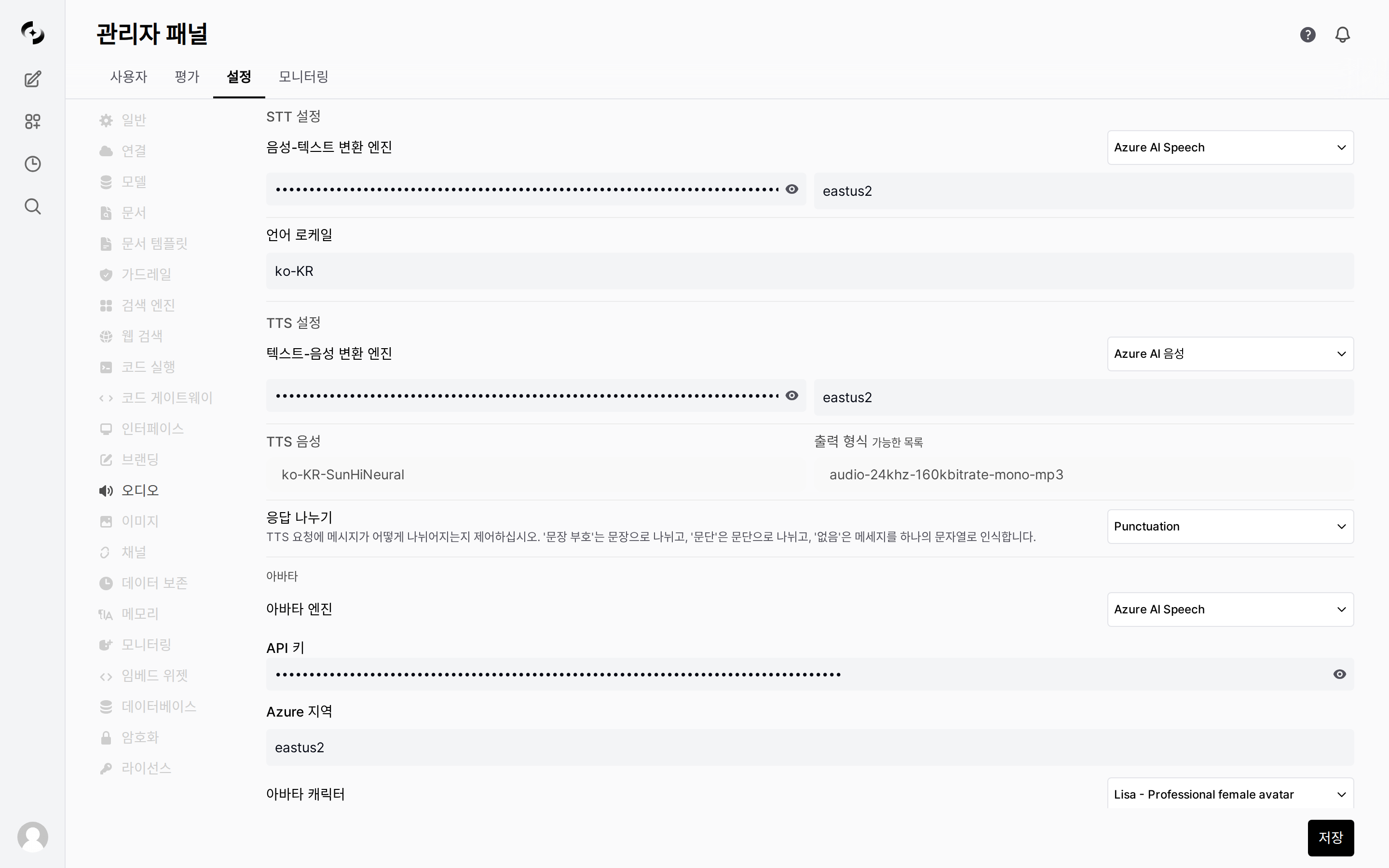 ***
## TTS (Text-to-Speech)
Configure the engine that converts AI responses to speech.
| Setting | Description | Default |
| ---------------------- | -------------------------------------------- | ------------- |
| **Engine** | TTS service selection | `Web API` |
| **Model** | Per-engine TTS model | - |
| **Voice** | Voice type | - |
| **Response splitting** | TTS response split unit (sentence/paragraph) | `Punctuation` |
Uses the browser's built-in Web Speech API. Ready to use without separate configuration.
Synthesizes speech with the server's built-in Transformers model. Requires no external API key.
| Setting | Description |
| ---------------- | --------------------------------------------------- |
| **API Base URL** | OpenAI API Endpoint |
| **API Key** | API authentication key |
| **Model** | e.g., `tts-1`, `tts-1-hd` |
| **Voice** | `alloy`, `echo`, `fable`, `onyx`, `nova`, `shimmer` |
| Setting | Description |
| ----------------- | ----------------------------------- |
| **API Key** | Azure AI Speech Service key |
| **Region** | Azure region (e.g., `koreacentral`) |
| **Output Format** | Audio output format |
| Setting | Description |
| ----------- | -------------------- |
| **API Key** | ElevenLabs API key |
| **Voice** | Voice selection |
| **Model** | ElevenLabs TTS model |
| Setting | Description |
| ------------------------------ | ------------------------------------- |
| **Language Filter (Optional)** | Voice language filter (e.g., `ko-KR`) |
| **Service Account Key** | Global key or Custom JSON key |
| Setting | Description |
| ----------------------- | ---------------------------------------------------------- |
| **Location** | Region (default: `us-central1`) |
| **Service Account Key** | Global key or Custom JSON key |
| **TTS Voice** | Gemini TTS voice selection |
| **Model** | Gemini TTS model (default: `gemini-2.5-flash-preview-tts`) |
***
## STT (Speech-to-Text)
Configure the engine that converts user voice input to text.
| Setting | Description | Default |
| ---------- | --------------------- | ----------------- |
| **Engine** | STT service selection | `Whisper (local)` |
| **Model** | Per-engine STT model | - |
Transcribes with the server's built-in faster-whisper model. **Default**, requires no external API key.
Uses the browser's built-in Web Speech API.
| Setting | Description |
| ---------------- | ----------------------- |
| **API Base URL** | OpenAI API Endpoint |
| **API Key** | API authentication key |
| **Model** | Whisper model selection |
| Setting | Description |
| ----------- | ------------------------------------------------------------ |
| **API Key** | Azure AI Speech Service key |
| **Region** | Azure region |
| **Locales** | Recognition languages (comma-separated, e.g., `ko-KR,en-US`) |
| Setting | Description |
| ----------- | ---------------- |
| **API Key** | Deepgram API key |
| Setting | Description |
| ----------------------- | --------------------------------------- |
| **Project ID** | Google Cloud project ID |
| **Location** | Region (default: `global`) |
| **Language Codes** | Recognition languages (default: `auto`) |
| **Service Account Key** | Global key or Custom JSON key |
***
## Avatar
Configure avatars displayed during AI responses.
| Setting | Description |
| ------------- | --------------------------------- |
| **Engine** | Avatar service selection |
| **API Key** | Avatar service authentication key |
| **Region** | Service region |
| **Character** | Avatar character selection |
| **Style** | Avatar style |
| **Greeting** | Avatar greeting |
***
## TTS (Text-to-Speech)
Configure the engine that converts AI responses to speech.
| Setting | Description | Default |
| ---------------------- | -------------------------------------------- | ------------- |
| **Engine** | TTS service selection | `Web API` |
| **Model** | Per-engine TTS model | - |
| **Voice** | Voice type | - |
| **Response splitting** | TTS response split unit (sentence/paragraph) | `Punctuation` |
Uses the browser's built-in Web Speech API. Ready to use without separate configuration.
Synthesizes speech with the server's built-in Transformers model. Requires no external API key.
| Setting | Description |
| ---------------- | --------------------------------------------------- |
| **API Base URL** | OpenAI API Endpoint |
| **API Key** | API authentication key |
| **Model** | e.g., `tts-1`, `tts-1-hd` |
| **Voice** | `alloy`, `echo`, `fable`, `onyx`, `nova`, `shimmer` |
| Setting | Description |
| ----------------- | ----------------------------------- |
| **API Key** | Azure AI Speech Service key |
| **Region** | Azure region (e.g., `koreacentral`) |
| **Output Format** | Audio output format |
| Setting | Description |
| ----------- | -------------------- |
| **API Key** | ElevenLabs API key |
| **Voice** | Voice selection |
| **Model** | ElevenLabs TTS model |
| Setting | Description |
| ------------------------------ | ------------------------------------- |
| **Language Filter (Optional)** | Voice language filter (e.g., `ko-KR`) |
| **Service Account Key** | Global key or Custom JSON key |
| Setting | Description |
| ----------------------- | ---------------------------------------------------------- |
| **Location** | Region (default: `us-central1`) |
| **Service Account Key** | Global key or Custom JSON key |
| **TTS Voice** | Gemini TTS voice selection |
| **Model** | Gemini TTS model (default: `gemini-2.5-flash-preview-tts`) |
***
## STT (Speech-to-Text)
Configure the engine that converts user voice input to text.
| Setting | Description | Default |
| ---------- | --------------------- | ----------------- |
| **Engine** | STT service selection | `Whisper (local)` |
| **Model** | Per-engine STT model | - |
Transcribes with the server's built-in faster-whisper model. **Default**, requires no external API key.
Uses the browser's built-in Web Speech API.
| Setting | Description |
| ---------------- | ----------------------- |
| **API Base URL** | OpenAI API Endpoint |
| **API Key** | API authentication key |
| **Model** | Whisper model selection |
| Setting | Description |
| ----------- | ------------------------------------------------------------ |
| **API Key** | Azure AI Speech Service key |
| **Region** | Azure region |
| **Locales** | Recognition languages (comma-separated, e.g., `ko-KR,en-US`) |
| Setting | Description |
| ----------- | ---------------- |
| **API Key** | Deepgram API key |
| Setting | Description |
| ----------------------- | --------------------------------------- |
| **Project ID** | Google Cloud project ID |
| **Location** | Region (default: `global`) |
| **Language Codes** | Recognition languages (default: `auto`) |
| **Service Account Key** | Global key or Custom JSON key |
***
## Avatar
Configure avatars displayed during AI responses.
| Setting | Description |
| ------------- | --------------------------------- |
| **Engine** | Avatar service selection |
| **API Key** | Avatar service authentication key |
| **Region** | Service region |
| **Character** | Avatar character selection |
| **Style** | Avatar style |
| **Greeting** | Avatar greeting |