> ## Documentation Index
> Fetch the complete documentation index at: https://docs.cloosphere.ai/llms.txt
> Use this file to discover all available pages before exploring further.
# Data Retention
> Set automatic cleanup retention periods for log/trace data and check the background task queue status.
Admin › Settings › Data Retention
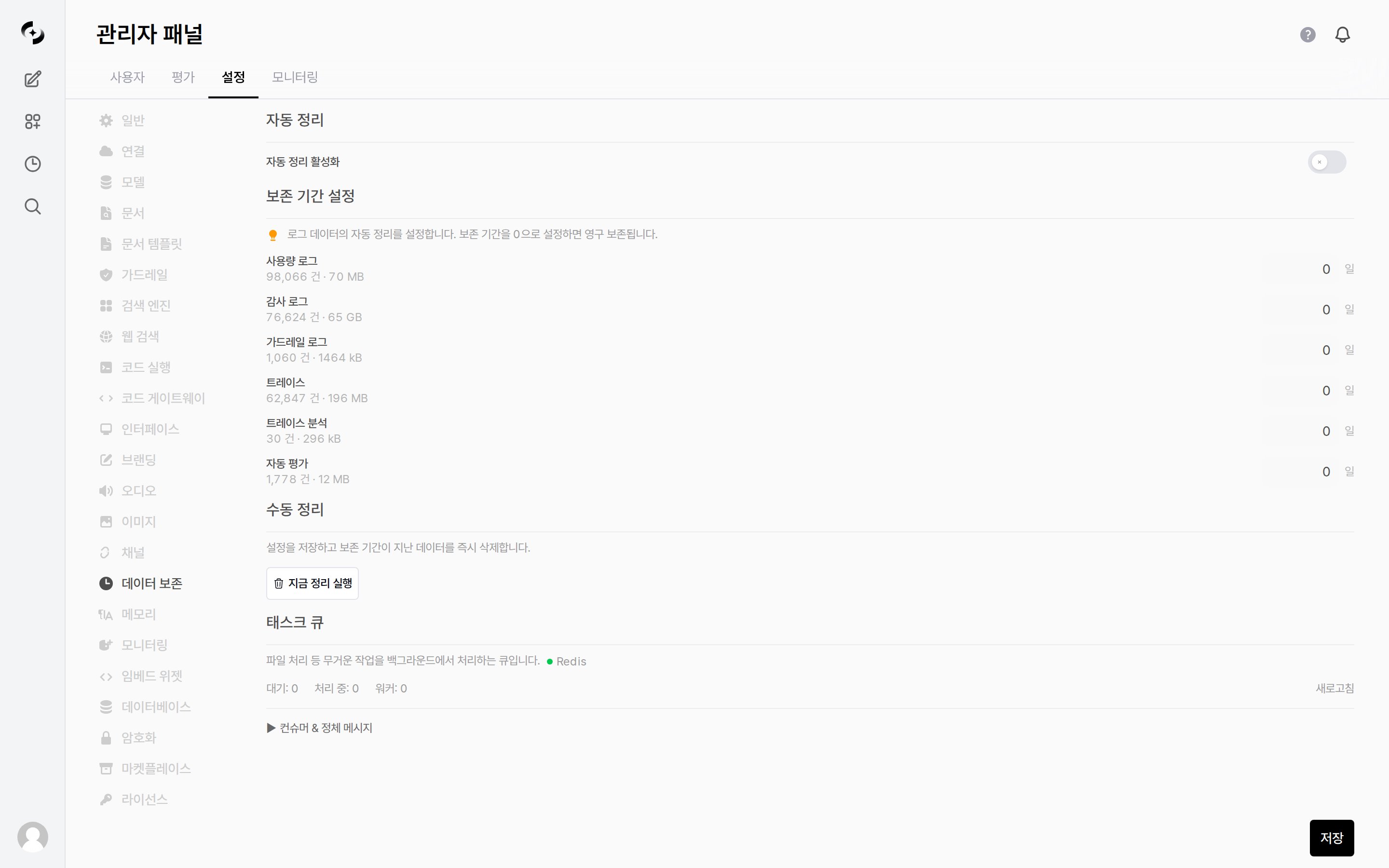
Set the **retention period** for accumulating log data such as usage, audit, and trace, and automatically clean up data past the period.
* Use this to manage storage and comply with data retention policies.
 ***
## Automatic Cleanup
When **Enable Auto Cleanup** (off by default) is on, data past the configured retention period is deleted automatically every day.
* Turning the toggle on also reveals a **Cleanup Time** dropdown. Pick the hour the cleanup job runs; the default is `03:00`.
Setting a retention period to **`0` means permanent retention** (no automatic deletion). To clean up, specify a number of days of 1 or more. **Every type defaults to `0`**, so until you enter values, turning auto cleanup on deletes nothing.
### Retention Targets
Set the retention period (days) individually for each data type.
* Under each type name, the **current record count and storage size** are shown, so you can tell what to trim first.
| Data | Description |
| ------------------- | ----------------------------------------------------- |
| **Usage logs** | Token/request usage records |
| **Audit logs** | Admin/user activity audit records |
| **Guardrail logs** | Guardrail block/pass records |
| **Traces** | Step-by-step records of how AI requests are processed |
| **Trace analytics** | Aggregated/summarized analytics of traces |
| **Auto evaluation** | Automatic evaluation results |
***
## Manual Cleanup
Clicking **Run Cleanup Now** saves the current settings and **immediately** deletes data past the retention period.
If every retention period is `0`, nothing runs and the message "Set retention period for at least one log type before cleanup" is shown.
***
## Task Queue
Check the status of the work queue that processes heavy tasks (like file processing) in the background.
* The queue backend is shown next to the description — **Redis** when connected to Redis, otherwise **In-process** (handled inside the server process).
| Item | Description |
| -------------- | --------------------------------------- |
| **Queued** | Number of tasks waiting to be processed |
| **Processing** | Number of tasks currently running |
| **Workers** | Number of workers processing tasks |
### Consumers & Stuck Messages
Expanding `▶ Consumers & Stuck Messages` shows the **Consumers (N)** list and the **Oldest pending messages (N)** list, along with two buttons.
| Button | Action |
| ----------------------- | ------------------------------------------------------------------------------------------------ |
| **Cleanup Zombies** | Removes only consumers idle for more than an hour that have no pending messages. No data is lost |
| **Reclaim Stuck (>5m)** | Force-acknowledges pending messages that have been stuck for more than 5 minutes |
**Reclaiming drops the work instead of running it.** Use it only when the queue is jammed, and check the list first to see which tasks disappear.
***
## Automatic Cleanup
When **Enable Auto Cleanup** (off by default) is on, data past the configured retention period is deleted automatically every day.
* Turning the toggle on also reveals a **Cleanup Time** dropdown. Pick the hour the cleanup job runs; the default is `03:00`.
Setting a retention period to **`0` means permanent retention** (no automatic deletion). To clean up, specify a number of days of 1 or more. **Every type defaults to `0`**, so until you enter values, turning auto cleanup on deletes nothing.
### Retention Targets
Set the retention period (days) individually for each data type.
* Under each type name, the **current record count and storage size** are shown, so you can tell what to trim first.
| Data | Description |
| ------------------- | ----------------------------------------------------- |
| **Usage logs** | Token/request usage records |
| **Audit logs** | Admin/user activity audit records |
| **Guardrail logs** | Guardrail block/pass records |
| **Traces** | Step-by-step records of how AI requests are processed |
| **Trace analytics** | Aggregated/summarized analytics of traces |
| **Auto evaluation** | Automatic evaluation results |
***
## Manual Cleanup
Clicking **Run Cleanup Now** saves the current settings and **immediately** deletes data past the retention period.
If every retention period is `0`, nothing runs and the message "Set retention period for at least one log type before cleanup" is shown.
***
## Task Queue
Check the status of the work queue that processes heavy tasks (like file processing) in the background.
* The queue backend is shown next to the description — **Redis** when connected to Redis, otherwise **In-process** (handled inside the server process).
| Item | Description |
| -------------- | --------------------------------------- |
| **Queued** | Number of tasks waiting to be processed |
| **Processing** | Number of tasks currently running |
| **Workers** | Number of workers processing tasks |
### Consumers & Stuck Messages
Expanding `▶ Consumers & Stuck Messages` shows the **Consumers (N)** list and the **Oldest pending messages (N)** list, along with two buttons.
| Button | Action |
| ----------------------- | ------------------------------------------------------------------------------------------------ |
| **Cleanup Zombies** | Removes only consumers idle for more than an hour that have no pending messages. No data is lost |
| **Reclaim Stuck (>5m)** | Force-acknowledges pending messages that have been stuck for more than 5 minutes |
**Reclaiming drops the work instead of running it.** Use it only when the queue is jammed, and check the list first to see which tasks disappear.