> ## Documentation Index
> Fetch the complete documentation index at: https://docs.cloosphere.ai/llms.txt
> Use this file to discover all available pages before exploring further.
# Document Templates
> Register master PowerPoint · Word · Excel templates that agents use when generating documents.
Admin › Settings › Document Templates
Upload **master templates** that agents use as the basis when generating slides, documents, and spreadsheets.
* Registered templates apply your company's formatting (fonts, colors, logo, theme) consistently to the output.
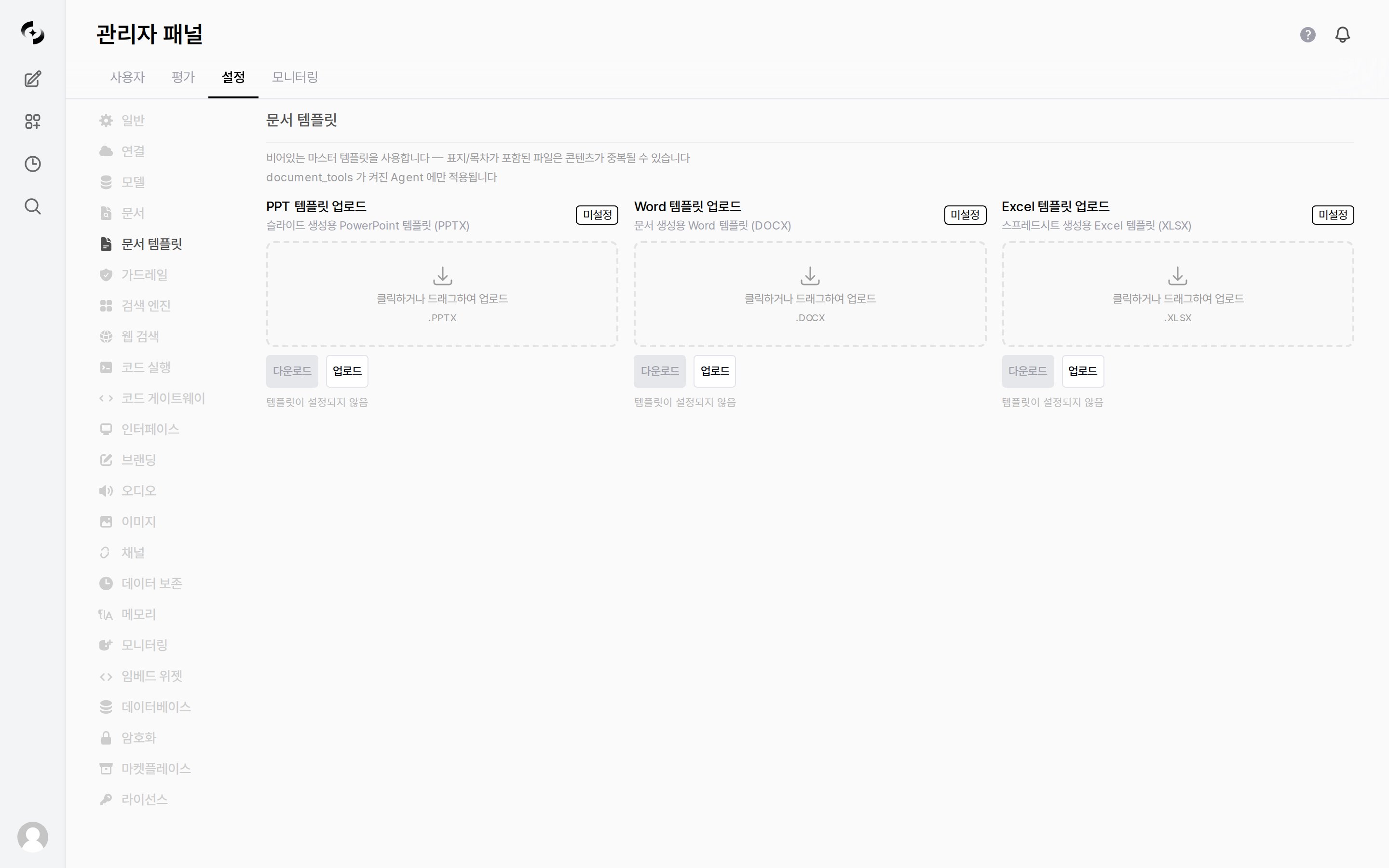 These templates apply only to **[agents](/en/workspace/agents) with `document_tools` enabled**. Agents that don't use document generation tools are unaffected.
***
## Supported Templates
| Format | Use | Extension |
| ------------------ | ------------------------------- | :-------: |
| **PPT template** | Slide (presentation) generation | `.PPTX` |
| **Word template** | Document generation | `.DOCX` |
| **Excel template** | Spreadsheet generation | `.XLSX` |
Each item is uploaded by **clicking or dragging**. Before configuration, a `Not set` badge and the text `No template set` are shown, and the **Download** button is disabled.
Once uploaded, the badge changes to `Custom`, the upload time is shown next to it, and the buttons expand as follows.
| Button | Action |
| ------------------- | ------------------------------------------------ |
| **Download** | Downloads the currently registered template file |
| **Replace** | Overwrites it with a new file |
| **Remove template** | Clears the registration and returns to `Not set` |
Corrupt files, or files that are not valid Office documents, are rejected on upload.
***
## Empty Templates Recommended
We recommend **empty master templates without a cover page or table of contents**. If you use a file that includes a cover or TOC as the template, the agent-generated content and the template's fixed content may **duplicate**.
Keep only styles (fonts, colors, headers/footers, theme) in the template and leave the actual content empty. The agent fills generated content on top of these styles.
These templates apply only to **[agents](/en/workspace/agents) with `document_tools` enabled**. Agents that don't use document generation tools are unaffected.
***
## Supported Templates
| Format | Use | Extension |
| ------------------ | ------------------------------- | :-------: |
| **PPT template** | Slide (presentation) generation | `.PPTX` |
| **Word template** | Document generation | `.DOCX` |
| **Excel template** | Spreadsheet generation | `.XLSX` |
Each item is uploaded by **clicking or dragging**. Before configuration, a `Not set` badge and the text `No template set` are shown, and the **Download** button is disabled.
Once uploaded, the badge changes to `Custom`, the upload time is shown next to it, and the buttons expand as follows.
| Button | Action |
| ------------------- | ------------------------------------------------ |
| **Download** | Downloads the currently registered template file |
| **Replace** | Overwrites it with a new file |
| **Remove template** | Clears the registration and returns to `Not set` |
Corrupt files, or files that are not valid Office documents, are rejected on upload.
***
## Empty Templates Recommended
We recommend **empty master templates without a cover page or table of contents**. If you use a file that includes a cover or TOC as the template, the agent-generated content and the template's fixed content may **duplicate**.
Keep only styles (fonts, colors, headers/footers, theme) in the template and leave the actual content empty. The agent fills generated content on top of these styles.