> ## Documentation Index
> Fetch the complete documentation index at: https://docs.cloosphere.ai/llms.txt
> Use this file to discover all available pages before exploring further.
# Documents
> Configure document processing profiles, content extraction, embedding engines, and search parameters.
Admin › Settings › Documents
The document processing quality of Knowledge Bases (KBSphere) is determined by these settings.
* Properly configuring content extraction engines, text splitting, and embedding models is essential for RAG search accuracy.
 ***
## Extraction Engine
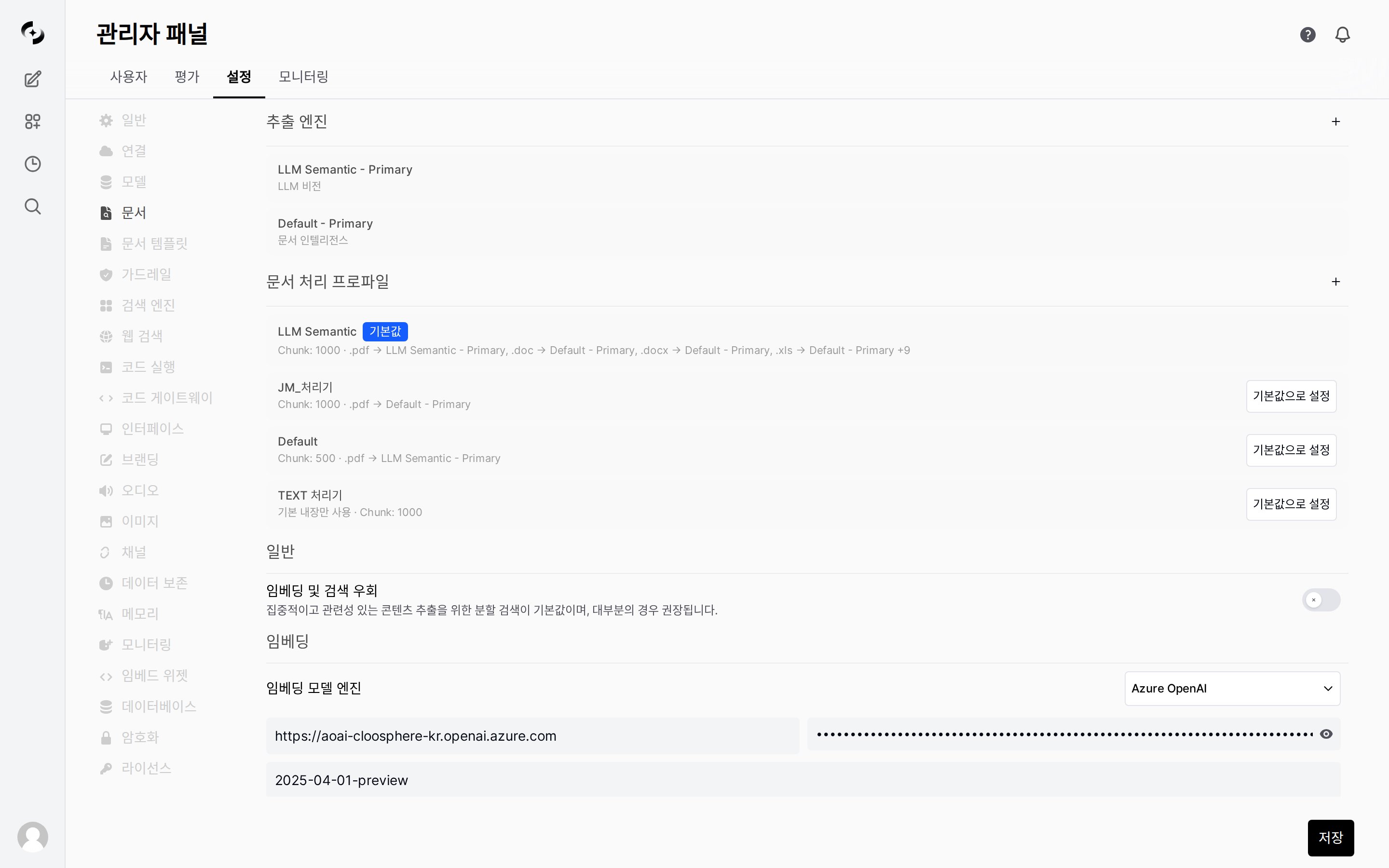
In the **Extraction Engine** section at the top of the page, register and manage the **engine instances** used to extract document text.
* Extraction is not "picking a single engine globally" — instead, you register **named instances** and select them per extension within a profile.
Add an instance with the **+** button in the **Extraction Engine** section, then specify a name and engine type (Default, LLM Vision, Document Intelligence, etc. — see [Content Extraction](#content-extraction) for type descriptions). You can register multiple instances of the same type with different settings.
Designate an instance as **Primary**. When a profile doesn't map a specific extension to an individual instance, the Primary instance is used as the default extractor.
Registered instances are shown as `Name - Primary` (e.g., `Default - Primary`, `LLM Semantic - Primary`) and referenced by this name in a profile's extension mapping.
***
## Document Processing Profiles
**New feature** — Bundle document extraction methods and chunking strategies into **profiles**. Create multiple profiles and select per Knowledge Base (KB).
### What is a Profile?
Previously, only one global extraction/chunking setting was possible. With profiles, define **different setting bundles per use case** and pick the appropriate profile for each KB. Each profile consists of an **extraction engine mapping per file extension** (e.g., `.pdf → Default - Primary`) and **chunking settings**.
```
Examples:
• "Default Extraction" → default engine + fixed-size chunking
• "High-Precision OCR" → Document Intelligence + table preservation
• "LLM Vision + Context" → Vision LLM extraction + semantic chunking + Contextual Chunking
```
### Profile Management
In the **Document Processing Profiles** section at the top of the Documents settings page, create and manage profiles.
Click **+ New Profile** to open the profile creation modal.
| Setting | Description | Default |
| ----------------------------------- | -------------------------------------------------------------------------------------------------------------------------------------------------------------- | :-------: |
| **Name** | Profile identifier name | — |
| **Extraction Engine per Extension** | Map an [extraction engine instance](#extraction-engine) to use for each file extension (.pdf, .docx, .xls, etc.). Unmapped extensions use the Primary instance | Primary |
| **PDF Image Extraction** | Whether to extract text from PDF images | OFF |
| **Text Splitter** | Chunking strategy (fixed-size / semantic) | Character |
| **Chunk Size** | Size of each chunk | 1000 |
| **Chunk Overlap** | Overlap between chunks | 100 |
| **Advanced Settings** | Table preservation, context preservation, per-engine details | — |
Click **Set as Default** in the profile list to sync that profile's settings as the **global default**. KBs without a specified profile are processed with this default.
In **Workspace > Knowledge Base** edit screen, pick the document processing profile. If unset, the default profile applies.
The default profile can't be deleted. Set another profile as default before deleting.
***
## Content Extraction
These are the **engine types** you can create as [Extraction Engine](#extraction-engine) instances.
* Register each type as an instance, then map it per extension in a profile.
| Engine | Strengths | Best For | Additional Settings |
| ------------------------- | ----------------------------------- | -------------------------------------- | ------------------------------------------- |
| **Default** | Built-in text extractor | Simple text documents | PDF Extract Images toggle |
| **Tika** | Apache Tika server-based | Diverse file format support | Server URL (default: `http://tika:9998`) |
| **Docling** | Advanced document processing engine | Documents with complex layouts | Server URL (default: `http://docling:5001`) |
| **Document Intelligence** | Azure AI Document Intelligence | Azure environments, accurate OCR | Endpoint + API Key |
| **Document AI** | Google Cloud Document AI | Tables, forms, multi-column layouts | Project ID + Processor ID + Location |
| **Mistral OCR** | Mistral-based OCR | Image-based documents | Mistral API Key |
| **LLM Vision** | Vision LLM-based extraction | Complex layouts, text in charts/images | Vision model ID + prompt (optional) |
The default engine is sufficient for most text-based documents (PDF, DOCX, TXT). For mostly scanned documents or image-heavy PDFs, **Document Intelligence** or **Mistral OCR** is recommended.
### LLM Vision Extraction
**New feature** — A method that sends page images directly to a Vision-capable LLM (GPT-4o, Claude, etc.) for extraction as markdown text.
Compared to traditional OCR engines, this provides higher accuracy for **complex layouts, text within images, and chart descriptions**.
**Behavior:**
1. Convert PDF to per-page images (300DPI-class)
2. Send each page image to Vision LLM in parallel
3. LLM returns markdown preserving table/list/title structure
4. Auto-correct broken sentences at adjacent page boundaries
| Setting | Description |
| --------------------- | ------------------------------------------------------------------------ |
| **Vision Model** | Pick a Vision-supporting model registered in the system (e.g., `gpt-4o`) |
| **Extraction Prompt** | Custom prompt (default prompt used if empty) |
LLM Vision incurs **page count × LLM calls**. A 10-page PDF → \~19 calls (10 extractions + 9 boundary corrections). Consider processing time and cost for large documents.
LLM Vision requires the **PyMuPDF** package. Without it, document uploads using this engine will fail. Verify PyMuPDF installation in the deployment environment.
***
## Text Splitting
Configure how extracted text is split into search-friendly chunks.
| Setting | Default | Description |
| ----------------- | :-------: | ---------------------------------------------------------------------------------------------------- |
| **Text Splitter** | Character | `Character`: split by char count. `Token`: split by Tiktoken tokens. `Semantic`: meaning-based split |
| **Chunk Size** | 1000 | Chunk size (chars or tokens). Reference value in Semantic mode |
| **Chunk Overlap** | 100 | Overlap between chunks (preserves context flow) |
| Size | Pro | Con | Recommended |
| :------------: | ----------------------- | ---------------------- | ------------------------ |
| Small (≤ 500) | Precise search | Context may be cut | FAQ, short paragraphs |
| Medium (1000) | Balanced performance | — | **Most cases (default)** |
| Large (≥ 2000) | Wider context preserved | Lower search precision | Long narrative documents |
When sentences are cut at chunk boundaries, related content may be missed during search. Overlap shares some text between adjacent chunks to preserve context. The default 100 is appropriate in most cases.
Enabling **Bypass Embedding and Retrieval** skips text splitting and embedding, injecting the entire document directly into the LLM context. Use only for small documents — large documents may exceed token limits.
### Semantic Chunking
**New feature** — A method that splits chunks based on **inter-sentence meaning similarity** instead of fixed size.
When Text Splitter is set to **Semantic**, sentences are converted to embedding vectors, and chunk boundaries are auto-determined where similarity between adjacent sentences drops sharply.
| | Fixed Size (Character/Token) | Semantic |
| ------------------- | ------------------------------ | ---------------------------------------------------- |
| **Split criterion** | Character / token count | Meaning similarity change |
| **Pro** | Fast and predictable | Splits at topic boundaries, improves search accuracy |
| **Con** | May cut mid-sentence/paragraph | Requires embedding engine, longer processing |
| **Recommended** | General documents | Long documents with frequent topic shifts |
Semantic chunking requires an embedding engine to be configured. Without one, picking Semantic causes errors.
### Table Preservation
**New feature** — Preserve tables (HTML/markdown format) in documents intact instead of splitting.
Standard chunking can split tables across multiple chunks, losing row/column information. With **Table Preservation** enabled:
1. Auto-detect tables in the document (HTML `
***
## Extraction Engine
In the **Extraction Engine** section at the top of the page, register and manage the **engine instances** used to extract document text.
* Extraction is not "picking a single engine globally" — instead, you register **named instances** and select them per extension within a profile.
Add an instance with the **+** button in the **Extraction Engine** section, then specify a name and engine type (Default, LLM Vision, Document Intelligence, etc. — see [Content Extraction](#content-extraction) for type descriptions). You can register multiple instances of the same type with different settings.
Designate an instance as **Primary**. When a profile doesn't map a specific extension to an individual instance, the Primary instance is used as the default extractor.
Registered instances are shown as `Name - Primary` (e.g., `Default - Primary`, `LLM Semantic - Primary`) and referenced by this name in a profile's extension mapping.
***
## Document Processing Profiles
**New feature** — Bundle document extraction methods and chunking strategies into **profiles**. Create multiple profiles and select per Knowledge Base (KB).
### What is a Profile?
Previously, only one global extraction/chunking setting was possible. With profiles, define **different setting bundles per use case** and pick the appropriate profile for each KB. Each profile consists of an **extraction engine mapping per file extension** (e.g., `.pdf → Default - Primary`) and **chunking settings**.
```
Examples:
• "Default Extraction" → default engine + fixed-size chunking
• "High-Precision OCR" → Document Intelligence + table preservation
• "LLM Vision + Context" → Vision LLM extraction + semantic chunking + Contextual Chunking
```
### Profile Management
In the **Document Processing Profiles** section at the top of the Documents settings page, create and manage profiles.
Click **+ New Profile** to open the profile creation modal.
| Setting | Description | Default |
| ----------------------------------- | -------------------------------------------------------------------------------------------------------------------------------------------------------------- | :-------: |
| **Name** | Profile identifier name | — |
| **Extraction Engine per Extension** | Map an [extraction engine instance](#extraction-engine) to use for each file extension (.pdf, .docx, .xls, etc.). Unmapped extensions use the Primary instance | Primary |
| **PDF Image Extraction** | Whether to extract text from PDF images | OFF |
| **Text Splitter** | Chunking strategy (fixed-size / semantic) | Character |
| **Chunk Size** | Size of each chunk | 1000 |
| **Chunk Overlap** | Overlap between chunks | 100 |
| **Advanced Settings** | Table preservation, context preservation, per-engine details | — |
Click **Set as Default** in the profile list to sync that profile's settings as the **global default**. KBs without a specified profile are processed with this default.
In **Workspace > Knowledge Base** edit screen, pick the document processing profile. If unset, the default profile applies.
The default profile can't be deleted. Set another profile as default before deleting.
***
## Content Extraction
These are the **engine types** you can create as [Extraction Engine](#extraction-engine) instances.
* Register each type as an instance, then map it per extension in a profile.
| Engine | Strengths | Best For | Additional Settings |
| ------------------------- | ----------------------------------- | -------------------------------------- | ------------------------------------------- |
| **Default** | Built-in text extractor | Simple text documents | PDF Extract Images toggle |
| **Tika** | Apache Tika server-based | Diverse file format support | Server URL (default: `http://tika:9998`) |
| **Docling** | Advanced document processing engine | Documents with complex layouts | Server URL (default: `http://docling:5001`) |
| **Document Intelligence** | Azure AI Document Intelligence | Azure environments, accurate OCR | Endpoint + API Key |
| **Document AI** | Google Cloud Document AI | Tables, forms, multi-column layouts | Project ID + Processor ID + Location |
| **Mistral OCR** | Mistral-based OCR | Image-based documents | Mistral API Key |
| **LLM Vision** | Vision LLM-based extraction | Complex layouts, text in charts/images | Vision model ID + prompt (optional) |
The default engine is sufficient for most text-based documents (PDF, DOCX, TXT). For mostly scanned documents or image-heavy PDFs, **Document Intelligence** or **Mistral OCR** is recommended.
### LLM Vision Extraction
**New feature** — A method that sends page images directly to a Vision-capable LLM (GPT-4o, Claude, etc.) for extraction as markdown text.
Compared to traditional OCR engines, this provides higher accuracy for **complex layouts, text within images, and chart descriptions**.
**Behavior:**
1. Convert PDF to per-page images (300DPI-class)
2. Send each page image to Vision LLM in parallel
3. LLM returns markdown preserving table/list/title structure
4. Auto-correct broken sentences at adjacent page boundaries
| Setting | Description |
| --------------------- | ------------------------------------------------------------------------ |
| **Vision Model** | Pick a Vision-supporting model registered in the system (e.g., `gpt-4o`) |
| **Extraction Prompt** | Custom prompt (default prompt used if empty) |
LLM Vision incurs **page count × LLM calls**. A 10-page PDF → \~19 calls (10 extractions + 9 boundary corrections). Consider processing time and cost for large documents.
LLM Vision requires the **PyMuPDF** package. Without it, document uploads using this engine will fail. Verify PyMuPDF installation in the deployment environment.
***
## Text Splitting
Configure how extracted text is split into search-friendly chunks.
| Setting | Default | Description |
| ----------------- | :-------: | ---------------------------------------------------------------------------------------------------- |
| **Text Splitter** | Character | `Character`: split by char count. `Token`: split by Tiktoken tokens. `Semantic`: meaning-based split |
| **Chunk Size** | 1000 | Chunk size (chars or tokens). Reference value in Semantic mode |
| **Chunk Overlap** | 100 | Overlap between chunks (preserves context flow) |
| Size | Pro | Con | Recommended |
| :------------: | ----------------------- | ---------------------- | ------------------------ |
| Small (≤ 500) | Precise search | Context may be cut | FAQ, short paragraphs |
| Medium (1000) | Balanced performance | — | **Most cases (default)** |
| Large (≥ 2000) | Wider context preserved | Lower search precision | Long narrative documents |
When sentences are cut at chunk boundaries, related content may be missed during search. Overlap shares some text between adjacent chunks to preserve context. The default 100 is appropriate in most cases.
Enabling **Bypass Embedding and Retrieval** skips text splitting and embedding, injecting the entire document directly into the LLM context. Use only for small documents — large documents may exceed token limits.
### Semantic Chunking
**New feature** — A method that splits chunks based on **inter-sentence meaning similarity** instead of fixed size.
When Text Splitter is set to **Semantic**, sentences are converted to embedding vectors, and chunk boundaries are auto-determined where similarity between adjacent sentences drops sharply.
| | Fixed Size (Character/Token) | Semantic |
| ------------------- | ------------------------------ | ---------------------------------------------------- |
| **Split criterion** | Character / token count | Meaning similarity change |
| **Pro** | Fast and predictable | Splits at topic boundaries, improves search accuracy |
| **Con** | May cut mid-sentence/paragraph | Requires embedding engine, longer processing |
| **Recommended** | General documents | Long documents with frequent topic shifts |
Semantic chunking requires an embedding engine to be configured. Without one, picking Semantic causes errors.
### Table Preservation
**New feature** — Preserve tables (HTML/markdown format) in documents intact instead of splitting.
Standard chunking can split tables across multiple chunks, losing row/column information. With **Table Preservation** enabled:
1. Auto-detect tables in the document (HTML ``, markdown `|...|`)
2. Standard chunking on text portions only
3. **Tables are attached intact to the closest text chunk**
4. Tables exceeding chunk size are split row-by-row while preserving the header
Controlled by the **Preserve Tables** option in profile advanced settings (default: enabled).
Especially effective for table-heavy financial reports and technical specifications. Search accuracy for specific cell values within tables is greatly improved.
### Contextual Chunking
**New feature** — Each chunk has a context summary of the entire document generated by the LLM and prepended. Implements Anthropic's Contextual Retrieval technique.
In later chunks of long documents, earlier context is lost, causing search matching failures. With contextual preservation enabled:
1. After chunking completes, call LLM for each chunk
2. Generate a summary of "where this chunk is in the entire document and its context"
3. Prepend the summary to the chunk before vectorization
```
[Before contextual preservation]
Chunk: "In conclusion, the initial hypothesis was confirmed."
→ Can't tell what "A hypothesis" refers to → search fails
[After contextual preservation]
Chunk: "This chunk is the conclusion of the A Hypothesis Verification Report,
containing the final judgment integrating 50 experiment results.
In conclusion, the initial hypothesis was confirmed."
→ Includes context → search succeeds
```
| Setting | Description |
| ----------------------- | ---------------------------------------- |
| **Contextual Chunking** | Activate/deactivate toggle |
| **Model** | LLM model used for context summarization |
**LLM calls happen per chunk count.** A document with 100 chunks → 100 LLM calls. Bulk uploading large documents can greatly increase API costs. Use selectively for small or important documents.
***
## Embedding Settings
Configure the embedding engine and model that converts documents to vectors.
| Setting | Default | Description |
| -------------------------- | :------------------: | -------------------------------------------------------------------- |
| **Embedding Model Engine** | SentenceTransformers | Service for vector conversion |
| **Embedding Model** | `all-MiniLM-L6-v2` | Model name to use |
| **Batch Size** | 32 | Documents processed per batch (only shown for Ollama, OpenAI, Azure) |
| **Embedding Dimension** | 0 (auto) | Vector dimension count. 0 uses model default |
Changing the embedding model makes existing document vectors incompatible. After changing the model, **all Knowledge Bases must be reindexed**.
**Supported Engines:**
Open-source embedding engine running locally.
| Setting | Description |
| --------- | ----------------------------------------------------------------------- |
| **Model** | HuggingFace model name (e.g., `sentence-transformers/all-MiniLM-L6-v2`) |
| Setting | Description |
| ----------- | ------------------------------ |
| **API URL** | OpenAI API Endpoint |
| **API Key** | API authentication key |
| **Model** | e.g., `text-embedding-3-small` |
| Setting | Description |
| --------------- | --------------------- |
| **API URL** | Azure OpenAI Endpoint |
| **API Key** | Azure auth key |
| **API Version** | API version |
| Setting | Description |
| ----------- | ------------------------ |
| **API URL** | Ollama server address |
| **Model** | e.g., `nomic-embed-text` |
| Setting | Description |
| ----------------------- | ------------------------------- |
| **Project ID** | Google Cloud project ID |
| **Location** | Region (default: `us-central1`) |
| **Service Account Key** | Global key or Custom JSON key |
Uses Google Gemini embedding API.
| Setting | Description |
| ----------- | ------------------------------------------------- |
| **API Key** | Gemini API auth key |
| **Model** | Embedding model name (e.g., `text-embedding-004`) |
***
## File Upload Limits
| Setting | Default | Description |
| ----------------------------- | :---------: | ---------------------------------------------------------------------------------------------------------- |
| **Max file size** | Unlimited | Single file upload max size (in MB) |
| **Max files** | Unlimited | Files usable simultaneously per chat |
| **Allowed file extensions** | All allowed | Comma-separated (e.g., `pdf, docx, txt`). Empty = all extensions allowed |
| **PDF conversion extensions** | Disabled | Extensions to convert to PDF via LibreOffice (e.g., `pptx, docx, xlsx`). LibreOffice installation required |
***
## Question Generation
A feature that pre-generates "questions a user might ask" for each chunk via LLM to improve search accuracy.
| Setting | Default | Description |
| --------------------------- | :-----: | -------------------------------------------------------------- |
| **Enabled** | OFF | Toggle on |
| **Model** | — | LLM for question generation |
| **Max questions per chunk** | 10 | Range 1–20 |
| **Question vector weight** | 0.5 | 0.0 (content only) \~ 1.0 (questions only). 0.5 = equal weight |
Enabling adds LLM calls during document processing. Increases processing time and cost — use only when search accuracy is insufficient.
***
## Cloud Storage Integration
Import documents into Knowledge Bases from external cloud storage.
* This setting only provides toggles — **actual auth info must be set via environment variables**.
| Storage | Toggle | Required Environment Variables |
| ---------------- | :----: | ---------------------------------------------------------------------------- |
| **Google Drive** | ON/OFF | `GOOGLE_DRIVE_CLIENT_ID`, `GOOGLE_DRIVE_API_KEY` |
| **OneDrive** | ON/OFF | `ONEDRIVE_CLIENT_ID` |
| **SharePoint** | ON/OFF | `ONEDRIVE_CLIENT_ID_BUSINESS`, `SHAREPOINT_TENANT_ID`, `SHAREPOINT_SITE_URL` |
Environment variables must be set to enable toggles. Enabling a toggle shows the cloud source in the Knowledge Base's **Add Content** menu.
***
## Reindexing and Reset
The actions below are **irreversible**. Always confirm before executing.
| Action | Description | Impact Scope |
| --------------------------- | --------------------------------------- | ----------------------------------------- |
| **Reindex Knowledge Bases** | Rebuild vector indexes for all KBs | All Knowledge Bases (takes time) |
| **Reset Vector Storage** | Delete all data in the Vector DB | Deletes all vectors → reindexing required |
| **Reset Upload Directory** | Delete all files uploaded to the server | Deletes original files |
### When Reindexing is Needed
* When you've changed the embedding model
* When you've changed the search engine (Vector DB)
* When you've changed chunk size/overlap
* When document processing has issues
***
## Related Pages
Create Knowledge Bases and manage documents — pick profile per KB
Vector DB and search parameter settings
Knowledge Base metadata filter settings