> ## Documentation Index
> Fetch the complete documentation index at: https://docs.cloosphere.ai/llms.txt
> Use this file to discover all available pages before exploring further.
# Encryption
> Choose the KMS provider that encrypts sensitive settings, re-encrypt legacy ciphertext, and perform integrity audits.
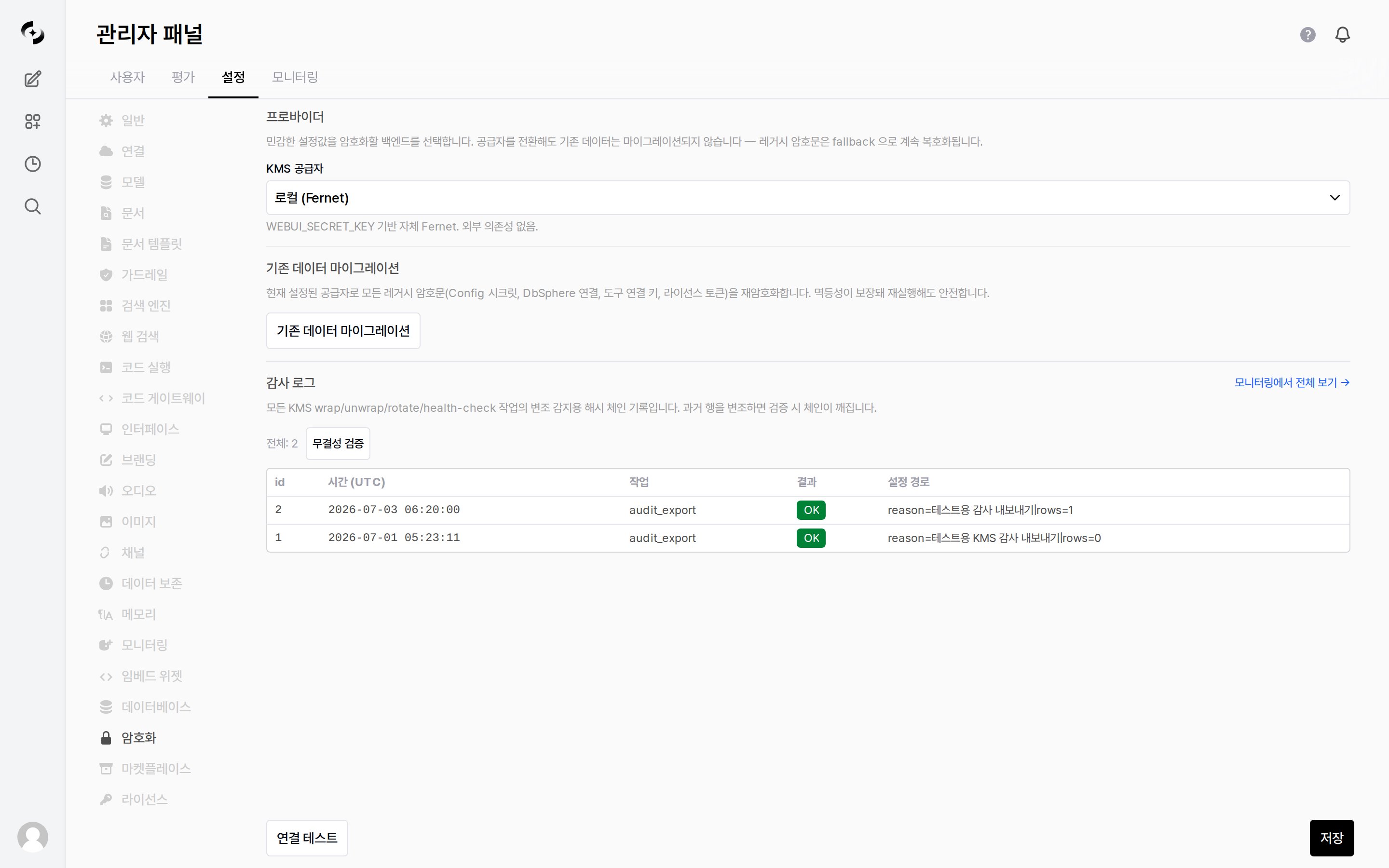
Admin › Settings › Encryption
Choose the key management backend (KMS, Key Management System) that **encrypts sensitive settings** — Config secrets, database connections, tool connection keys, user API keys, and more.
 ***
## Providers
Select the encryption backend in the **KMS provider** field.
| KMS provider | Description |
| ------------------------------ | -------------------------------------------------------------------------------------------------------- |
| **Local (Fernet)** | Built-in Fernet encryption based on `WEBUI_SECRET_KEY`. No external dependency |
| **Azure Key Vault (envelope)** | Encrypts data with AES-256-GCM and wraps that data key (DEK) with an RSA-OAEP-256 key in Azure Key Vault |
Switching providers **does not automatically migrate existing data.** Legacy ciphertext continues to decrypt via fallback, so nothing breaks immediately, but run the migration below to unify everything under the new provider.
### Azure Key Vault settings
Choosing **Azure Key Vault (envelope)** reveals the fields below.
| Setting | Description |
| --------------------------------- | ------------------------------------------------------------------------------------------------- |
| **KEK URI (default tier)** | The Key Vault key URI used by default. It wraps the `Confidential` and `Internal` classifications |
| **Restricted KEK URI (optional)** | Specify this to wrap higher-grade data with a separate key |
**Service Principal (optional)** — leave blank to use the server's managed identity / default credentials.
| Setting | Description |
| ----------------- | ----------------------- |
| **Tenant ID** | Directory (tenant) ID |
| **Client ID** | Application (client) ID |
| **Client Secret** | Client secret value |
Press **Test Connection** (bottom left of the screen) first to confirm Key Vault is reachable. The result appears as a `Connected` / `Failed` badge.
***
## Migrating Existing Data
Running **Migrate existing data** **re-encrypts** all legacy ciphertext with the currently configured provider.
* Targets: Config secrets · DbSphere connections · tool connection keys · user API keys
* **Idempotent**, so it is safe to re-run.
* Each target reports `Migrated N` · `Skipped N` · `Failed N` badges when the run finishes.
***
## Auto Rotation
A section that appears only for the **Azure Key Vault** provider. It periodically checks whether the Key Vault key has rolled to a new version and re-encrypts accordingly.
| Setting | Description | Default |
| -------------------------- | ------------------------------------------------------------------------------------ | ------- |
| **Enable auto rotation** | Run the periodic check and rotation | Off |
| **Dry-run mode** | Records the "rotation needed" decision in the audit log without touching live config | Off |
| **Check interval (hours)** | Minimum 1. The scheduler checks at most once per interval (24 = daily) | `24` |
**Dry-run check** or **Check Now** runs the check immediately and reports per key tier as `Up to date` · `Rotated` · `Would rotate (dry-run)` · `Error` badges. The last check time is shown too, or `never` if it has never run.
**This is off by default.** Run a dry-run first to see what would rotate, then turn it on.
***
## Audit Log · Integrity Check
Every KMS `wrap`, `unwrap`, `rotate`, and `health-check` operation is recorded in a **tamper-evident hash chain**.
* Tampering with a past entry breaks the chain at verification time.
| Action | Description |
| ------------------- | ------------------------------------------------ |
| **Integrity check** | Verify the integrity of the audit log hash chain |
| **Connection test** | Check the current KMS provider connection status |
You can view the full audit records and integrity verification in [Monitoring › KMS Audit](/en/monitoring/kms-audit).
***
## Providers
Select the encryption backend in the **KMS provider** field.
| KMS provider | Description |
| ------------------------------ | -------------------------------------------------------------------------------------------------------- |
| **Local (Fernet)** | Built-in Fernet encryption based on `WEBUI_SECRET_KEY`. No external dependency |
| **Azure Key Vault (envelope)** | Encrypts data with AES-256-GCM and wraps that data key (DEK) with an RSA-OAEP-256 key in Azure Key Vault |
Switching providers **does not automatically migrate existing data.** Legacy ciphertext continues to decrypt via fallback, so nothing breaks immediately, but run the migration below to unify everything under the new provider.
### Azure Key Vault settings
Choosing **Azure Key Vault (envelope)** reveals the fields below.
| Setting | Description |
| --------------------------------- | ------------------------------------------------------------------------------------------------- |
| **KEK URI (default tier)** | The Key Vault key URI used by default. It wraps the `Confidential` and `Internal` classifications |
| **Restricted KEK URI (optional)** | Specify this to wrap higher-grade data with a separate key |
**Service Principal (optional)** — leave blank to use the server's managed identity / default credentials.
| Setting | Description |
| ----------------- | ----------------------- |
| **Tenant ID** | Directory (tenant) ID |
| **Client ID** | Application (client) ID |
| **Client Secret** | Client secret value |
Press **Test Connection** (bottom left of the screen) first to confirm Key Vault is reachable. The result appears as a `Connected` / `Failed` badge.
***
## Migrating Existing Data
Running **Migrate existing data** **re-encrypts** all legacy ciphertext with the currently configured provider.
* Targets: Config secrets · DbSphere connections · tool connection keys · user API keys
* **Idempotent**, so it is safe to re-run.
* Each target reports `Migrated N` · `Skipped N` · `Failed N` badges when the run finishes.
***
## Auto Rotation
A section that appears only for the **Azure Key Vault** provider. It periodically checks whether the Key Vault key has rolled to a new version and re-encrypts accordingly.
| Setting | Description | Default |
| -------------------------- | ------------------------------------------------------------------------------------ | ------- |
| **Enable auto rotation** | Run the periodic check and rotation | Off |
| **Dry-run mode** | Records the "rotation needed" decision in the audit log without touching live config | Off |
| **Check interval (hours)** | Minimum 1. The scheduler checks at most once per interval (24 = daily) | `24` |
**Dry-run check** or **Check Now** runs the check immediately and reports per key tier as `Up to date` · `Rotated` · `Would rotate (dry-run)` · `Error` badges. The last check time is shown too, or `never` if it has never run.
**This is off by default.** Run a dry-run first to see what would rotate, then turn it on.
***
## Audit Log · Integrity Check
Every KMS `wrap`, `unwrap`, `rotate`, and `health-check` operation is recorded in a **tamper-evident hash chain**.
* Tampering with a past entry breaks the chain at verification time.
| Action | Description |
| ------------------- | ------------------------------------------------ |
| **Integrity check** | Verify the integrity of the audit log hash chain |
| **Connection test** | Check the current KMS provider connection status |
You can view the full audit records and integrity verification in [Monitoring › KMS Audit](/en/monitoring/kms-audit).