> ## Documentation Index
> Fetch the complete documentation index at: https://docs.cloosphere.ai/llms.txt
> Use this file to discover all available pages before exploring further.
# General
> Manage authentication, feature enablement, and other system-wide defaults.
Admin › Settings › General
Set system-wide default behavior — authentication policy, sign-in methods, feature enablement, etc.
* Changes made here take effect for all users immediately on save.
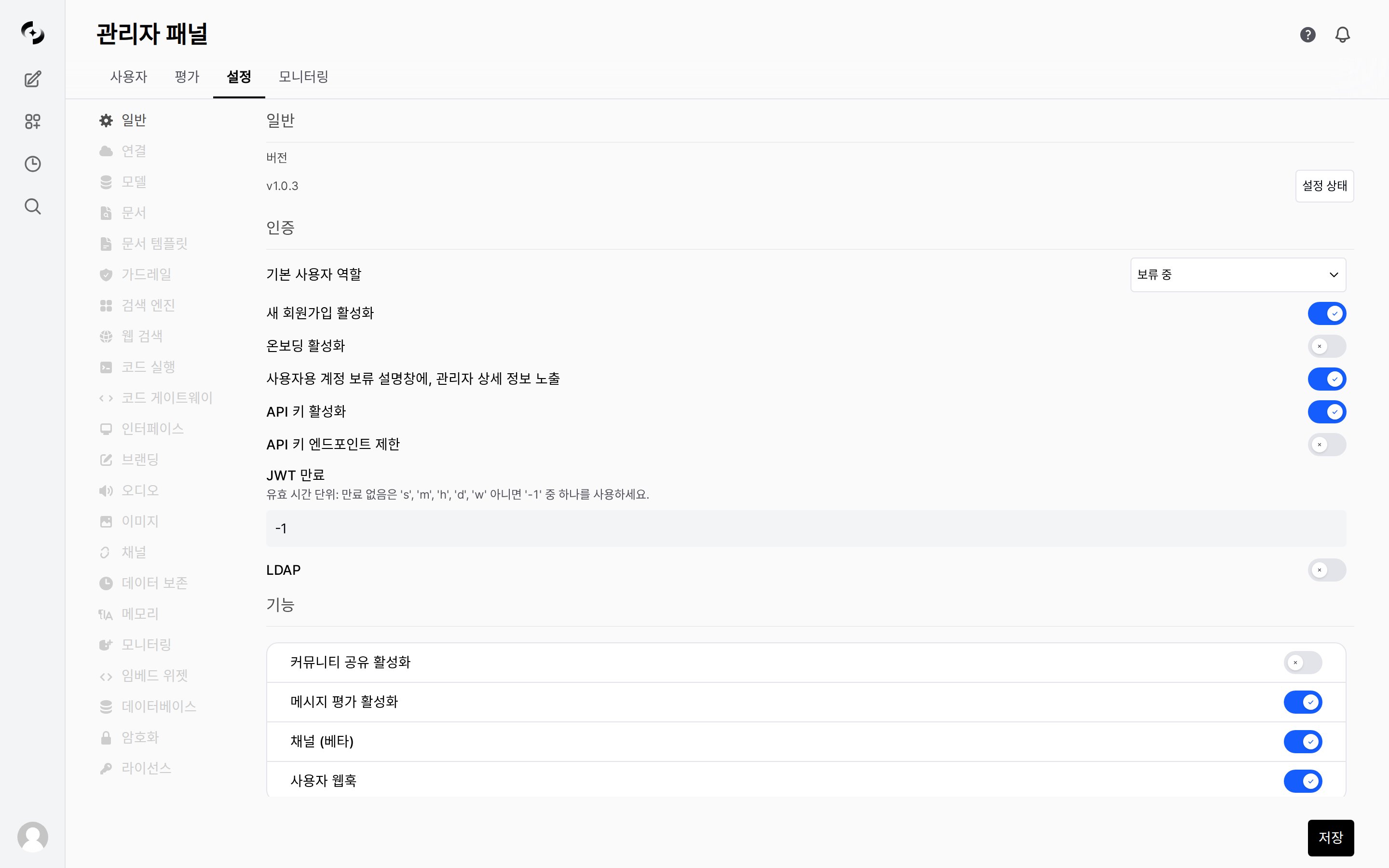 ***
## Authentication Settings
Set policies for user signup, sign-in, and sessions.
### Default User Role
The role automatically assigned to new sign-ups.
* Whether a user can use the service right after signup hinges on this value.
| Role | State after sign-in | Best for |
| --------------------- | -------------------------------------------------------------------------------------------------------------------------------------------------------------------- | --------------------------------------------------- |
| **Pending** (default) | Only the approval-waiting screen is shown; chat and workspace are fully locked. Requires an admin to raise the role in [User Management](/en/admin/users) before use | Operations that require admin approval after signup |
| **User** | Usable immediately after signup (within the granted group permissions) | Access limited to trusted users, e.g. corporate SSO |
| **Admin** | Access all the way to the admin panel and settings | Not recommended as the default for new users |
### Authentication Toggles
| Setting | Purpose | Effect · Link |
| ------------------------------ | --------------------------------- | ---------------------------------------------------------------------------------------------------------------------------------- |
| **Enable new sign-ups** | Allow self-registration | Shows the sign-up form on the sign-in screen. When disabled, admins create accounts directly in [User Management](/en/admin/users) |
| **Enable onboarding** | First-visit intro | Shows the service intro screen before sign-in (when disabled, goes straight to the sign-in screen) |
| **Show admin details** | Show whom to contact for approval | Displays the admin's name and email at the bottom of the approval-waiting screen for 'Pending' users |
| **Enable API keys** | External program integration | Allows issuing personal API keys (`sk-…`) **→** call the Cloosphere API from external scripts and automation tools |
| **Restrict API key endpoints** | Narrow API key scope | Only paths registered in **Allowed endpoints** may be called with an API key; all others are blocked |
| **JWT expiration** | Session retention period | Auto sign-out and re-login required once the set period elapses (`-1` = no expiration) |
JWT expiration format: `30m` (minutes), `1h` (hours), `10d` (days), `1w` (weeks), `-1` (no expiration). `-1` is convenient but makes a token hard to revoke if leaked, so in enterprise environments `8h` to `1d` is recommended.
### Email De-identification
When the `ENABLE_EMAIL_DEIDENTIFY=true` environment variable is set, **the @ domain part is removed** from user email addresses, storing only the ID portion.
| Item | Disabled (default) | Enabled |
| -------------------- | ------------------- | ------------------------------------------------- |
| **Sign-in/up label** | "Email" | "Account ID" |
| **Input field** | `type="email"` | `type="text"` |
| **Email validation** | @ required | No format restriction (allows employee IDs, etc.) |
| **Stored value** | `sykim@cloocus.com` | `sykim` |
Use this when **privacy protection requirements** dictate not storing full email addresses in DB in SSO/LDAP environments. Same applies to OAuth sign-in users.
***
## LDAP Settings
Integrate with corporate LDAP / Active Directory servers for unified authentication.
* When enabled, an LDAP option appears on the sign-in screen and a form for server connection details expands.
* When an LDAP user signs in for the first time, an account is auto-created with the **Default user role** above applied.
| Setting | Description | Example |
| --------------------------- | ---------------------------------------------- | ---------------------------------------- |
| **Label** | LDAP server identifier name | `Corporate AD` |
| **Host** | LDAP server address | `ldap.example.com` |
| **Port** | Connection port (default 636 with TLS) | `389` |
| **Application DN** | Bind account DN | `cn=admin,dc=example,dc=com` |
| **Application DN Password** | Bind account password | - |
| **Attribute for Mail** | LDAP attribute mapped to email | `mail` |
| **Attribute for Username** | LDAP attribute mapped to username | `uid`, `sAMAccountName` |
| **Search Base** | User search base | `ou=users,dc=example,dc=com` |
| **Search Filters** | LDAP search filter (optional) | `(&(objectClass=inetOrgPerson)(uid=%s))` |
| **TLS** | Use TLS encryption | Disabled |
| **Certificate Path** | Certificate path (shown when TLS enabled) | - |
| **Ciphers** | Allowed cipher suites (shown when TLS enabled) | - |
LDAP settings apply immediately. Misconfiguration can block user sign-ins, so verify with a test account first.
***
## Feature Toggles
Control whether specific features are enabled system-wide.
* When disabled, the related menus and buttons disappear from the user's screen and the corresponding API calls are also blocked.
| Feature | Purpose | Effect · Link |
| --------------------- | --------------------------------- | ----------------------------------------------------------------------------------------------------------------------------------------------------------------------------- |
| **Community Sharing** | External community integration | Shows a "Share to Community" button on models, prompts, and chats **→** exchange models and prompts with the [openwebui.com community](https://openwebui.com) |
| **Message Rating** | Collect response-quality feedback | Shows like/dislike buttons on AI responses **→** source data for [Evaluation](/en/monitoring/evaluations) and [Feedback](/en/monitoring/feedback) monitoring |
| **Channels (Beta)** | Team chat | Provides channel features for team chat |
| **User Webhooks** | Personal away notifications | Allows registering per-user personal webhooks **→** receive completion responses generated while away and [Channels](/en/admin/notifications) messages via Slack, Teams, etc. |
### Notification URLs
Below the feature toggles, configure the two URLs used for notifications.
* The three similarly named items below serve different roles.
| Item | Purpose | Effect · Link |
| -------------------------------- | --------------------------- | ------------------------------------------------------------------------------------------------------------------ |
| **WebUI URL** | Generate notification links | Public address used to build the "Open conversation" link (`…/c/…`) inside notification messages (not for sending) |
| **Webhook URL** | New sign-up notifications | Sends a notification to a single admin URL on new sign-up or first SSO login (Slack, Teams, Discord supported) |
| **User Webhooks** (toggle above) | Personal away notifications | A personal route each user registers individually — separate from the two above |
This is normal when the **Default user role** is 'Pending' (the default). Until an admin approves them, a sign-up only sees the "Account pending approval" screen. Change that user's role to **User** in [User Management](/en/admin/users) to let them use the service right away. If approving each time is cumbersome, change the Default user role itself to **User** — but since anyone can then sign up and use the service immediately, only open sign-ups in a trusted environment.
Yes. Even with LDAP enabled, you can sign in with existing local accounts (email/password). When an LDAP user signs in for the first time, an account is auto-created. The default role is the **Default user role** under "Authentication Settings".
***
## Authentication Settings
Set policies for user signup, sign-in, and sessions.
### Default User Role
The role automatically assigned to new sign-ups.
* Whether a user can use the service right after signup hinges on this value.
| Role | State after sign-in | Best for |
| --------------------- | -------------------------------------------------------------------------------------------------------------------------------------------------------------------- | --------------------------------------------------- |
| **Pending** (default) | Only the approval-waiting screen is shown; chat and workspace are fully locked. Requires an admin to raise the role in [User Management](/en/admin/users) before use | Operations that require admin approval after signup |
| **User** | Usable immediately after signup (within the granted group permissions) | Access limited to trusted users, e.g. corporate SSO |
| **Admin** | Access all the way to the admin panel and settings | Not recommended as the default for new users |
### Authentication Toggles
| Setting | Purpose | Effect · Link |
| ------------------------------ | --------------------------------- | ---------------------------------------------------------------------------------------------------------------------------------- |
| **Enable new sign-ups** | Allow self-registration | Shows the sign-up form on the sign-in screen. When disabled, admins create accounts directly in [User Management](/en/admin/users) |
| **Enable onboarding** | First-visit intro | Shows the service intro screen before sign-in (when disabled, goes straight to the sign-in screen) |
| **Show admin details** | Show whom to contact for approval | Displays the admin's name and email at the bottom of the approval-waiting screen for 'Pending' users |
| **Enable API keys** | External program integration | Allows issuing personal API keys (`sk-…`) **→** call the Cloosphere API from external scripts and automation tools |
| **Restrict API key endpoints** | Narrow API key scope | Only paths registered in **Allowed endpoints** may be called with an API key; all others are blocked |
| **JWT expiration** | Session retention period | Auto sign-out and re-login required once the set period elapses (`-1` = no expiration) |
JWT expiration format: `30m` (minutes), `1h` (hours), `10d` (days), `1w` (weeks), `-1` (no expiration). `-1` is convenient but makes a token hard to revoke if leaked, so in enterprise environments `8h` to `1d` is recommended.
### Email De-identification
When the `ENABLE_EMAIL_DEIDENTIFY=true` environment variable is set, **the @ domain part is removed** from user email addresses, storing only the ID portion.
| Item | Disabled (default) | Enabled |
| -------------------- | ------------------- | ------------------------------------------------- |
| **Sign-in/up label** | "Email" | "Account ID" |
| **Input field** | `type="email"` | `type="text"` |
| **Email validation** | @ required | No format restriction (allows employee IDs, etc.) |
| **Stored value** | `sykim@cloocus.com` | `sykim` |
Use this when **privacy protection requirements** dictate not storing full email addresses in DB in SSO/LDAP environments. Same applies to OAuth sign-in users.
***
## LDAP Settings
Integrate with corporate LDAP / Active Directory servers for unified authentication.
* When enabled, an LDAP option appears on the sign-in screen and a form for server connection details expands.
* When an LDAP user signs in for the first time, an account is auto-created with the **Default user role** above applied.
| Setting | Description | Example |
| --------------------------- | ---------------------------------------------- | ---------------------------------------- |
| **Label** | LDAP server identifier name | `Corporate AD` |
| **Host** | LDAP server address | `ldap.example.com` |
| **Port** | Connection port (default 636 with TLS) | `389` |
| **Application DN** | Bind account DN | `cn=admin,dc=example,dc=com` |
| **Application DN Password** | Bind account password | - |
| **Attribute for Mail** | LDAP attribute mapped to email | `mail` |
| **Attribute for Username** | LDAP attribute mapped to username | `uid`, `sAMAccountName` |
| **Search Base** | User search base | `ou=users,dc=example,dc=com` |
| **Search Filters** | LDAP search filter (optional) | `(&(objectClass=inetOrgPerson)(uid=%s))` |
| **TLS** | Use TLS encryption | Disabled |
| **Certificate Path** | Certificate path (shown when TLS enabled) | - |
| **Ciphers** | Allowed cipher suites (shown when TLS enabled) | - |
LDAP settings apply immediately. Misconfiguration can block user sign-ins, so verify with a test account first.
***
## Feature Toggles
Control whether specific features are enabled system-wide.
* When disabled, the related menus and buttons disappear from the user's screen and the corresponding API calls are also blocked.
| Feature | Purpose | Effect · Link |
| --------------------- | --------------------------------- | ----------------------------------------------------------------------------------------------------------------------------------------------------------------------------- |
| **Community Sharing** | External community integration | Shows a "Share to Community" button on models, prompts, and chats **→** exchange models and prompts with the [openwebui.com community](https://openwebui.com) |
| **Message Rating** | Collect response-quality feedback | Shows like/dislike buttons on AI responses **→** source data for [Evaluation](/en/monitoring/evaluations) and [Feedback](/en/monitoring/feedback) monitoring |
| **Channels (Beta)** | Team chat | Provides channel features for team chat |
| **User Webhooks** | Personal away notifications | Allows registering per-user personal webhooks **→** receive completion responses generated while away and [Channels](/en/admin/notifications) messages via Slack, Teams, etc. |
### Notification URLs
Below the feature toggles, configure the two URLs used for notifications.
* The three similarly named items below serve different roles.
| Item | Purpose | Effect · Link |
| -------------------------------- | --------------------------- | ------------------------------------------------------------------------------------------------------------------ |
| **WebUI URL** | Generate notification links | Public address used to build the "Open conversation" link (`…/c/…`) inside notification messages (not for sending) |
| **Webhook URL** | New sign-up notifications | Sends a notification to a single admin URL on new sign-up or first SSO login (Slack, Teams, Discord supported) |
| **User Webhooks** (toggle above) | Personal away notifications | A personal route each user registers individually — separate from the two above |
This is normal when the **Default user role** is 'Pending' (the default). Until an admin approves them, a sign-up only sees the "Account pending approval" screen. Change that user's role to **User** in [User Management](/en/admin/users) to let them use the service right away. If approving each time is cumbersome, change the Default user role itself to **User** — but since anyone can then sign up and use the service immediately, only open sign-ups in a trusted environment.
Yes. Even with LDAP enabled, you can sign in with existing local accounts (email/password). When an LDAP user signs in for the first time, an account is auto-created. The default role is the **Default user role** under "Authentication Settings".