> ## Documentation Index
> Fetch the complete documentation index at: https://docs.cloosphere.ai/llms.txt
> Use this file to discover all available pages before exploring further.
# Guardrails
> Configure global guardrails and file upload security checks to apply across all chats and agents at once.
Admin › Settings › Guardrails
**Global guardrails** are safeguards that apply to **all chats and agents at once**, regardless of individual agent guardrail settings.
* Use them to enforce a minimum input/output validation baseline across the entire organization.
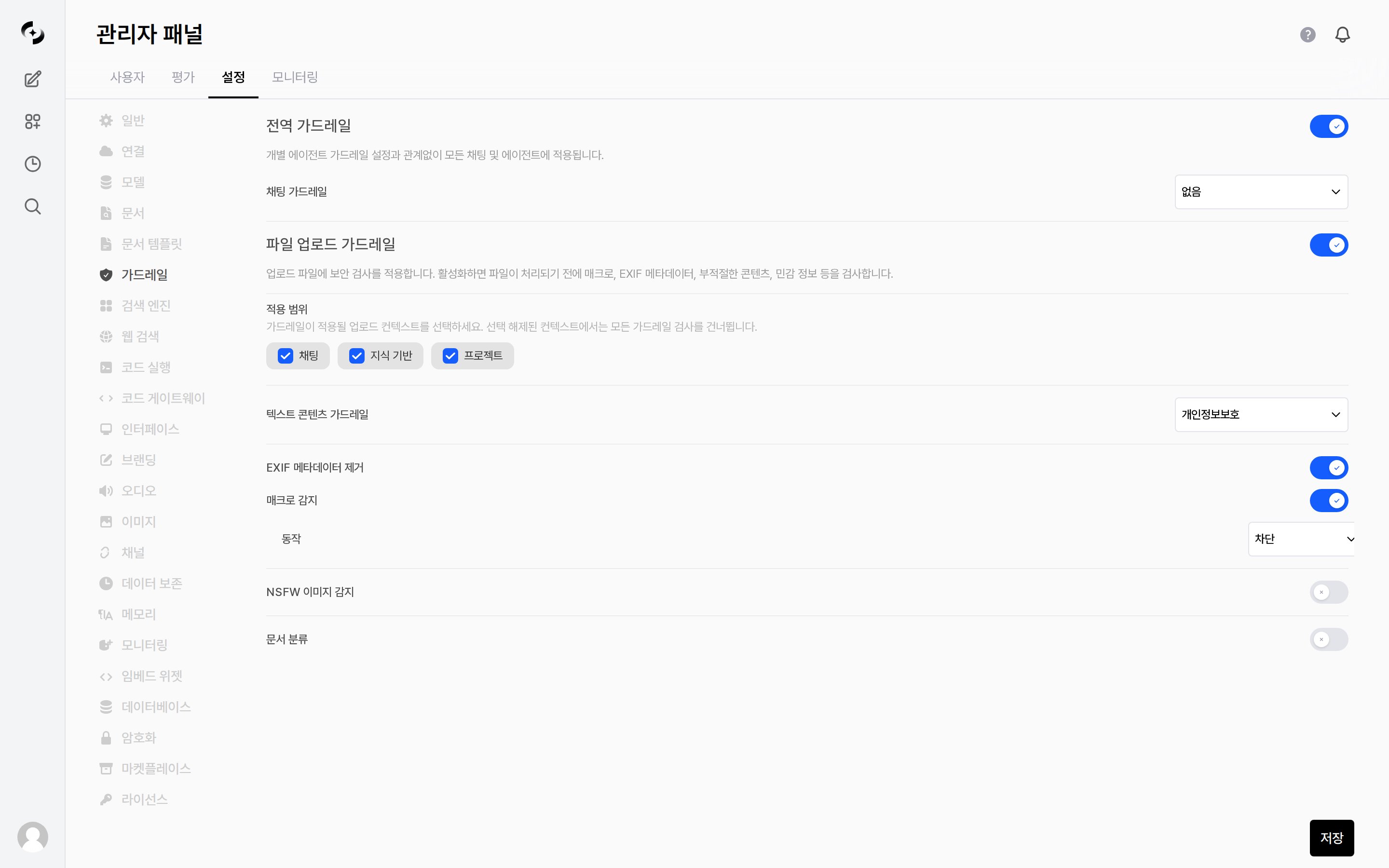 What this tab shows depends on your [license](/en/admin/settings/license) feature keys. The tab itself requires the `file_guardrail` module, and the **Global Guardrails** section requires `global_guardrail`.
***
## Global Guardrails
| Setting | Description |
| --------------------- | ------------------------------------------------------------------------------------------------------------------ |
| **Global Guardrails** | Overall ON/OFF toggle. When on, applies to all chats and agents |
| **Chat Guardrail** | Select one guardrail to apply globally. Its PII detection, blocked words, and LLM Judge are then enforced globally |
The guardrails themselves (the check rules) are defined in [Workspace › Guardrails](/en/workspace/guardrails). This page is where you choose which of them to **enforce globally**.
***
## File Upload Guardrails
Apply security checks to uploaded files.
* Turning the toggle on reveals the **Applied Scopes** and the checks below; the checks run **before** a file is processed.
### Applied Scopes
Choose which upload paths the guardrails apply to — **Chat · Knowledge · Project**. Unchecked contexts skip all guardrail checks.
### Checks
| Check | Form | Description |
| --------------------------- | ---------------- | ------------------------------------------------------------------------------------------------------------------------------------------- |
| **Text Content Guardrails** | Guardrail picker | Scans the extracted document text with the selected guardrail. If a violation is detected (PII, sensitive data, etc.) the upload is blocked |
| **EXIF Metadata Stripping** | Toggle | Automatically strips GPS, camera info and other EXIF metadata from uploaded images |
| **Macro Detection** | Toggle + action | Detects executable macros embedded in documents |
| **NSFW Image Detection** | Toggle + model | Uses an LLM to judge inappropriate images |
| **Document Classification** | Toggle + model | Uses an LLM to classify document sensitivity and act per category |
**Text Content Guardrails**, **NSFW Image Detection** and **Document Classification** require a model or guardrail to be selected. **EXIF Metadata Stripping** and **Macro Detection** are static checks that run without a model.
### Macro Detection
When the toggle is on, an **Action** can be chosen.
| Action | Result |
| --------- | -------------------------------- |
| **Block** | The upload is blocked |
| **Flag** | The upload is allowed but marked |
### NSFW Image Detection
| Setting | Description |
| ------------------ | ------------------------------------------------- |
| **Model** | LLM used for the judgment |
| **Prompt** | Prompt that defines the judgment criteria |
| **Pass Examples** | List of image descriptions that should pass |
| **Block Examples** | List of image descriptions that should be blocked |
### Document Classification
| Setting | Description |
| ---------------------------------- | ------------------------------------------------------------------------- |
| **Model** | LLM used for classification |
| **Max Characters** | Upper bound on the body text passed to the classifier |
| **Prompt** | Prompt that defines the classification criteria |
| **Categories** | Set `ID` · `description` · **action** (Allow / Flag / Block) per category |
| **Pass Examples · Block Examples** | `Sample text` + `category` pairs that reinforce the criteria |
***
## Guardrail Application Priority
Guardrails can be set at multiple layers. Rather than only one applying by priority, **guardrails from all layers are combined (union) and applied together**.
```mermaid theme={null}
flowchart LR
A[Agent guardrails] --> R([All layers
What this tab shows depends on your [license](/en/admin/settings/license) feature keys. The tab itself requires the `file_guardrail` module, and the **Global Guardrails** section requires `global_guardrail`.
***
## Global Guardrails
| Setting | Description |
| --------------------- | ------------------------------------------------------------------------------------------------------------------ |
| **Global Guardrails** | Overall ON/OFF toggle. When on, applies to all chats and agents |
| **Chat Guardrail** | Select one guardrail to apply globally. Its PII detection, blocked words, and LLM Judge are then enforced globally |
The guardrails themselves (the check rules) are defined in [Workspace › Guardrails](/en/workspace/guardrails). This page is where you choose which of them to **enforce globally**.
***
## File Upload Guardrails
Apply security checks to uploaded files.
* Turning the toggle on reveals the **Applied Scopes** and the checks below; the checks run **before** a file is processed.
### Applied Scopes
Choose which upload paths the guardrails apply to — **Chat · Knowledge · Project**. Unchecked contexts skip all guardrail checks.
### Checks
| Check | Form | Description |
| --------------------------- | ---------------- | ------------------------------------------------------------------------------------------------------------------------------------------- |
| **Text Content Guardrails** | Guardrail picker | Scans the extracted document text with the selected guardrail. If a violation is detected (PII, sensitive data, etc.) the upload is blocked |
| **EXIF Metadata Stripping** | Toggle | Automatically strips GPS, camera info and other EXIF metadata from uploaded images |
| **Macro Detection** | Toggle + action | Detects executable macros embedded in documents |
| **NSFW Image Detection** | Toggle + model | Uses an LLM to judge inappropriate images |
| **Document Classification** | Toggle + model | Uses an LLM to classify document sensitivity and act per category |
**Text Content Guardrails**, **NSFW Image Detection** and **Document Classification** require a model or guardrail to be selected. **EXIF Metadata Stripping** and **Macro Detection** are static checks that run without a model.
### Macro Detection
When the toggle is on, an **Action** can be chosen.
| Action | Result |
| --------- | -------------------------------- |
| **Block** | The upload is blocked |
| **Flag** | The upload is allowed but marked |
### NSFW Image Detection
| Setting | Description |
| ------------------ | ------------------------------------------------- |
| **Model** | LLM used for the judgment |
| **Prompt** | Prompt that defines the judgment criteria |
| **Pass Examples** | List of image descriptions that should pass |
| **Block Examples** | List of image descriptions that should be blocked |
### Document Classification
| Setting | Description |
| ---------------------------------- | ------------------------------------------------------------------------- |
| **Model** | LLM used for classification |
| **Max Characters** | Upper bound on the body text passed to the classifier |
| **Prompt** | Prompt that defines the classification criteria |
| **Categories** | Set `ID` · `description` · **action** (Allow / Flag / Block) per category |
| **Pass Examples · Block Examples** | `Sample text` + `category` pairs that reinforce the criteria |
***
## Guardrail Application Priority
Guardrails can be set at multiple layers. Rather than only one applying by priority, **guardrails from all layers are combined (union) and applied together**.
```mermaid theme={null}
flowchart LR
A[Agent guardrails] --> R([All layers
combined])
G[Group guardrails] --> R
O[Organizational unit guardrails] --> R
E[Global guardrails] --> R
```
Global guardrails can also be managed in [Code Gateway](/en/admin/code-gateway). If you turn off `Inherit global guardrails` at the organizational unit level, that OU is not affected by global guardrails — see [Organization management](/en/admin/organizations#per-ou-guardrails).