> ## Documentation Index
> Fetch the complete documentation index at: https://docs.cloosphere.ai/llms.txt
> Use this file to discover all available pages before exploring further.
# Interface
> Manage UI settings — task model, auto-generation features (title/tags/follow-up/autocomplete), prompt suggestions, banners.
Admin › Settings › Interface
Configure chat interface automations and UI elements.
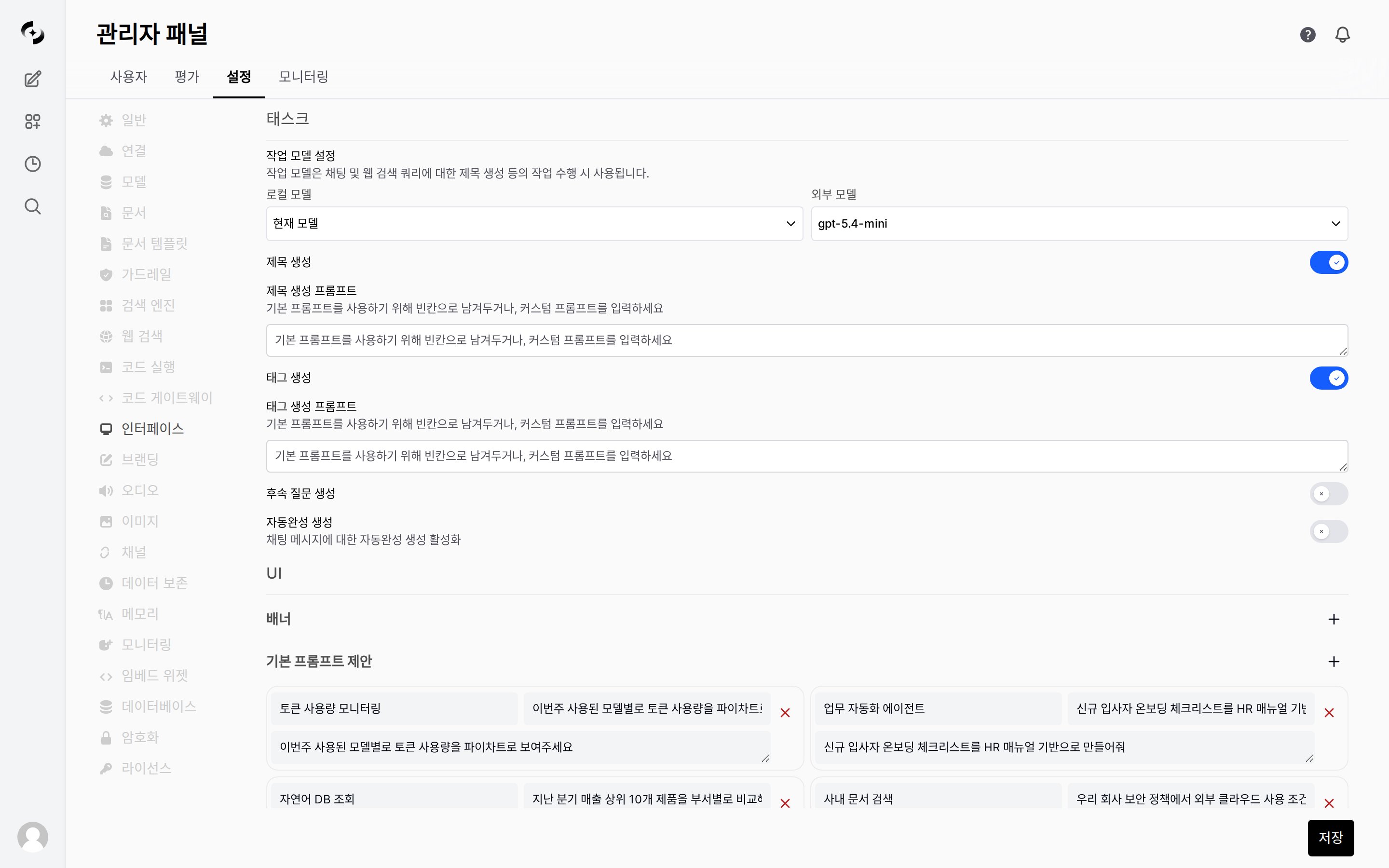 The screen has two main sections: **Tasks** (auto-generation features, task model) and **UI** (banners, prompt suggestions).
***
## Task Model
Specify the model used for **background automation** like title generation, tag generation, and follow-up suggestions.
| Setting | Description |
| ------------------- | ----------------------------------------------------------------- |
| **Local Models** | Pick from models registered in the system |
| **External Models** | Pick from models registered via an external API, using a dropdown |
The task model needs fast response and low cost above all. Use lightweight models (e.g., GPT-4o-mini, Claude Haiku, Gemini Flash).
When the task model is unset, the **currently selected chat model** is used for background tasks too.
In a chat using a high-cost model (Opus, GPT-4o, etc.), the same model is invoked every turn for title/tags/follow-up generation, greatly increasing cost. Always set a separate task model in production.
***
## Auto-Generation Features
Configure activation and prompts for chat-related auto-generation Tasks.
* Each Task can be individually **enabled/disabled** and have its **prompt template customized**.
| Task | Behavior | Default |
| --------------------------- | ---------------------------------------------------------------------------------- | :-----: |
| **Title Generation** | Auto-generate title from chat content after the first turn | ON |
| **Tags Generation** | Auto-extract and assign tags from chat content | ON |
| **Follow-Up Generation** | Suggest 3–5 follow-up questions as a button list below the last assistant response | **OFF** |
| **Autocomplete Generation** | Suggest message autocomplete during user input | ON |
**Follow-Up Generation ships OFF by default**. Showing follow-up question buttons to users incurs additional LLM calls every turn — turn it on after considering cost and response latency.
When enabled, suggested questions appear as a vertical button list below the assistant response immediately after it ends.
### Prompt Customization
Leaving each Task's prompt empty uses the system default; entering a prompt overrides it.
| Prompt | Description |
| ------------------------------- | ----------------------------------------------------------------------------------------------------------- |
| **Title Generation Prompt** | Length/style for generating chat titles |
| **Tags Generation Prompt** | Categories/language for tag extraction |
| **Follow-Up Generation Prompt** | Tone/perspective/count of follow-up questions (e.g., "3 short questions predicting the user's next action") |
### Autocomplete Input Max Length
Set the input-length cap for triggering autocomplete.
| Value | Meaning |
| :--------------------- | :------------------------------------------------- |
| `-1` | No length limit (try autocomplete on every input) |
| Positive integer ≥ `1` | Only call autocomplete when input is ≤ that length |
Calling autocomplete on every long message accumulates cost and latency, so set a reasonable cap (e.g., `200`) in production.
***
## Prompt Suggestions
Configure default prompt suggestions shown to users when starting a new chat.
* Each suggestion consists of **Title**, **Subtitle**, and **Content** (the actual prompt sent). Add with the **+ button** and delete with each item's **× button**.
For per-agent prompt suggestions, set Custom in the agent edit screen's **Prompt Suggestions** section. Per-agent settings take precedence over this global setting.
***
## Banners
Show announcement banners across the system.
* Use for maintenance schedules, policy changes, etc.
| Setting | Description |
| --------------- | ------------------------------------- |
| **Banner type** | `info`, `warning`, `error`, `success` |
| **Content** | Banner message (HTML supported) |
| **Dismissible** | Whether users can close the banner |
The screen has two main sections: **Tasks** (auto-generation features, task model) and **UI** (banners, prompt suggestions).
***
## Task Model
Specify the model used for **background automation** like title generation, tag generation, and follow-up suggestions.
| Setting | Description |
| ------------------- | ----------------------------------------------------------------- |
| **Local Models** | Pick from models registered in the system |
| **External Models** | Pick from models registered via an external API, using a dropdown |
The task model needs fast response and low cost above all. Use lightweight models (e.g., GPT-4o-mini, Claude Haiku, Gemini Flash).
When the task model is unset, the **currently selected chat model** is used for background tasks too.
In a chat using a high-cost model (Opus, GPT-4o, etc.), the same model is invoked every turn for title/tags/follow-up generation, greatly increasing cost. Always set a separate task model in production.
***
## Auto-Generation Features
Configure activation and prompts for chat-related auto-generation Tasks.
* Each Task can be individually **enabled/disabled** and have its **prompt template customized**.
| Task | Behavior | Default |
| --------------------------- | ---------------------------------------------------------------------------------- | :-----: |
| **Title Generation** | Auto-generate title from chat content after the first turn | ON |
| **Tags Generation** | Auto-extract and assign tags from chat content | ON |
| **Follow-Up Generation** | Suggest 3–5 follow-up questions as a button list below the last assistant response | **OFF** |
| **Autocomplete Generation** | Suggest message autocomplete during user input | ON |
**Follow-Up Generation ships OFF by default**. Showing follow-up question buttons to users incurs additional LLM calls every turn — turn it on after considering cost and response latency.
When enabled, suggested questions appear as a vertical button list below the assistant response immediately after it ends.
### Prompt Customization
Leaving each Task's prompt empty uses the system default; entering a prompt overrides it.
| Prompt | Description |
| ------------------------------- | ----------------------------------------------------------------------------------------------------------- |
| **Title Generation Prompt** | Length/style for generating chat titles |
| **Tags Generation Prompt** | Categories/language for tag extraction |
| **Follow-Up Generation Prompt** | Tone/perspective/count of follow-up questions (e.g., "3 short questions predicting the user's next action") |
### Autocomplete Input Max Length
Set the input-length cap for triggering autocomplete.
| Value | Meaning |
| :--------------------- | :------------------------------------------------- |
| `-1` | No length limit (try autocomplete on every input) |
| Positive integer ≥ `1` | Only call autocomplete when input is ≤ that length |
Calling autocomplete on every long message accumulates cost and latency, so set a reasonable cap (e.g., `200`) in production.
***
## Prompt Suggestions
Configure default prompt suggestions shown to users when starting a new chat.
* Each suggestion consists of **Title**, **Subtitle**, and **Content** (the actual prompt sent). Add with the **+ button** and delete with each item's **× button**.
For per-agent prompt suggestions, set Custom in the agent edit screen's **Prompt Suggestions** section. Per-agent settings take precedence over this global setting.
***
## Banners
Show announcement banners across the system.
* Use for maintenance schedules, policy changes, etc.
| Setting | Description |
| --------------- | ------------------------------------- |
| **Banner type** | `info`, `warning`, `error`, `success` |
| **Content** | Banner message (HTML supported) |
| **Dismissible** | Whether users can close the banner |