> ## Documentation Index
> Fetch the complete documentation index at: https://docs.cloosphere.ai/llms.txt
> Use this file to discover all available pages before exploring further.
# License
> Register license keys, review per-tier features, and manage feature keys.
Admin › Settings › License
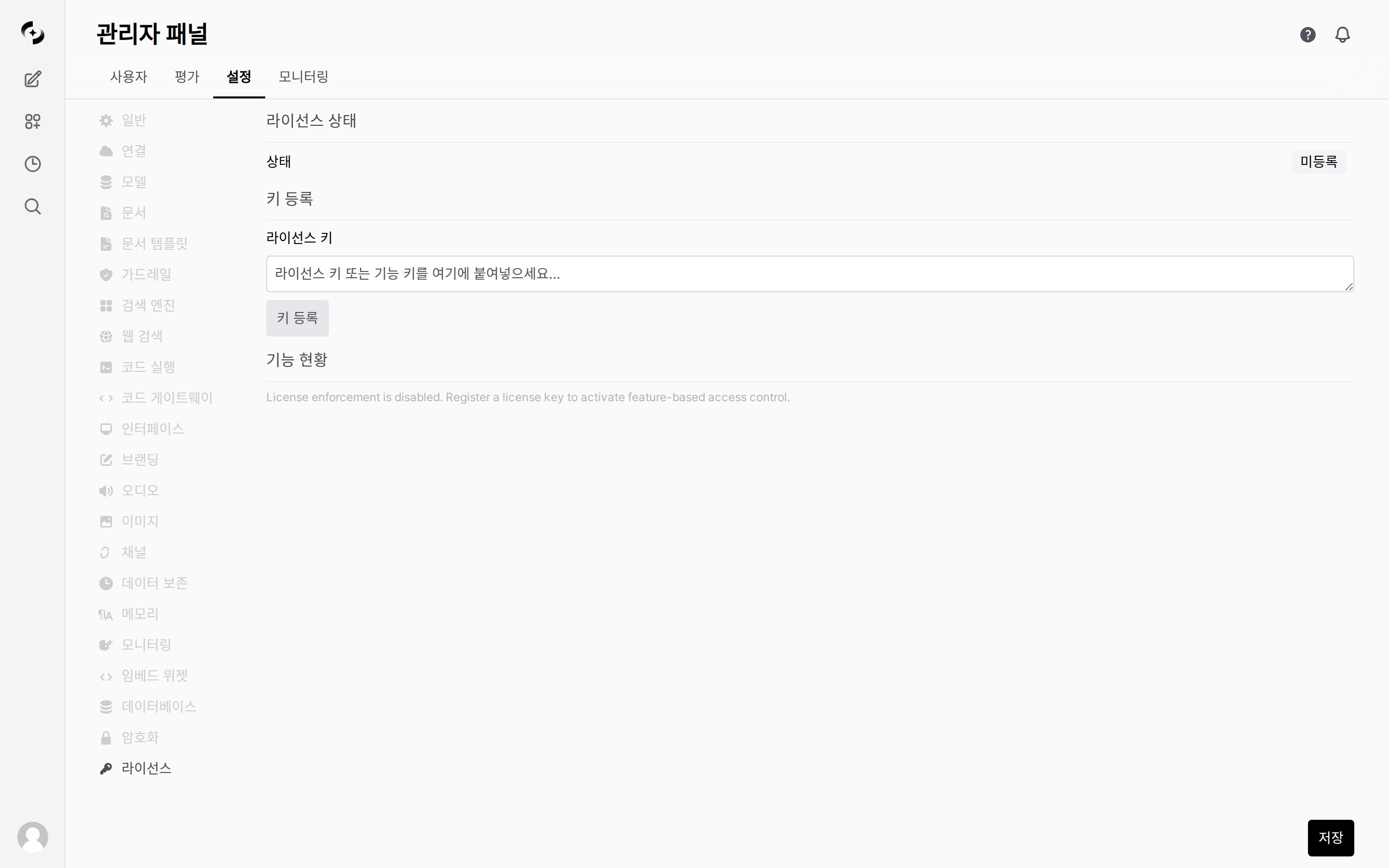
Register a license key to activate per-tier features, and review per-module activation status.
 ***
## Tier Composition
| Tier | Included Features |
| ---------------- | --------------------------------------------------------------------------------------------------------------------------------------------------------------------------------------------------- |
| **Basic** | Basic chat, user management (no license modules) |
| **Standard** | Basic + audit logs, glossary, guardrails, image generation, KbSphere, tools (6 modules) |
| **Professional** | Standard + agent flows, dashboard, branding, DbSphere, document templates, embed widgets, auto-evaluation, tracing |
| **Enterprise** | **All modules included** (`has_all_features` — future modules are automatically included too). Added over Professional: Code Gateway, encryption, File Guardrail, global guardrail, knowledge graph |
***
## Key Types
| Type | Description |
| --------------- | ------------------------------------------------------------ |
| **License key** | Specifies the tier, includes max user count and expiration |
| **Feature key** | Activates specific modules individually, independent of tier |
**Modules activatable via feature keys:**
| Module | Description |
| -------------------- | ------------------------- |
| `audit_log` | Audit log |
| `glossary` | Glossary |
| `guardrail` | Guardrail |
| `image_generation` | Image generation |
| `kbsphere` | Knowledge Base (KbSphere) |
| `tools` | Tools |
| `agent_flow` | Agent Flow |
| `ai_dashboard` | Dashboard |
| `branding` | Branding |
| `dbsphere` | DbSphere |
| `document_templates` | Document templates |
| `embed_widget` | Embed widget |
| `evaluation` | Auto-evaluation |
| `trace` | Tracing |
| `code_gateway` | Code Gateway |
| `encryption` | Encryption (KMS) |
| `file_guardrail` | File Guardrail |
| `global_guardrail` | Global guardrail |
| `knowledge_graph` | Knowledge graph |
***
## Registering a License
Get a license key from your Cloocus contact.
Enter the key in the **Admin > Settings > License** tab.
Click **Register Key**. License keys and feature keys use the same input.
After registration, check the current license status.
| Item | Description |
| ------------------ | ----------------------------------------------------------- |
| **Tier** | Currently active tier |
| **Company name** | License issuer target |
| **Max users** | Maximum allowed user count |
| **Expiration** | License expiration date/time |
| **Feature Status** | Per-module Available / Not Licensed and enforcement setting |
***
## License Management
Registered license keys and feature keys appear in the list and can be individually deleted.
* Once a license is registered, **License Status** shows the tier, company name, max users, and expiry date, and **Feature Status** shows each module as `Available` / `Not Licensed`.
Before a license is registered, the status appears as unregistered, and the key list and feature status are empty. The information above appears only after you register a license key.
When the `ENABLE_LICENSE_ENFORCEMENT` environment variable is `false`, all features are available without a license.
Set to `true` in enterprise environments where feature control is required.
Deleting a license key immediately disables that tier's features.
Verify that currently used features won't be affected before deleting.
***
## Tier Composition
| Tier | Included Features |
| ---------------- | --------------------------------------------------------------------------------------------------------------------------------------------------------------------------------------------------- |
| **Basic** | Basic chat, user management (no license modules) |
| **Standard** | Basic + audit logs, glossary, guardrails, image generation, KbSphere, tools (6 modules) |
| **Professional** | Standard + agent flows, dashboard, branding, DbSphere, document templates, embed widgets, auto-evaluation, tracing |
| **Enterprise** | **All modules included** (`has_all_features` — future modules are automatically included too). Added over Professional: Code Gateway, encryption, File Guardrail, global guardrail, knowledge graph |
***
## Key Types
| Type | Description |
| --------------- | ------------------------------------------------------------ |
| **License key** | Specifies the tier, includes max user count and expiration |
| **Feature key** | Activates specific modules individually, independent of tier |
**Modules activatable via feature keys:**
| Module | Description |
| -------------------- | ------------------------- |
| `audit_log` | Audit log |
| `glossary` | Glossary |
| `guardrail` | Guardrail |
| `image_generation` | Image generation |
| `kbsphere` | Knowledge Base (KbSphere) |
| `tools` | Tools |
| `agent_flow` | Agent Flow |
| `ai_dashboard` | Dashboard |
| `branding` | Branding |
| `dbsphere` | DbSphere |
| `document_templates` | Document templates |
| `embed_widget` | Embed widget |
| `evaluation` | Auto-evaluation |
| `trace` | Tracing |
| `code_gateway` | Code Gateway |
| `encryption` | Encryption (KMS) |
| `file_guardrail` | File Guardrail |
| `global_guardrail` | Global guardrail |
| `knowledge_graph` | Knowledge graph |
***
## Registering a License
Get a license key from your Cloocus contact.
Enter the key in the **Admin > Settings > License** tab.
Click **Register Key**. License keys and feature keys use the same input.
After registration, check the current license status.
| Item | Description |
| ------------------ | ----------------------------------------------------------- |
| **Tier** | Currently active tier |
| **Company name** | License issuer target |
| **Max users** | Maximum allowed user count |
| **Expiration** | License expiration date/time |
| **Feature Status** | Per-module Available / Not Licensed and enforcement setting |
***
## License Management
Registered license keys and feature keys appear in the list and can be individually deleted.
* Once a license is registered, **License Status** shows the tier, company name, max users, and expiry date, and **Feature Status** shows each module as `Available` / `Not Licensed`.
Before a license is registered, the status appears as unregistered, and the key list and feature status are empty. The information above appears only after you register a license key.
When the `ENABLE_LICENSE_ENFORCEMENT` environment variable is `false`, all features are available without a license.
Set to `true` in enterprise environments where feature control is required.
Deleting a license key immediately disables that tier's features.
Verify that currently used features won't be affected before deleting.