> ## Documentation Index
> Fetch the complete documentation index at: https://docs.cloosphere.ai/llms.txt
> Use this file to discover all available pages before exploring further.
# Memory
> Configure the extraction model, confidence threshold, and retention policy (TTL) for user/organization memory, and audit memory events.
Admin › Settings › Memory
Cloosphere extracts and accumulates facts about users from conversations as **memory** and uses them in later responses.
* On this page you manage the model used for memory extraction, the extraction quality bar, and the retention period.
 ***
## Extraction Settings
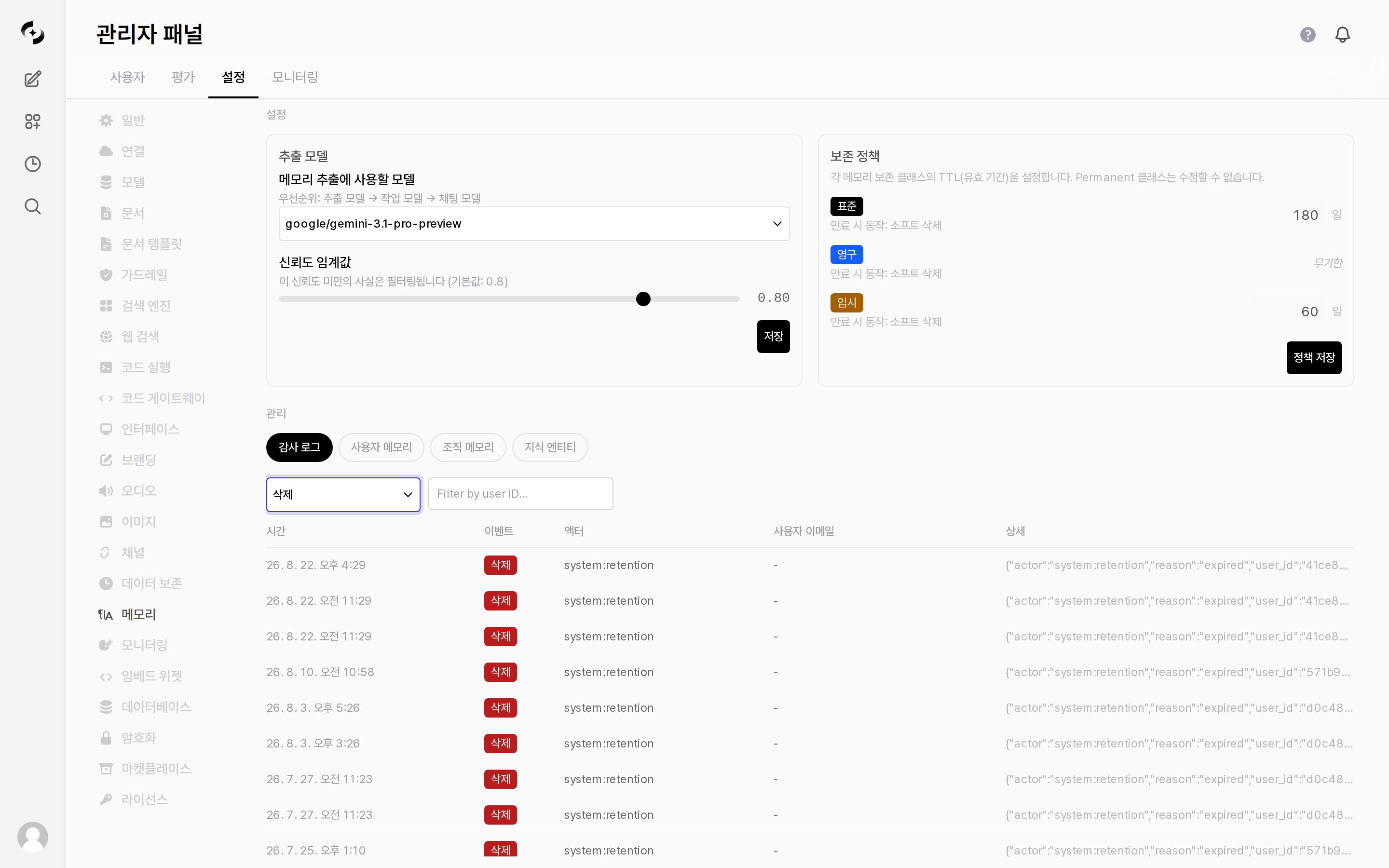
The left card in the `Configuration` section. Changes only take effect after pressing **Save** inside that card.
| Setting | Description |
| ------------------------ | --------------------------------------------------------------------------------------------------------------------------------------------------------------------- |
| **Extraction Model** | The model used for memory extraction. The screen shows the order **extraction model → task model → chat model**; if none is chosen, the later models are used instead |
| **Confidence Threshold** | Facts extracted with confidence below this value are filtered out and not stored. Adjusted with a slider (default `0.8`) |
**Adjusting the confidence threshold:**
* **Higher** — only confident facts are stored, reducing wrong memories, but useful information may be missed.
* **Lower** — remembers more facts, but inaccurate or trivial content may also be stored.
***
## Retention Policy
The right card in the `Configuration` section. Memory has different valid periods (TTL) per **retention class**, and each class shows its `On expire` action underneath.
* Expired memory is **soft-deleted**.
| Class | TTL | Notes |
| ------------- | ----------------------- | ------------------------------------------------------------------ |
| **Standard** | Configured days | General memory |
| **Permanent** | Indefinite | **Cannot be modified** — shown as `Indefinite` instead of an input |
| **Temporary** | Configured days (short) | Short-term memory |
After changing the day counts, press **Save Policies** to apply them. That button is separate from the extraction settings' Save.
***
## Memory Management · Audit
View the memory change history in the `Management` section, and inspect or clean up stored memory directly.
***
## Extraction Settings
The left card in the `Configuration` section. Changes only take effect after pressing **Save** inside that card.
| Setting | Description |
| ------------------------ | --------------------------------------------------------------------------------------------------------------------------------------------------------------------- |
| **Extraction Model** | The model used for memory extraction. The screen shows the order **extraction model → task model → chat model**; if none is chosen, the later models are used instead |
| **Confidence Threshold** | Facts extracted with confidence below this value are filtered out and not stored. Adjusted with a slider (default `0.8`) |
**Adjusting the confidence threshold:**
* **Higher** — only confident facts are stored, reducing wrong memories, but useful information may be missed.
* **Lower** — remembers more facts, but inaccurate or trivial content may also be stored.
***
## Retention Policy
The right card in the `Configuration` section. Memory has different valid periods (TTL) per **retention class**, and each class shows its `On expire` action underneath.
* Expired memory is **soft-deleted**.
| Class | TTL | Notes |
| ------------- | ----------------------- | ------------------------------------------------------------------ |
| **Standard** | Configured days | General memory |
| **Permanent** | Indefinite | **Cannot be modified** — shown as `Indefinite` instead of an input |
| **Temporary** | Configured days (short) | Short-term memory |
After changing the day counts, press **Save Policies** to apply them. That button is separate from the extraction settings' Save.
***
## Memory Management · Audit
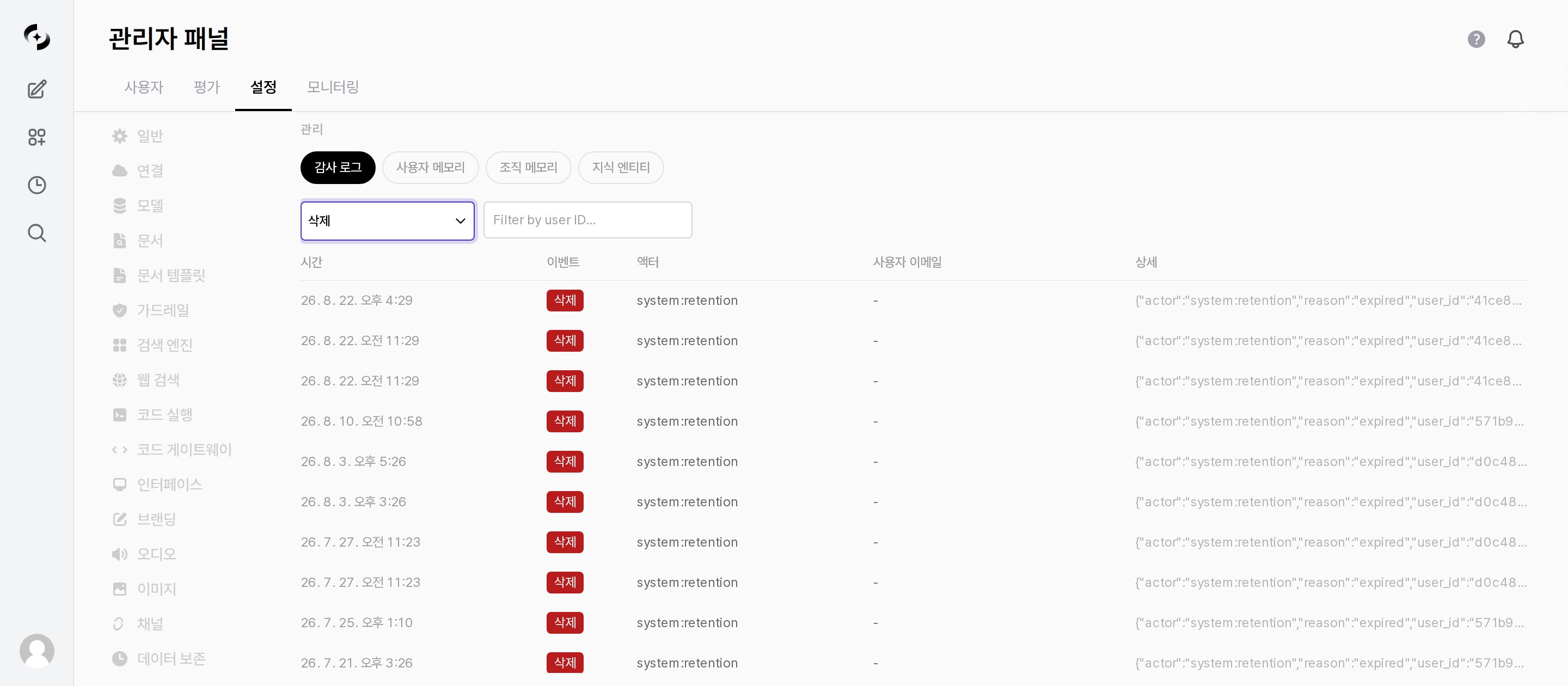
View the memory change history in the `Management` section, and inspect or clean up stored memory directly.
 | Tab | Description |
| ------------------------- | ----------------------------------------------------------------------------------------------- |
| **Audit Log** | All memory create/update/delete events |
| **User Memories** | Pick a user to view their memories and delete them individually |
| **Organization Memories** | View organizational unit memory, **add entries directly**, and delete them |
| **Knowledge Entities** | Extracted entity types with per-type counts and examples. Entity types can be added and deleted |
### Audit Log
| Item | Description |
| ------------------ | ----------------------------------------------------------------- |
| **Event filter** | `All Events` · `CREATE` · `UPDATE` · `DELETE` · `SETTINGS_CHANGE` |
| **User ID filter** | Keeps only the events of one user |
| **Columns** | Time · Event · Actor · User Email · Details |
The list is paginated, with `Page N of M (total records)` and Prev/Next buttons at the bottom.
The **actor** indicates the entity behind an event.
| Actor | Meaning |
| ---------------------- | --------------------------------------------- |
| `system:extraction` | Automatic memory extraction from conversation |
| `system:consolidation` | Consolidation of duplicate/related memory |
| `system:retention` | Automatic deletion on retention expiry |
| `user:` | Created/deleted directly by a user |
Rows whose actor is `system:*` were performed by the system, so the **User Email** column shows `-`.
| Tab | Description |
| ------------------------- | ----------------------------------------------------------------------------------------------- |
| **Audit Log** | All memory create/update/delete events |
| **User Memories** | Pick a user to view their memories and delete them individually |
| **Organization Memories** | View organizational unit memory, **add entries directly**, and delete them |
| **Knowledge Entities** | Extracted entity types with per-type counts and examples. Entity types can be added and deleted |
### Audit Log
| Item | Description |
| ------------------ | ----------------------------------------------------------------- |
| **Event filter** | `All Events` · `CREATE` · `UPDATE` · `DELETE` · `SETTINGS_CHANGE` |
| **User ID filter** | Keeps only the events of one user |
| **Columns** | Time · Event · Actor · User Email · Details |
The list is paginated, with `Page N of M (total records)` and Prev/Next buttons at the bottom.
The **actor** indicates the entity behind an event.
| Actor | Meaning |
| ---------------------- | --------------------------------------------- |
| `system:extraction` | Automatic memory extraction from conversation |
| `system:consolidation` | Consolidation of duplicate/related memory |
| `system:retention` | Automatic deletion on retention expiry |
| `user:` | Created/deleted directly by a user |
Rows whose actor is `system:*` were performed by the system, so the **User Email** column shows `-`.