> ## Documentation Index
> Fetch the complete documentation index at: https://docs.cloosphere.ai/llms.txt
> Use this file to discover all available pages before exploring further.
# Collaboration Overview
> Team collaboration via projects, channels, and granular sharing/permissions
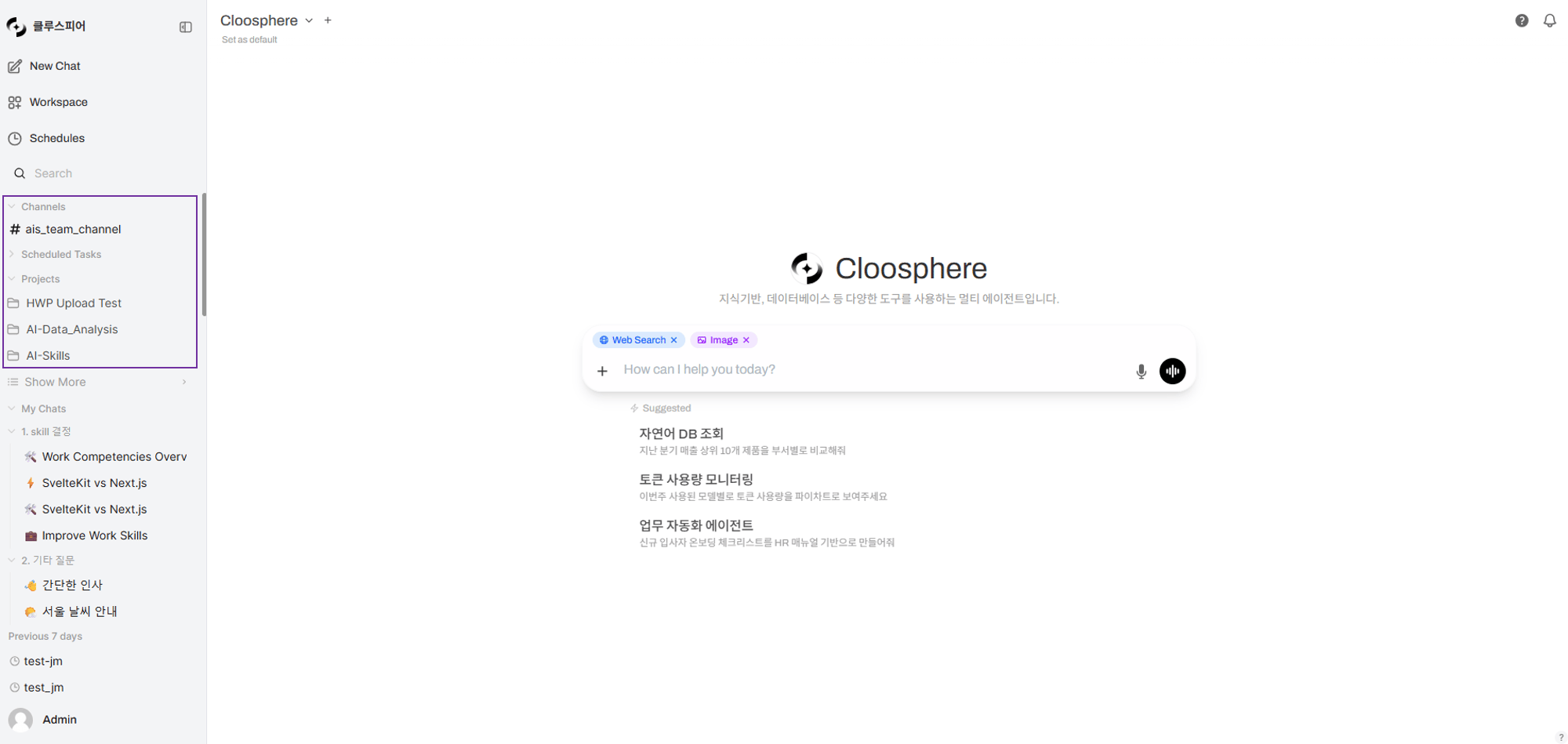
Cloosphere extends AI use beyond individual work to team-level collaboration. Bundle documents and chats into Projects, communicate in real time with teammates in Channels, and safely share resources with fine-grained access control.
 ***
## Collaboration Features
Bundle Knowledge Bases + chats into one space and share with teammates. The AI references project documents to answer.
Team messaging space. Slack-style communication with threads, reactions, and real-time typing indicators.
Granular control over resource read/write permissions by group, organization, or individual.
***
## Collaboration Flow
The flow: bundle documents and chats from individual work into projects, communicate with the team in channels, and safely share via access permissions.
```mermaid theme={null}
flowchart TD
subgraph Individual_Work
A[Chat with agent/model] --> B[Generate chat history]
C[Upload documents] --> D[Build Knowledge Base]
end
subgraph Team_Collaboration
E[Create project] --> F[Unified doc + chat management]
F --> G[Share with teammates]
H[Create channel] --> I[Real-time team messaging]
I --> J[In-depth discussion via threads]
end
subgraph Permission_Management
K[Set access permissions] --> L[Group-based read/write]
K --> M[Inherit by organizational unit]
K --> N[Per-user assignment]
end
B --> E
D --> E
G -.-> K
H -.-> K
```
***
## Feature Comparison
| Feature | Projects | Channels | Sharing & Permissions |
| ----------------------- | ----------------------------- | ----------------------------- | ------------------------- |
| **Purpose** | Unified doc + chat management | Real-time team messaging | Resource access control |
| **Audience** | Individual / small team | Whole team / department | All workspace resources |
| **AI integration** | Project-doc-based RAG chat | - | - |
| **Real-time** | - | Socket.IO real-time messaging | - |
| **Sharing model** | Copy-based | Access-permission-based | Group/Org/User assignment |
| **Creation permission** | All users | Admins only | Admins set per group |
***
## Sharing Model Comparison
Cloosphere offers two sharing models depending on resource type.
Add groups/organizations/users to the original resource. Edits to the original are reflected immediately to all sharees.
**Applies to:** Agents, Knowledge Bases, channels, tools, guardrails, prompts, glossaries
| Pro | Con |
| ----------------- | -------------------------------- |
| Real-time sync | No personalization |
| Storage-efficient | Original changes affect everyone |
A separate copy is created on share. Each user can edit freely.
**Applies to:** Projects, Schedules
| Pro | Con |
| ------------------------ | -------------------------------- |
| Each can edit freely | Original changes don't propagate |
| Personalization possible | More storage used |
***
## Example Setup: Marketing Team Collaboration
```mermaid theme={null}
flowchart TD
A[Marketing Agent] -->|Access permission| B[Marketing Group]
C[Q1 Campaign Project] -->|Copy share| D[Member A]
C -->|Copy share| E[Member B]
F[#marketing channel] -->|Access permission| B
G[Campaign KB] -->|Access permission| B
```
| Resource | Sharing Model | Audience |
| ---------------------- | ------------------------ | -------------------------- |
| **Marketing Agent** | Access permission (read) | Marketing group |
| **Campaign KB** | Access permission (read) | Marketing group |
| **Q1 Project** | Copy share | Individual copy per member |
| **#marketing channel** | Access permission | Marketing group |
***
## Get Started
Create a project from the sidebar and upload documents. Talk to the AI in the project context.
Join team channels from the channel list in the sidebar. Send messages and discuss in threads.
Configure access permissions for workspace resources (agents, Knowledge Bases, etc.) per group to share with the team.
Projects are personal document spaces using **copy-based sharing**, while channels and workspace resources use **access-permission-based sharing**. Pick the right model for your use case.
***
## Per-Role Guide
| Role | Main Activities | Reference |
| ---------------- | --------------------------------------------------- | -------------------------------------------------------------------------------------- |
| **Regular user** | Create projects, join channels, send messages | [Projects](/en/collaboration/projects), [Channels](/en/collaboration/channels) |
| **Team lead** | Share projects, manage resource permissions | [Sharing & Permissions](/en/collaboration/sharing-permissions) |
| **Admin** | Create/manage channels, set up groups/organizations | [User Management](/en/admin/users), [Organization Management](/en/admin/organizations) |
***
## Collaboration Features
Bundle Knowledge Bases + chats into one space and share with teammates. The AI references project documents to answer.
Team messaging space. Slack-style communication with threads, reactions, and real-time typing indicators.
Granular control over resource read/write permissions by group, organization, or individual.
***
## Collaboration Flow
The flow: bundle documents and chats from individual work into projects, communicate with the team in channels, and safely share via access permissions.
```mermaid theme={null}
flowchart TD
subgraph Individual_Work
A[Chat with agent/model] --> B[Generate chat history]
C[Upload documents] --> D[Build Knowledge Base]
end
subgraph Team_Collaboration
E[Create project] --> F[Unified doc + chat management]
F --> G[Share with teammates]
H[Create channel] --> I[Real-time team messaging]
I --> J[In-depth discussion via threads]
end
subgraph Permission_Management
K[Set access permissions] --> L[Group-based read/write]
K --> M[Inherit by organizational unit]
K --> N[Per-user assignment]
end
B --> E
D --> E
G -.-> K
H -.-> K
```
***
## Feature Comparison
| Feature | Projects | Channels | Sharing & Permissions |
| ----------------------- | ----------------------------- | ----------------------------- | ------------------------- |
| **Purpose** | Unified doc + chat management | Real-time team messaging | Resource access control |
| **Audience** | Individual / small team | Whole team / department | All workspace resources |
| **AI integration** | Project-doc-based RAG chat | - | - |
| **Real-time** | - | Socket.IO real-time messaging | - |
| **Sharing model** | Copy-based | Access-permission-based | Group/Org/User assignment |
| **Creation permission** | All users | Admins only | Admins set per group |
***
## Sharing Model Comparison
Cloosphere offers two sharing models depending on resource type.
Add groups/organizations/users to the original resource. Edits to the original are reflected immediately to all sharees.
**Applies to:** Agents, Knowledge Bases, channels, tools, guardrails, prompts, glossaries
| Pro | Con |
| ----------------- | -------------------------------- |
| Real-time sync | No personalization |
| Storage-efficient | Original changes affect everyone |
A separate copy is created on share. Each user can edit freely.
**Applies to:** Projects, Schedules
| Pro | Con |
| ------------------------ | -------------------------------- |
| Each can edit freely | Original changes don't propagate |
| Personalization possible | More storage used |
***
## Example Setup: Marketing Team Collaboration
```mermaid theme={null}
flowchart TD
A[Marketing Agent] -->|Access permission| B[Marketing Group]
C[Q1 Campaign Project] -->|Copy share| D[Member A]
C -->|Copy share| E[Member B]
F[#marketing channel] -->|Access permission| B
G[Campaign KB] -->|Access permission| B
```
| Resource | Sharing Model | Audience |
| ---------------------- | ------------------------ | -------------------------- |
| **Marketing Agent** | Access permission (read) | Marketing group |
| **Campaign KB** | Access permission (read) | Marketing group |
| **Q1 Project** | Copy share | Individual copy per member |
| **#marketing channel** | Access permission | Marketing group |
***
## Get Started
Create a project from the sidebar and upload documents. Talk to the AI in the project context.
Join team channels from the channel list in the sidebar. Send messages and discuss in threads.
Configure access permissions for workspace resources (agents, Knowledge Bases, etc.) per group to share with the team.
Projects are personal document spaces using **copy-based sharing**, while channels and workspace resources use **access-permission-based sharing**. Pick the right model for your use case.
***
## Per-Role Guide
| Role | Main Activities | Reference |
| ---------------- | --------------------------------------------------- | -------------------------------------------------------------------------------------- |
| **Regular user** | Create projects, join channels, send messages | [Projects](/en/collaboration/projects), [Channels](/en/collaboration/channels) |
| **Team lead** | Share projects, manage resource permissions | [Sharing & Permissions](/en/collaboration/sharing-permissions) |
| **Admin** | Create/manage channels, set up groups/organizations | [User Management](/en/admin/users), [Organization Management](/en/admin/organizations) |