> ## Documentation Index
> Fetch the complete documentation index at: https://docs.cloosphere.ai/llms.txt
> Use this file to discover all available pages before exploring further.
# Audit Log
> Security audit and compliance through user activity records — track authentication, resource changes, permission changes
Admin › Monitoring › Audit Logs
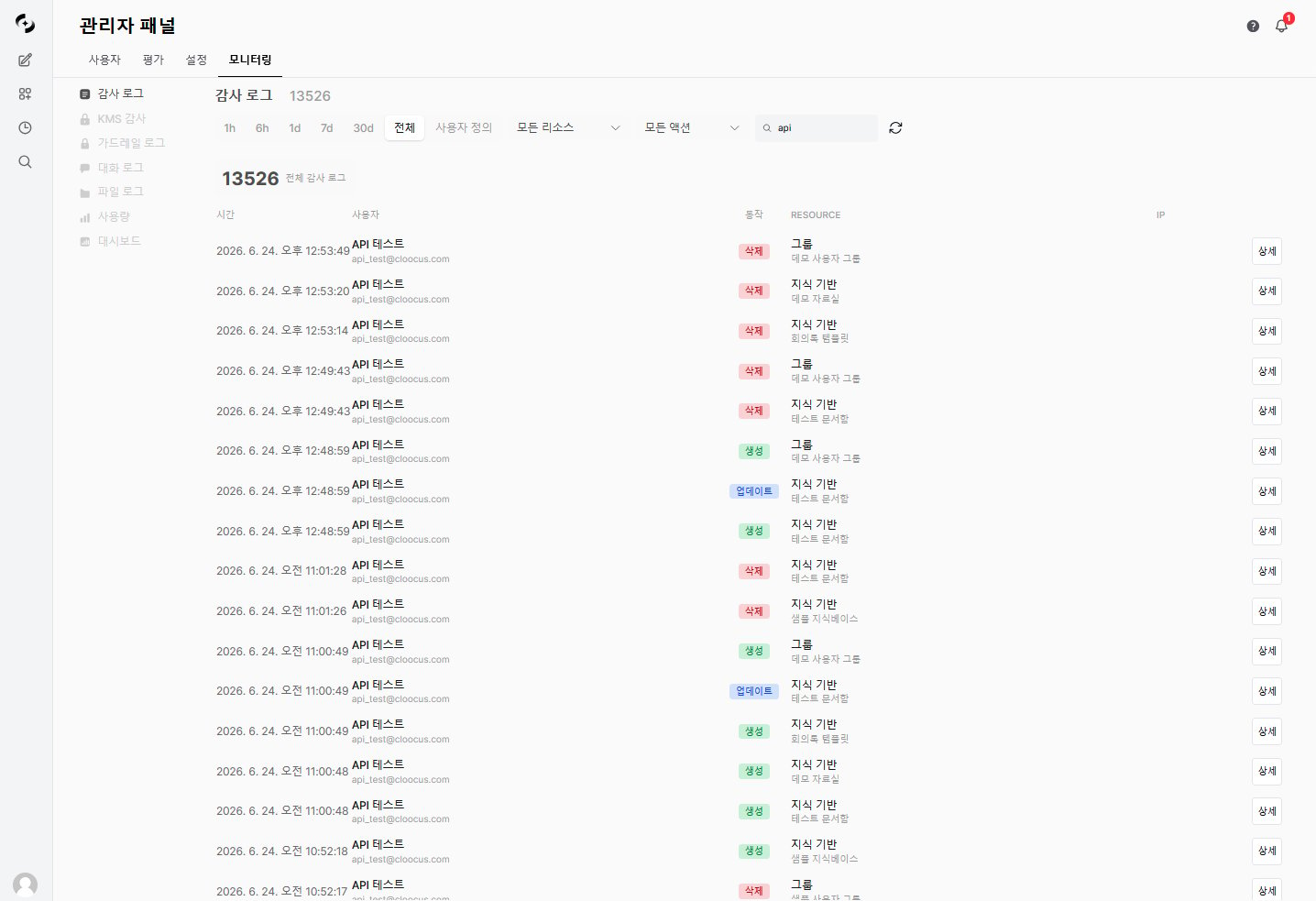
The Audit Log **chronologically records all major activities** in the system.
* Transparently track who, when, what, and how — meeting security audit and compliance requirements.
 Audit Log is a licensed feature. Requires a license with `audit_log` feature enabled.
***
## Recorded Activities
### Action Types
**Core actions**
| Action | Description |
| ----------------------------------------- | ------------------------------------ |
| **CREATE** | Resource creation |
| **UPDATE** | Resource modification |
| **DELETE** | Resource deletion |
| **ACCESS\_CONTROL\_CHANGE** | Resource access permission change |
| **PERMISSION\_CHANGE** | Group feature permission change |
| **MEMBER\_ADD** | Group/organization member addition |
| **MEMBER\_REMOVE** | Group/organization member removal |
| **ROLE\_CHANGE** | User role change |
| **SETTINGS\_CHANGE** | System setting change |
| **LOGIN / LOGOUT / LOGIN\_FAILED** | Sign in · Sign out · Sign-in failure |
| **API\_KEY\_CREATED / API\_KEY\_DELETED** | API key issuance · revocation |
| **GUEST\_SESSION** | Embed widget guest session start |
**Integration actions** (Google Workspace · DbSphere)
| Action | Description |
| --------------------------- | ------------------------------ |
| **GMAIL\_SEND** | Send Gmail |
| **CALENDAR\_CREATE\_EVENT** | Create calendar event |
| **DRIVE\_CREATE\_DOC** | Create Google Drive document |
| **SQL\_FAILED** | DbSphere SQL execution failure |
Integration feature usage is also audited, and failure events are recorded in `*_FAILED` form (e.g., `DRIVE_CREATE_DOC_FAILED`).
### Resource Types
| Resource | Auto-tracked | Description |
| ------------------------ | :----------: | ---------------------------------------------------------------------- |
| **model** | ✅ | AI model |
| **knowledge** | ✅ | Knowledge Base |
| **dbsphere** | ✅ | Database connection |
| **glossary** | ✅ | Glossary |
| **prompt** | ✅ | Prompt |
| **tool** | ✅ | Tool |
| **user** | ✅ | User |
| **organization** | ✅ | Organization |
| **organizational\_unit** | ✅ | Organizational unit |
| **group** | ✅ | Group |
| **agent** | ⚠️ | Agent — only explicit logging calls are recorded (no auto-tracking) |
| **chat** | ⚠️ | Chat — only explicit logging calls are recorded (no auto-tracking) |
| **admin\_settings** | ⚠️ | Admin settings change — explicit logging with `SETTINGS_CHANGE` action |
| **auth** | ⚠️ | Auth events — LOGIN/LOGOUT/LOGIN\_FAILED auto, others explicit |
| **memory** | ⚠️ | Memory — only explicit logging calls are recorded |
| **embed\_widget** | ⚠️ | Embed widget guest session — auto with `GUEST_SESSION` action |
| **knowledge\_graph** | ⚠️ | Knowledge graph — recorded only via explicit logging calls |
| **gmail\_message** | ⚠️ | Gmail send (Google Workspace) |
| **calendar\_event** | ⚠️ | Calendar event (Google Workspace) |
| **drive\_document** | ⚠️ | Google Drive document (Google Workspace) |
✅ marked resources are **auto-recorded** in the audit log on DB changes.
⚠️ marked resources are recorded **only at points where the backend explicitly calls logging** — some events are auto (LOGIN/LOGOUT/LOGIN\_FAILED for auth, GUEST\_SESSION for guest, SETTINGS\_CHANGE for settings), but general CRUD on agent/chat/memory isn't auto-tracked.
READ is not logged separately (for performance).
***
## Log Entry Structure
Each audit log entry includes:
| Field | Description |
| ----------------------------- | -------------------------------------------------- |
| **Timestamp** | Event occurrence time |
| **User** | Activity actor (name, email) |
| **Action** | Performed action (CREATE, UPDATE, etc.) |
| **Resource type** | Target resource type |
| **Resource ID** | Target resource identifier |
| **Resource name** | Target resource name |
| **IP** | Source IP of the request |
| **Before state** | Pre-change values (JSON) |
| **After state** | Post-change values (JSON) |
| **Changed fields** | List of changed fields |
| **Permission change details** | Access permission change details (when applicable) |
***
## Viewing Logs
### Filter Options
| Filter | Description |
| ----------------- | ------------------------------------- |
| **Time range** | Start/end date range (Unix timestamp) |
| **Resource type** | model, knowledge, user, etc. |
| **Action** | CREATE, UPDATE, DELETE, LOGIN, etc. |
| **User** | Search by user name |
| **Organization** | Specific organization ID |
| **Resource ID** | Track changes to a specific resource |
## Log Detail View
Click a log entry to see details in a modal.
Audit Log is a licensed feature. Requires a license with `audit_log` feature enabled.
***
## Recorded Activities
### Action Types
**Core actions**
| Action | Description |
| ----------------------------------------- | ------------------------------------ |
| **CREATE** | Resource creation |
| **UPDATE** | Resource modification |
| **DELETE** | Resource deletion |
| **ACCESS\_CONTROL\_CHANGE** | Resource access permission change |
| **PERMISSION\_CHANGE** | Group feature permission change |
| **MEMBER\_ADD** | Group/organization member addition |
| **MEMBER\_REMOVE** | Group/organization member removal |
| **ROLE\_CHANGE** | User role change |
| **SETTINGS\_CHANGE** | System setting change |
| **LOGIN / LOGOUT / LOGIN\_FAILED** | Sign in · Sign out · Sign-in failure |
| **API\_KEY\_CREATED / API\_KEY\_DELETED** | API key issuance · revocation |
| **GUEST\_SESSION** | Embed widget guest session start |
**Integration actions** (Google Workspace · DbSphere)
| Action | Description |
| --------------------------- | ------------------------------ |
| **GMAIL\_SEND** | Send Gmail |
| **CALENDAR\_CREATE\_EVENT** | Create calendar event |
| **DRIVE\_CREATE\_DOC** | Create Google Drive document |
| **SQL\_FAILED** | DbSphere SQL execution failure |
Integration feature usage is also audited, and failure events are recorded in `*_FAILED` form (e.g., `DRIVE_CREATE_DOC_FAILED`).
### Resource Types
| Resource | Auto-tracked | Description |
| ------------------------ | :----------: | ---------------------------------------------------------------------- |
| **model** | ✅ | AI model |
| **knowledge** | ✅ | Knowledge Base |
| **dbsphere** | ✅ | Database connection |
| **glossary** | ✅ | Glossary |
| **prompt** | ✅ | Prompt |
| **tool** | ✅ | Tool |
| **user** | ✅ | User |
| **organization** | ✅ | Organization |
| **organizational\_unit** | ✅ | Organizational unit |
| **group** | ✅ | Group |
| **agent** | ⚠️ | Agent — only explicit logging calls are recorded (no auto-tracking) |
| **chat** | ⚠️ | Chat — only explicit logging calls are recorded (no auto-tracking) |
| **admin\_settings** | ⚠️ | Admin settings change — explicit logging with `SETTINGS_CHANGE` action |
| **auth** | ⚠️ | Auth events — LOGIN/LOGOUT/LOGIN\_FAILED auto, others explicit |
| **memory** | ⚠️ | Memory — only explicit logging calls are recorded |
| **embed\_widget** | ⚠️ | Embed widget guest session — auto with `GUEST_SESSION` action |
| **knowledge\_graph** | ⚠️ | Knowledge graph — recorded only via explicit logging calls |
| **gmail\_message** | ⚠️ | Gmail send (Google Workspace) |
| **calendar\_event** | ⚠️ | Calendar event (Google Workspace) |
| **drive\_document** | ⚠️ | Google Drive document (Google Workspace) |
✅ marked resources are **auto-recorded** in the audit log on DB changes.
⚠️ marked resources are recorded **only at points where the backend explicitly calls logging** — some events are auto (LOGIN/LOGOUT/LOGIN\_FAILED for auth, GUEST\_SESSION for guest, SETTINGS\_CHANGE for settings), but general CRUD on agent/chat/memory isn't auto-tracked.
READ is not logged separately (for performance).
***
## Log Entry Structure
Each audit log entry includes:
| Field | Description |
| ----------------------------- | -------------------------------------------------- |
| **Timestamp** | Event occurrence time |
| **User** | Activity actor (name, email) |
| **Action** | Performed action (CREATE, UPDATE, etc.) |
| **Resource type** | Target resource type |
| **Resource ID** | Target resource identifier |
| **Resource name** | Target resource name |
| **IP** | Source IP of the request |
| **Before state** | Pre-change values (JSON) |
| **After state** | Post-change values (JSON) |
| **Changed fields** | List of changed fields |
| **Permission change details** | Access permission change details (when applicable) |
***
## Viewing Logs
### Filter Options
| Filter | Description |
| ----------------- | ------------------------------------- |
| **Time range** | Start/end date range (Unix timestamp) |
| **Resource type** | model, knowledge, user, etc. |
| **Action** | CREATE, UPDATE, DELETE, LOGIN, etc. |
| **User** | Search by user name |
| **Organization** | Specific organization ID |
| **Resource ID** | Track changes to a specific resource |
## Log Detail View
Click a log entry to see details in a modal.
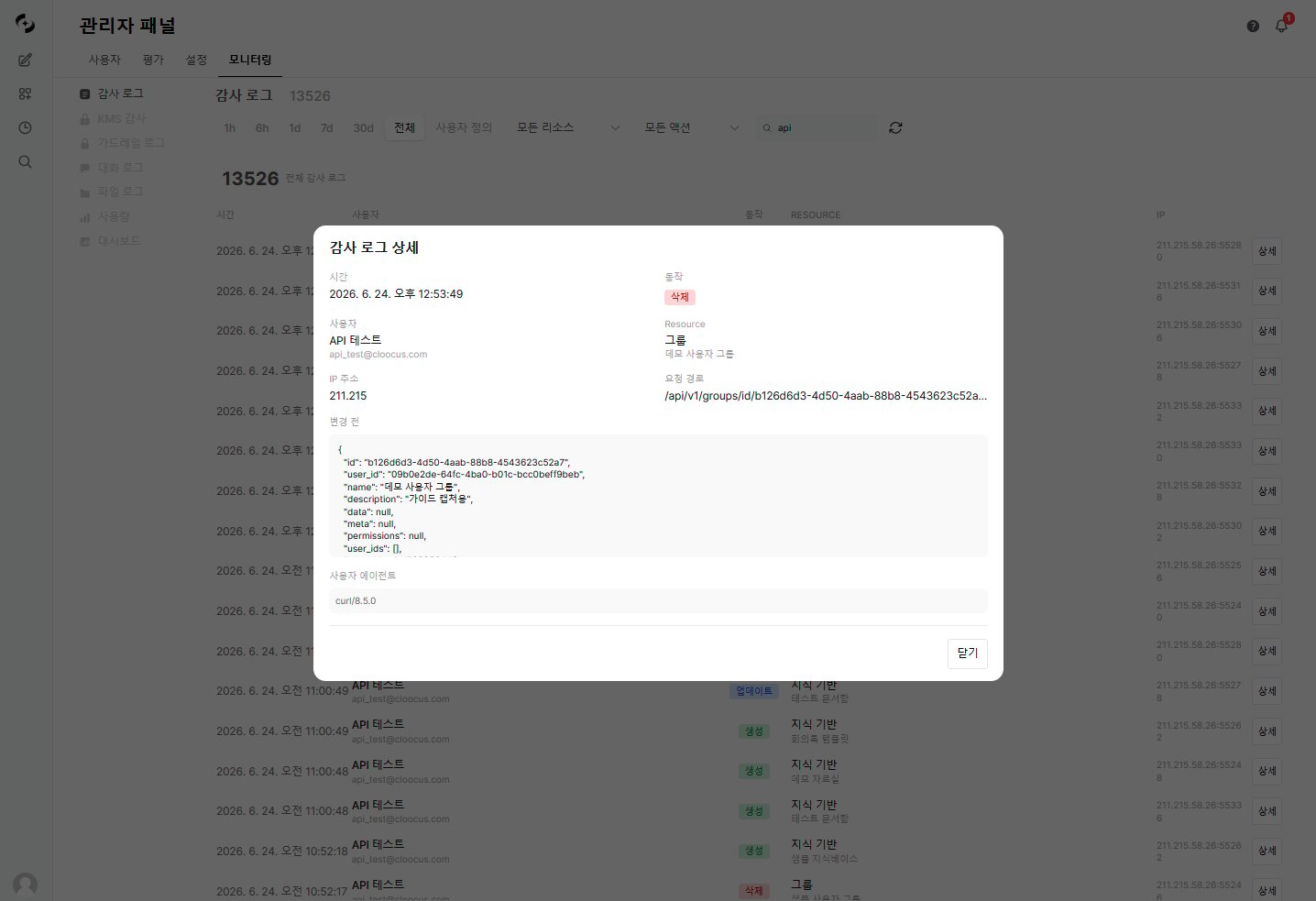 **Information shown:**
* Full request metadata
* Before/after state comparison (JSON diff)
* Highlighted changed fields
* Detailed access control changes for permission changes
***
## Statistics
The top of the audit log screen shows the **total number of audit log entries**.
* Combine the resource type and action filters to analyze activity distribution from the perspectives below.
| Statistic | Description |
| ------------------------------ | ---------------------------------------------- |
| **Action distribution** | Count by action (CREATE, UPDATE, DELETE, etc.) |
| **Resource type distribution** | Count by resource (model, user, chat, etc.) |
| **Total count** | Total audit log entries in the period |
***
## Use Cases
1. In the **Audit Log** tab, set the time range around the incident
2. Filter by relevant user or resource type
3. Review activity history chronologically
4. Verify changes via detail view
5. Preserve detailed logs as evidence
1. Periodically (monthly/quarterly) review audit log statistics
2. Review permission change logs to detect unauthorized access
3. Track setting change history to verify policy compliance
4. Compose audit reports based on audit logs
* Mass resource deletion outside business hours
* Repeated permission changes in short periods
* Abnormal sign-in failure patterns
* Admin permission escalation
***
## Best Practices
The system auto-records audit logs. There's no feature to delete or modify audit logs themselves — this preserves the integrity of the records.
* **Periodic review**: Review audit logs at least monthly to detect anomaly patterns
* **Long-term retention**: Per compliance requirements, retain for at least 1 year
* **Backup**: Regularly back up audit log data to external storage
* **Notification integration**: Configure alerts for important events (permission changes, mass deletions)
**Information shown:**
* Full request metadata
* Before/after state comparison (JSON diff)
* Highlighted changed fields
* Detailed access control changes for permission changes
***
## Statistics
The top of the audit log screen shows the **total number of audit log entries**.
* Combine the resource type and action filters to analyze activity distribution from the perspectives below.
| Statistic | Description |
| ------------------------------ | ---------------------------------------------- |
| **Action distribution** | Count by action (CREATE, UPDATE, DELETE, etc.) |
| **Resource type distribution** | Count by resource (model, user, chat, etc.) |
| **Total count** | Total audit log entries in the period |
***
## Use Cases
1. In the **Audit Log** tab, set the time range around the incident
2. Filter by relevant user or resource type
3. Review activity history chronologically
4. Verify changes via detail view
5. Preserve detailed logs as evidence
1. Periodically (monthly/quarterly) review audit log statistics
2. Review permission change logs to detect unauthorized access
3. Track setting change history to verify policy compliance
4. Compose audit reports based on audit logs
* Mass resource deletion outside business hours
* Repeated permission changes in short periods
* Abnormal sign-in failure patterns
* Admin permission escalation
***
## Best Practices
The system auto-records audit logs. There's no feature to delete or modify audit logs themselves — this preserves the integrity of the records.
* **Periodic review**: Review audit logs at least monthly to detect anomaly patterns
* **Long-term retention**: Per compliance requirements, retain for at least 1 year
* **Backup**: Regularly back up audit log data to external storage
* **Notification integration**: Configure alerts for important events (permission changes, mass deletions)