> ## Documentation Index
> Fetch the complete documentation index at: https://docs.cloosphere.ai/llms.txt
> Use this file to discover all available pages before exploring further.
# Guardrail Logs
> Track sensitive info and content violation events detected and processed by guardrails
Admin › Monitoring › Guardrail Logs
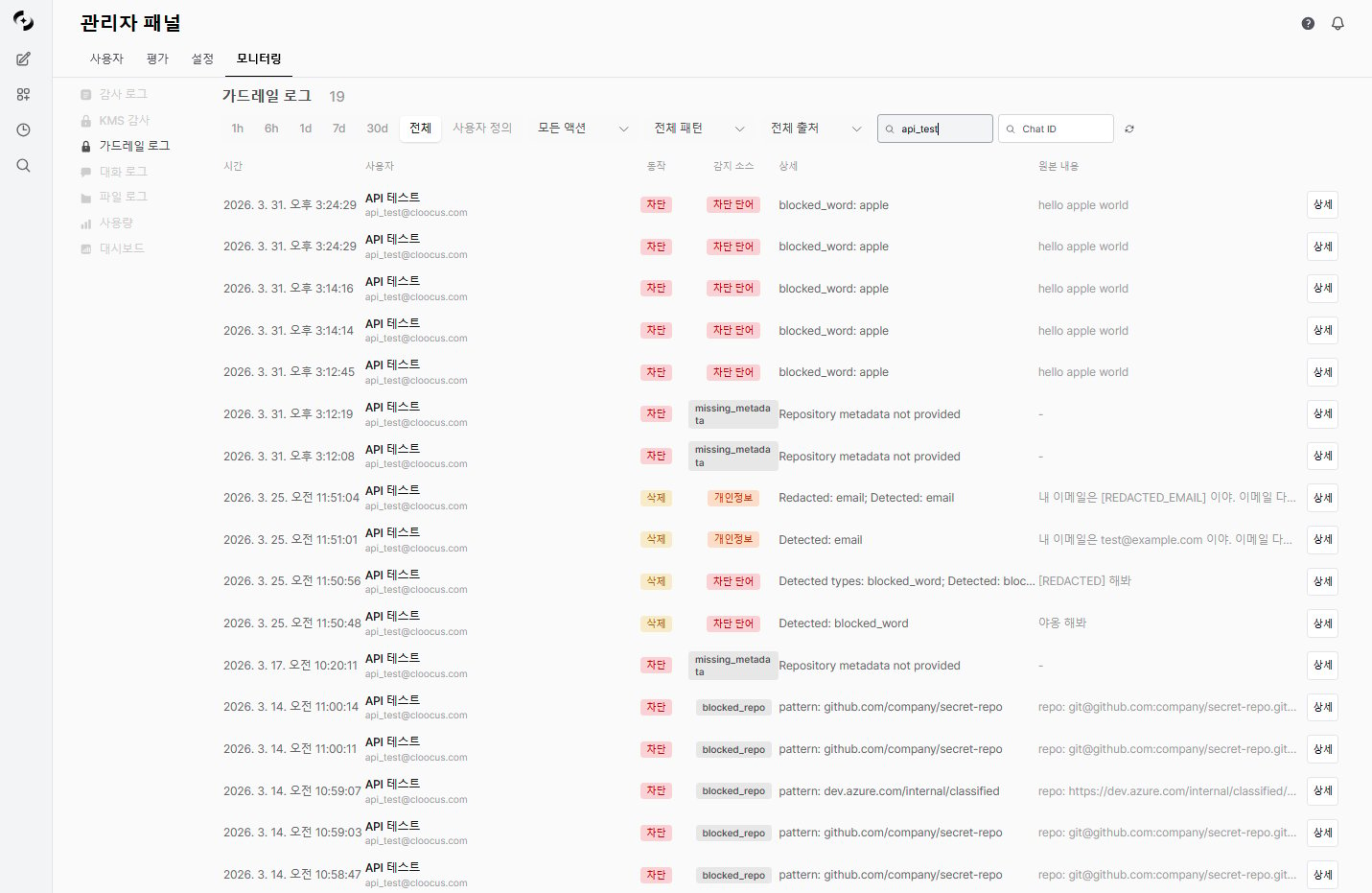
Guardrail logs record **all events detected and processed** by guardrails configured on agents.
* Transparently track which user entered which sensitive info and how which guardrail processed it.
The same guardrail logs can also be viewed from [Admin > Code Gateway > Guardrail Logs](/en/admin/code-gateway).
 ***
## What are Guardrail Logs?
When users converse with the AI, guardrails validate inputs and outputs.
* When sensitive info is detected, the configured strategy (block, redact, mask, etc.) is applied and the result is logged.
```mermaid theme={null}
flowchart LR
A[User input · AI output] --> B[Guardrail validation]
B --> C{Detected?}
C -->|No| D[Process normally]
C -->|Yes| E[Apply strategy]
E --> F[Log]
F --> G[Guardrail Logs]
```
***
## Log Entry Structure
Each guardrail log entry includes:
| Field | Description |
| --------------------- | ----------------------------------------------- |
| **Timestamp** | Detection event time |
| **User** | Input user (name, email) |
| **Chat ID** | Conversation session |
| **Message ID** | Message identifier |
| **Guardrail name** | Applied guardrail |
| **Action** | Processing strategy (block, redact, mask, etc.) |
| **Detection Pattern** | Detection method (Rule-based / LLM-based) |
| **Detection Detail** | Specific detected content |
| **Original content** | Original input text |
| **Processed Content** | Text after strategy applied |
***
## Action Types
| Action | Description |
| ---------- | ------------------------------------------------------------ |
| **block** | Block entire message |
| **redact** | Replace sensitive info with label (e.g., `[REDACTED_EMAIL]`) |
| **mask** | Show only some characters (e.g., `j***@***.com`) |
| **hash** | Convert to hash value |
| **log** | Log only without blocking |
## Detection Pattern
Detection methods are grouped into two categories.
| Group | Sources | Description |
| -------------- | ----------------------------------- | --------------------------------- |
| **Rule-based** | pii, custom\_pattern, blocked\_word | Regex/pattern-based detection |
| **LLM-based** | llm\_judge | LLM-based content risk assessment |
Individual source meanings:
| Source | Description |
| ------------------- | ---------------------------------------------------------- |
| **pii** | Detect PII patterns (email, credit card, IP address, etc.) |
| **custom\_pattern** | Detect user-defined regex patterns |
| **blocked\_word** | Detect prohibited words/phrases |
| **llm\_judge** | LLM-based content risk assessment |
***
## Filter Options
| Filter | Description |
| --------------------- | --------------------------------------------- |
| **Time range** | Start/end date range |
| **Action** | block, redact, mask, hash, log (multi-select) |
| **Detection Pattern** | Rule-based / LLM-based group selection |
| **User search** | Search by user ID, email, or name |
| **Chat ID** | Logs for a specific chat session only |
| **Source** | Request origin filter (e.g., `code_gateway`) |
***
## Log Detail View
Click a log entry to see details.
***
## What are Guardrail Logs?
When users converse with the AI, guardrails validate inputs and outputs.
* When sensitive info is detected, the configured strategy (block, redact, mask, etc.) is applied and the result is logged.
```mermaid theme={null}
flowchart LR
A[User input · AI output] --> B[Guardrail validation]
B --> C{Detected?}
C -->|No| D[Process normally]
C -->|Yes| E[Apply strategy]
E --> F[Log]
F --> G[Guardrail Logs]
```
***
## Log Entry Structure
Each guardrail log entry includes:
| Field | Description |
| --------------------- | ----------------------------------------------- |
| **Timestamp** | Detection event time |
| **User** | Input user (name, email) |
| **Chat ID** | Conversation session |
| **Message ID** | Message identifier |
| **Guardrail name** | Applied guardrail |
| **Action** | Processing strategy (block, redact, mask, etc.) |
| **Detection Pattern** | Detection method (Rule-based / LLM-based) |
| **Detection Detail** | Specific detected content |
| **Original content** | Original input text |
| **Processed Content** | Text after strategy applied |
***
## Action Types
| Action | Description |
| ---------- | ------------------------------------------------------------ |
| **block** | Block entire message |
| **redact** | Replace sensitive info with label (e.g., `[REDACTED_EMAIL]`) |
| **mask** | Show only some characters (e.g., `j***@***.com`) |
| **hash** | Convert to hash value |
| **log** | Log only without blocking |
## Detection Pattern
Detection methods are grouped into two categories.
| Group | Sources | Description |
| -------------- | ----------------------------------- | --------------------------------- |
| **Rule-based** | pii, custom\_pattern, blocked\_word | Regex/pattern-based detection |
| **LLM-based** | llm\_judge | LLM-based content risk assessment |
Individual source meanings:
| Source | Description |
| ------------------- | ---------------------------------------------------------- |
| **pii** | Detect PII patterns (email, credit card, IP address, etc.) |
| **custom\_pattern** | Detect user-defined regex patterns |
| **blocked\_word** | Detect prohibited words/phrases |
| **llm\_judge** | LLM-based content risk assessment |
***
## Filter Options
| Filter | Description |
| --------------------- | --------------------------------------------- |
| **Time range** | Start/end date range |
| **Action** | block, redact, mask, hash, log (multi-select) |
| **Detection Pattern** | Rule-based / LLM-based group selection |
| **User search** | Search by user ID, email, or name |
| **Chat ID** | Logs for a specific chat session only |
| **Source** | Request origin filter (e.g., `code_gateway`) |
***
## Log Detail View
Click a log entry to see details.
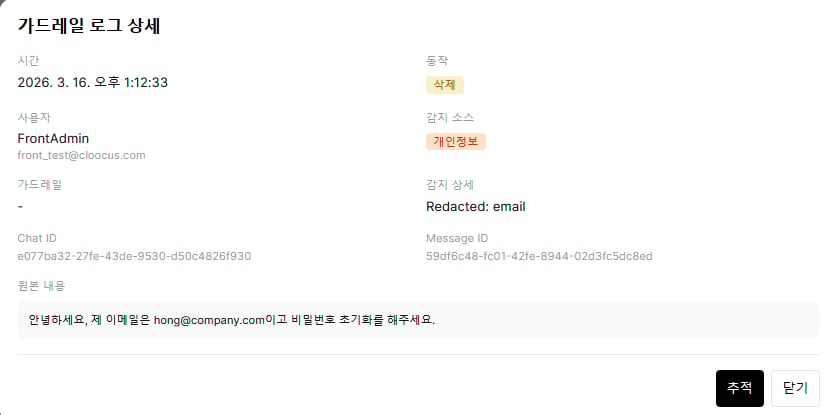 | Item | Description |
| --------------------- | ----------------------------------------------------------------------- |
| **Guardrail** | Applied guardrail name and ID |
| **Detection Pattern** | Rule-based (PII, custom pattern, blocked word) or LLM-based (LLM Judge) |
| **Detection Detail** | Specific detected pattern or item |
| **Original content** | User-entered original |
| **Processed Content** | Result after strategy applied |
| Item | Description |
| -------------- | --------------------------------- |
| **User** | Name, email |
| **Chat ID** | Conversation session identifier |
| **Message ID** | Message identifier |
| **Metadata** | Additional context (source, etc.) |
***
## Tracing Integration
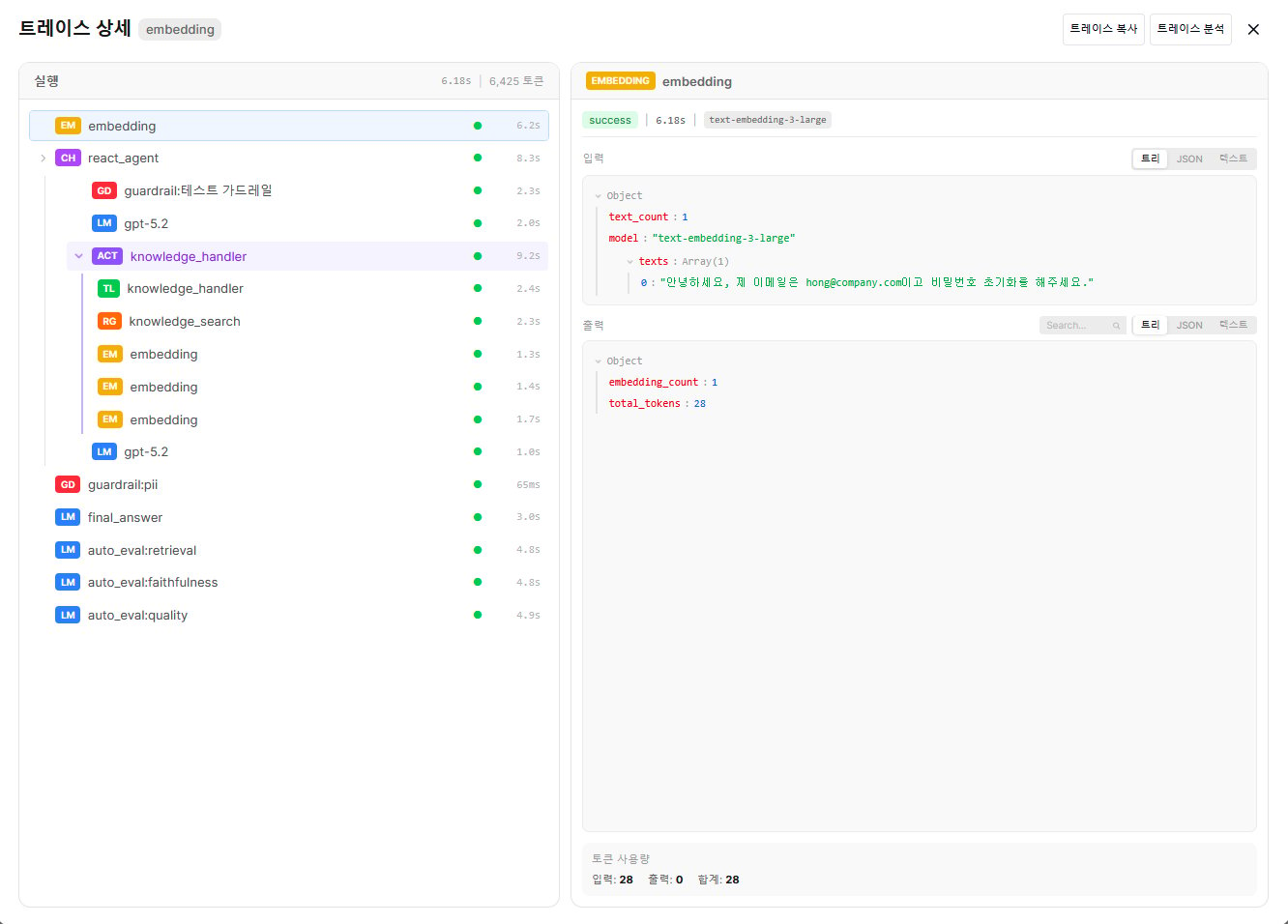
In guardrail log details, the **Trace** button lets you see the complete processing of that message.
Click the log entry for the guardrail event you're investigating.
Click the **Trace** button at the bottom-right of the detail modal.
The **Trace Detail** screen opens, showing the full Run tree — including the guardrail check for that message. Guardrail Runs are shown with red **GD** badges.
| Item | Description |
| --------------------- | ----------------------------------------------------------------------- |
| **Guardrail** | Applied guardrail name and ID |
| **Detection Pattern** | Rule-based (PII, custom pattern, blocked word) or LLM-based (LLM Judge) |
| **Detection Detail** | Specific detected pattern or item |
| **Original content** | User-entered original |
| **Processed Content** | Result after strategy applied |
| Item | Description |
| -------------- | --------------------------------- |
| **User** | Name, email |
| **Chat ID** | Conversation session identifier |
| **Message ID** | Message identifier |
| **Metadata** | Additional context (source, etc.) |
***
## Tracing Integration
In guardrail log details, the **Trace** button lets you see the complete processing of that message.
Click the log entry for the guardrail event you're investigating.
Click the **Trace** button at the bottom-right of the detail modal.
The **Trace Detail** screen opens, showing the full Run tree — including the guardrail check for that message. Guardrail Runs are shown with red **GD** badges.
 ***
## Use Cases
1. Set a time range and view logs by **Detection Pattern**
2. Review `log` action events to gauge false positive rate
3. Adjust regex or exclude patterns with many false positives
4. Add new patterns or blocked words for missed detections
1. Look up a specific user's guardrail events via user search
2. Check repeated `block` patterns
3. Review original content to determine intentional sensitive info leak attempts
4. Cross-analyze with related audit logs for full context
1. Filter **Detection Pattern** to `LLM-based`
2. Review original content of blocked messages
3. If excessive blocking, strengthen allow examples in the Judge prompt
4. If missing blocks, add block examples
***
## Guardrail Settings Integration
Improve guardrail settings based on patterns found in guardrail logs.
| Log Analysis Finding | Recommended Action |
| ------------------------------------- | ----------------------------------------------------- |
| Specific PII type detected frequently | Strengthen that type's strategy from `log` → `redact` |
| Frequent false positives | Narrow custom pattern regex |
| LLM Judge over-blocking | Add allow examples to Judge prompt |
| New sensitive info pattern found | Add regex via custom pattern |
See [Guardrails](/en/workspace/guardrails) for guardrail configuration.
***
## Use Cases
1. Set a time range and view logs by **Detection Pattern**
2. Review `log` action events to gauge false positive rate
3. Adjust regex or exclude patterns with many false positives
4. Add new patterns or blocked words for missed detections
1. Look up a specific user's guardrail events via user search
2. Check repeated `block` patterns
3. Review original content to determine intentional sensitive info leak attempts
4. Cross-analyze with related audit logs for full context
1. Filter **Detection Pattern** to `LLM-based`
2. Review original content of blocked messages
3. If excessive blocking, strengthen allow examples in the Judge prompt
4. If missing blocks, add block examples
***
## Guardrail Settings Integration
Improve guardrail settings based on patterns found in guardrail logs.
| Log Analysis Finding | Recommended Action |
| ------------------------------------- | ----------------------------------------------------- |
| Specific PII type detected frequently | Strengthen that type's strategy from `log` → `redact` |
| Frequent false positives | Narrow custom pattern regex |
| LLM Judge over-blocking | Add allow examples to Judge prompt |
| New sensitive info pattern found | Add regex via custom pattern |
See [Guardrails](/en/workspace/guardrails) for guardrail configuration.