> ## Documentation Index
> Fetch the complete documentation index at: https://docs.cloosphere.ai/llms.txt
> Use this file to discover all available pages before exploring further.
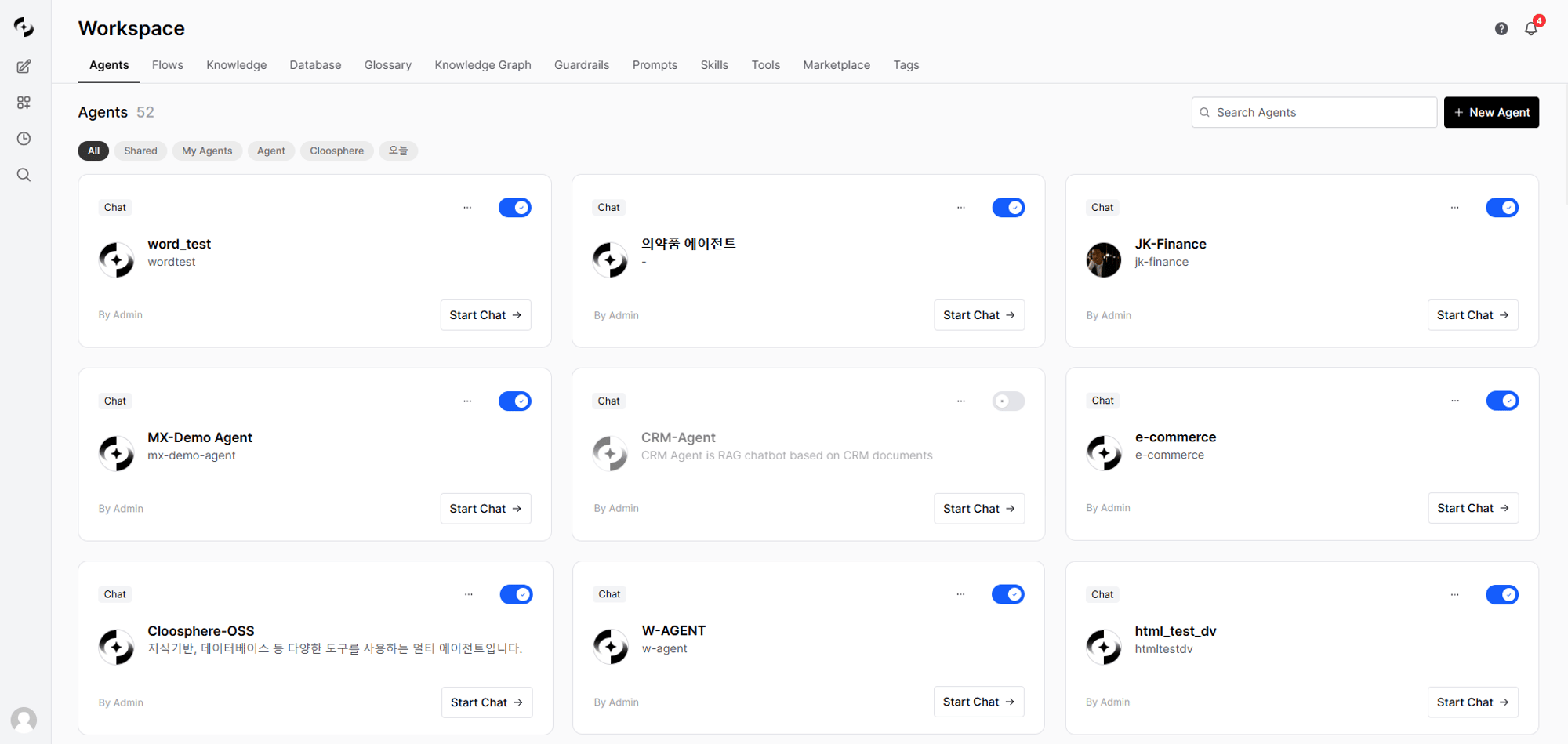
# Workspace
> Configure your AI work environment — agents, knowledge bases, databases, and more
The Workspace is where you tailor AI to your work and share it with your team.
With agents at the center, combine Knowledge Bases, Databases, Tools, Guardrails, and more to build an **AI environment customized for your organization**.
 ***
## Core Features
Create and manage custom AI assistants combining Knowledge Bases, Tools, and Guardrails.
Upload internal documents and run vector search via the RAG pipeline.
Query databases in natural language. Analyze data without writing SQL.
Visually connect multiple agents to compose multi-step workflows.
Configure AI I/O security policies — PII detection, content filtering, blocked terms.
Connect OpenAPI or MCP servers so agents can interact with external systems.
Save frequently used prompts as templates and share with the team. Invoke quickly via `/` commands.
Register domain terms so the AI accurately understands industry, abbreviation, and internal terminology.
Connect glossaries, databases, and documents into one graph to deepen agent understanding.
Tag workspace resources to classify and filter them.
Standardize repetitive work with reusable instruction playbooks that agents invoke on their own.
Add PPT/Word/Excel/HTML document generators and Google Workspace/Microsoft 365 integrations to your agents.
***
## How the Pieces Connect
The heart of the Workspace is the **Agent**. Agents combine other workspace features to operate.
```mermaid theme={null}
flowchart TD
A[Agent] --> B[Knowledge Base]
A --> C[Database]
A --> D[Tool]
A --> E[Guardrail]
A --> F[Glossary]
A --> G[Auto Evaluation]
A --> N[Knowledge Graph]
A --> S[Skill]
A --> P[Marketplace Tools]
N --> F
N --> C
N --> B
B --> H[(Vector DB)]
C --> I[(Relational DB)]
D --> J[External API / MCP]
P --> J
Q[Marketplace] -->|document generators| S
Q -->|MCP services| P
S -.->|generate docs · PPT · reports| R[(Code Execution · Jupyter)]
K[Agent Flow] --> A
L[Prompt] -.->|template| A
M[Tag] -.->|classify/filter| A
M -.-> B
M -.-> D
```
| Connection | Role |
| --------------------------- | --------------------------------------------------------------------------------------------- |
| **Agent + Knowledge Base** | RAG-based answers grounded on internal documents |
| **Agent + Database** | Data lookup via NL-to-SQL |
| **Agent + Knowledge Graph** | Unified glossary/DB/document linking — map business terms to data |
| **Agent + Tool** | External API calls (ticket creation, email sending, etc.) |
| **Agent + Guardrail** | I/O security validation (PII masking, content filter) |
| **Agent + Glossary** | Auto-recognition and accurate interpretation of specialized terms |
| **Agent + Skill** | Standardize how repetitive tasks are done — the agent auto-runs the matching playbook |
| **Agent + Marketplace** | Add document generators (PPT/Word/Excel/HTML) and Google Workspace/Microsoft 365 integrations |
| **Flow + Agent** | Workflows that run multiple agents sequentially or in parallel |
***
## Access Control
All workspace resources follow the same access-control model.
| Option | Description |
| ----------- | ----------------------------------------------------------------------------------------------------------------- |
| **Public** | Available to all users |
| **Private** | Available only to members of selected groups or organizational units. If unspecified, only the creator can access |
Each resource manages **read** and **write** permissions independently. For example, granting a group only read access lets that group use an agent but not modify its settings.
Admins can restrict regular users' ability to create workspace resources per feature in **Admin Settings > General**.
***
## Get Started
Create a custom AI by linking a base model, system prompt, and Knowledge Bases
Upload internal documents and configure RAG search
Connect a business DB and enable natural language queries
Select your agent and start a conversation
***
## Core Features
Create and manage custom AI assistants combining Knowledge Bases, Tools, and Guardrails.
Upload internal documents and run vector search via the RAG pipeline.
Query databases in natural language. Analyze data without writing SQL.
Visually connect multiple agents to compose multi-step workflows.
Configure AI I/O security policies — PII detection, content filtering, blocked terms.
Connect OpenAPI or MCP servers so agents can interact with external systems.
Save frequently used prompts as templates and share with the team. Invoke quickly via `/` commands.
Register domain terms so the AI accurately understands industry, abbreviation, and internal terminology.
Connect glossaries, databases, and documents into one graph to deepen agent understanding.
Tag workspace resources to classify and filter them.
Standardize repetitive work with reusable instruction playbooks that agents invoke on their own.
Add PPT/Word/Excel/HTML document generators and Google Workspace/Microsoft 365 integrations to your agents.
***
## How the Pieces Connect
The heart of the Workspace is the **Agent**. Agents combine other workspace features to operate.
```mermaid theme={null}
flowchart TD
A[Agent] --> B[Knowledge Base]
A --> C[Database]
A --> D[Tool]
A --> E[Guardrail]
A --> F[Glossary]
A --> G[Auto Evaluation]
A --> N[Knowledge Graph]
A --> S[Skill]
A --> P[Marketplace Tools]
N --> F
N --> C
N --> B
B --> H[(Vector DB)]
C --> I[(Relational DB)]
D --> J[External API / MCP]
P --> J
Q[Marketplace] -->|document generators| S
Q -->|MCP services| P
S -.->|generate docs · PPT · reports| R[(Code Execution · Jupyter)]
K[Agent Flow] --> A
L[Prompt] -.->|template| A
M[Tag] -.->|classify/filter| A
M -.-> B
M -.-> D
```
| Connection | Role |
| --------------------------- | --------------------------------------------------------------------------------------------- |
| **Agent + Knowledge Base** | RAG-based answers grounded on internal documents |
| **Agent + Database** | Data lookup via NL-to-SQL |
| **Agent + Knowledge Graph** | Unified glossary/DB/document linking — map business terms to data |
| **Agent + Tool** | External API calls (ticket creation, email sending, etc.) |
| **Agent + Guardrail** | I/O security validation (PII masking, content filter) |
| **Agent + Glossary** | Auto-recognition and accurate interpretation of specialized terms |
| **Agent + Skill** | Standardize how repetitive tasks are done — the agent auto-runs the matching playbook |
| **Agent + Marketplace** | Add document generators (PPT/Word/Excel/HTML) and Google Workspace/Microsoft 365 integrations |
| **Flow + Agent** | Workflows that run multiple agents sequentially or in parallel |
***
## Access Control
All workspace resources follow the same access-control model.
| Option | Description |
| ----------- | ----------------------------------------------------------------------------------------------------------------- |
| **Public** | Available to all users |
| **Private** | Available only to members of selected groups or organizational units. If unspecified, only the creator can access |
Each resource manages **read** and **write** permissions independently. For example, granting a group only read access lets that group use an agent but not modify its settings.
Admins can restrict regular users' ability to create workspace resources per feature in **Admin Settings > General**.
***
## Get Started
Create a custom AI by linking a base model, system prompt, and Knowledge Bases
Upload internal documents and configure RAG search
Connect a business DB and enable natural language queries
Select your agent and start a conversation