> ## Documentation Index
> Fetch the complete documentation index at: https://docs.cloosphere.ai/llms.txt
> Use this file to discover all available pages before exploring further.
# Tags
> Central feature for tagging and filtering workspace resources across the board
Workspace agents, Knowledge Bases, flows, guardrails, tools, prompts, databases, glossaries — as resources grow, finding what you need gets harder.
Tags are **labels you can attach to any workspace resource**. Create tags like "Marketing", "Customer Support", "Experimental" and classify resources, then filter by tag in each list.
***
## Tag Management
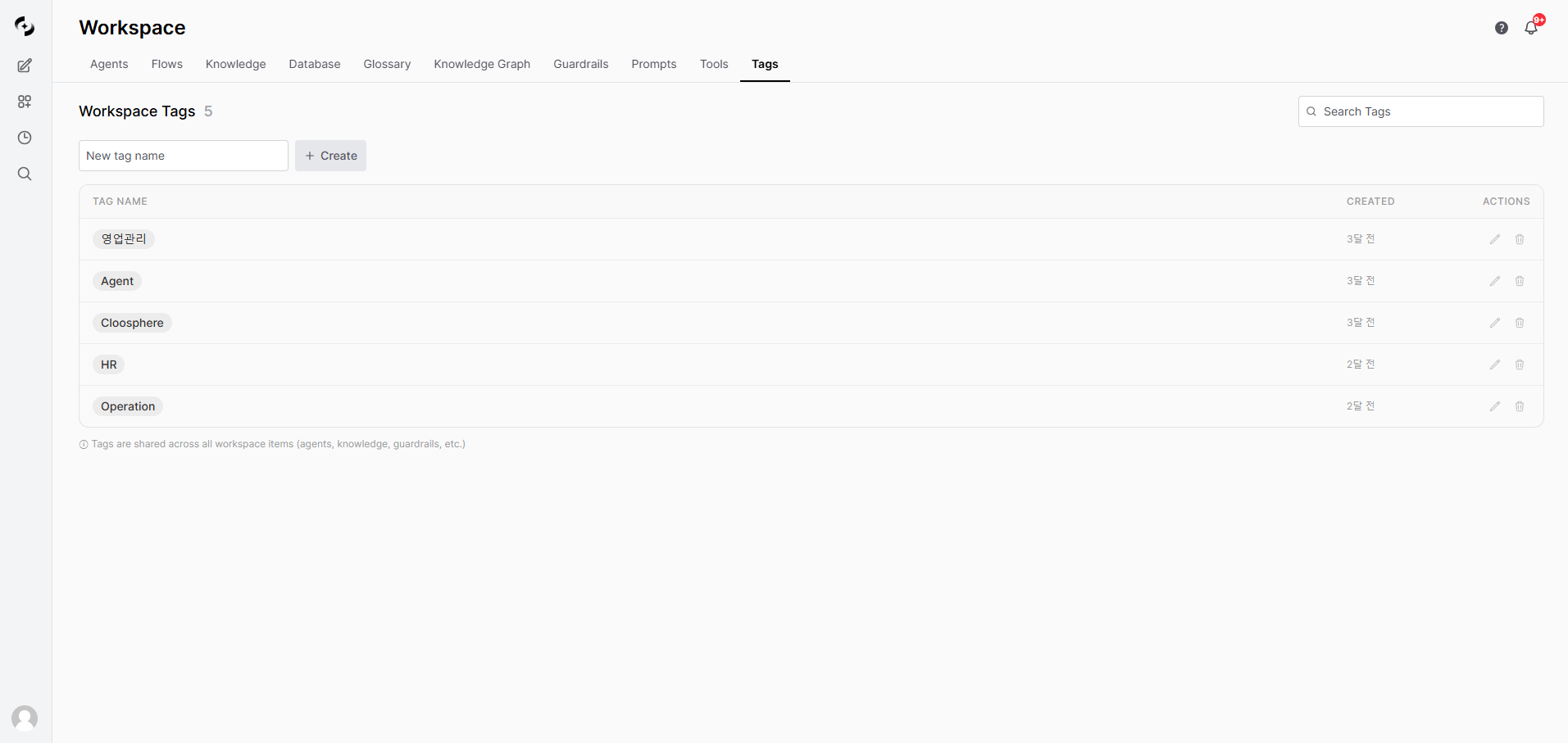
In the **Workspace > Tags** tab, create, edit, and delete tags.
 ### Create a Tag
Type a tag name in the input at the top and click **+ Create**. Duplicate names aren't allowed.
### Edit a Tag
Click the **pencil icon** on the right of a tag row to rename it instantly. Save with the **Enter key** or the **check mark**, or cancel editing with the **Esc key** or the **X mark**.
### Delete a Tag
Click the **trash icon** on the right of a tag row to delete it. Deleting **removes it from all workspace resources** that had it.
Tag deletion is irreversible. A confirmation dialog appears before deletion.
***
## Applying Tags
Add or remove tags on each workspace resource (Agents, Knowledge Bases, etc.) from its edit screen. You can also create tags right from the resource's location, in addition to applying them.
**Supported resource types:**
| Resource | Where to apply |
| ------------------- | --------------------------- |
| **Agent** | Agent edit screen |
| **Flow** | Flow editor |
| **Knowledge Base** | Knowledge Base edit screen |
| **Database** | DbSphere edit screen |
| **Glossary** | Glossary edit screen |
| **Knowledge Graph** | Knowledge Graph edit screen |
| **Guardrail** | Guardrail edit screen |
| **Prompt** | Prompt edit screen |
| **Tool** | Tool edit screen |
***
## Permissions
| Action | Required Permission |
| --------------------------------- | -------------------- |
| View tags | All signed-in users |
| Create tags | All signed-in users |
| Edit / delete tags | Tag creator or Admin |
| Attach / detach tags on resources | All signed-in users |
***
## Use Cases
Create "Marketing", "Engineering", "HR", "Finance" tags to distinguish agents and Knowledge Bases used by each department.
Manage resource lifecycle with tags like "Production", "Experimental", "Deprecating".
Apply a "Project-A" tag across agents, Knowledge Bases, and prompts to see related resources at a glance.
### Create a Tag
Type a tag name in the input at the top and click **+ Create**. Duplicate names aren't allowed.
### Edit a Tag
Click the **pencil icon** on the right of a tag row to rename it instantly. Save with the **Enter key** or the **check mark**, or cancel editing with the **Esc key** or the **X mark**.
### Delete a Tag
Click the **trash icon** on the right of a tag row to delete it. Deleting **removes it from all workspace resources** that had it.
Tag deletion is irreversible. A confirmation dialog appears before deletion.
***
## Applying Tags
Add or remove tags on each workspace resource (Agents, Knowledge Bases, etc.) from its edit screen. You can also create tags right from the resource's location, in addition to applying them.
**Supported resource types:**
| Resource | Where to apply |
| ------------------- | --------------------------- |
| **Agent** | Agent edit screen |
| **Flow** | Flow editor |
| **Knowledge Base** | Knowledge Base edit screen |
| **Database** | DbSphere edit screen |
| **Glossary** | Glossary edit screen |
| **Knowledge Graph** | Knowledge Graph edit screen |
| **Guardrail** | Guardrail edit screen |
| **Prompt** | Prompt edit screen |
| **Tool** | Tool edit screen |
***
## Permissions
| Action | Required Permission |
| --------------------------------- | -------------------- |
| View tags | All signed-in users |
| Create tags | All signed-in users |
| Edit / delete tags | Tag creator or Admin |
| Attach / detach tags on resources | All signed-in users |
***
## Use Cases
Create "Marketing", "Engineering", "HR", "Finance" tags to distinguish agents and Knowledge Bases used by each department.
Manage resource lifecycle with tags like "Production", "Experimental", "Deprecating".
Apply a "Project-A" tag across agents, Knowledge Bases, and prompts to see related resources at a glance.