> ## Documentation Index
> Fetch the complete documentation index at: https://docs.cloosphere.ai/llms.txt
> Use this file to discover all available pages before exploring further.
# 사용량
> 토큰 사용량과 API 요청 수를 모델/사용자/팀 단위로 추적하고 분석합니다
관리자 › 모니터링 › 사용량
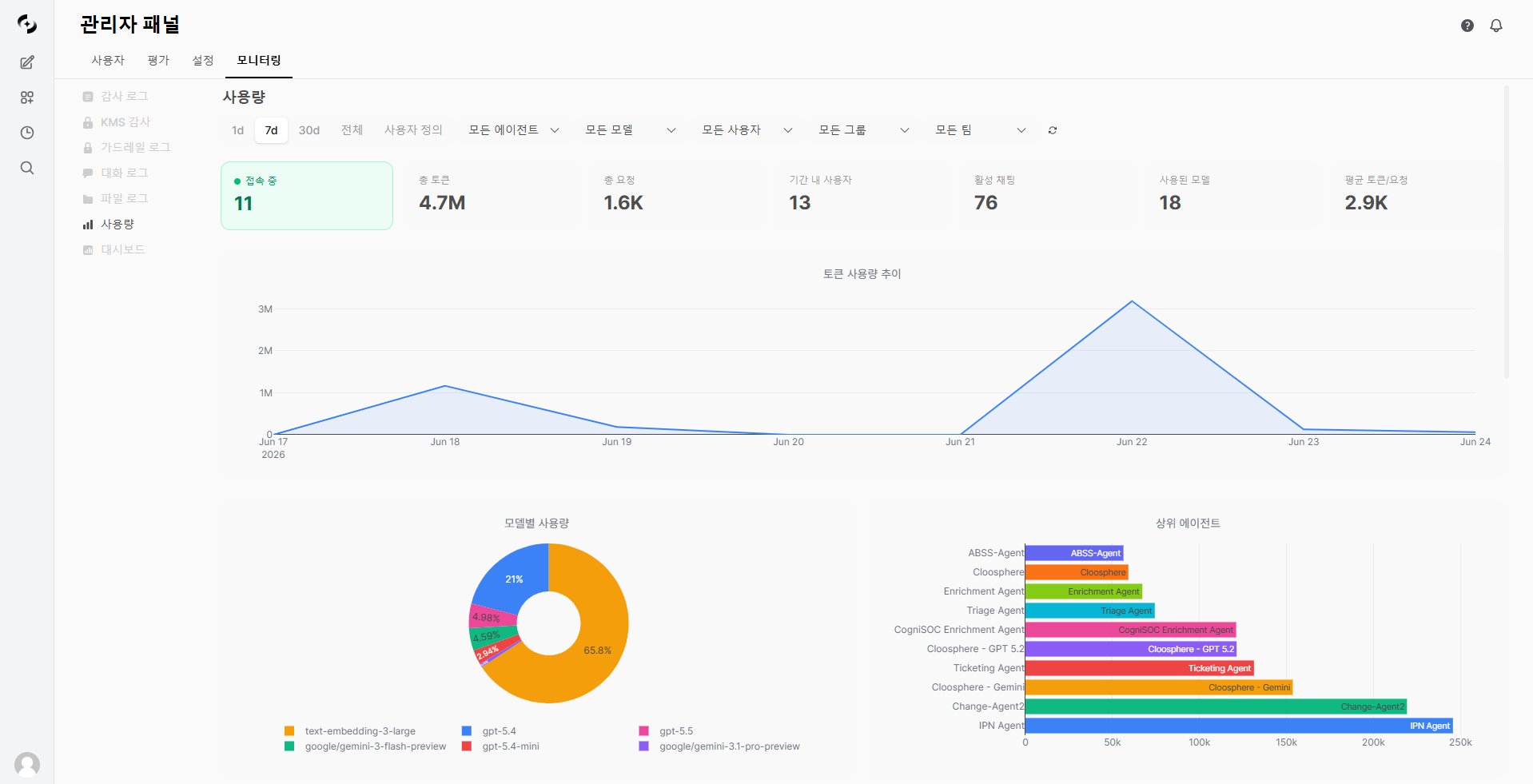
사용량 대시보드는 AI 리소스 소비 현황을 **실시간으로 시각화**합니다.
* 토큰 사용량과 요청 수를 다양한 차원(모델, 사용자, 에이전트, 그룹, 팀)으로 분석할 수 있습니다.
 ***
## 주요 지표
대시보드 상단에 핵심 지표가 카드 형태로 표시됩니다.
| 지표 | 설명 |
| ------------ | -------------------- |
| **접속 중** | 현재 접속 중인 사용자 수 (실시간) |
| **총 토큰** | 선택 기간 내 사용된 전체 토큰 수 |
| **총 요청** | API 호출 횟수 |
| **기간 내 사용자** | 기간 내 활동한 사용자 수 |
| **활성 채팅** | 기간 내 활성 채팅 세션 수 |
| **사용된 모델** | 사용된 모델 종류 수 |
| **평균 토큰/요청** | 요청당 평균 토큰 소비량 |
평균 토큰/요청이 비정상적으로 높다면, 과도한 system prompt나 불필요한 context가 포함되어 있을 수 있습니다. 에이전트 설정을 점검하세요.
***
## 사용량 추이 차트
시간별 사용량 변화를 라인 차트로 시각화합니다.
***
## 주요 지표
대시보드 상단에 핵심 지표가 카드 형태로 표시됩니다.
| 지표 | 설명 |
| ------------ | -------------------- |
| **접속 중** | 현재 접속 중인 사용자 수 (실시간) |
| **총 토큰** | 선택 기간 내 사용된 전체 토큰 수 |
| **총 요청** | API 호출 횟수 |
| **기간 내 사용자** | 기간 내 활동한 사용자 수 |
| **활성 채팅** | 기간 내 활성 채팅 세션 수 |
| **사용된 모델** | 사용된 모델 종류 수 |
| **평균 토큰/요청** | 요청당 평균 토큰 소비량 |
평균 토큰/요청이 비정상적으로 높다면, 과도한 system prompt나 불필요한 context가 포함되어 있을 수 있습니다. 에이전트 설정을 점검하세요.
***
## 사용량 추이 차트
시간별 사용량 변화를 라인 차트로 시각화합니다.
 ### 기간 선택
| 기간 | 설명 |
| ---------- | ----------- |
| **1d** | 최근 1일 |
| **7d** | 최근 7일 |
| **30d** | 최근 30일 |
| **전체** | 전체 기간 |
| **사용자 정의** | 날짜 범위 직접 선택 |
### 차트 지표
차트에는 **토큰 사용량 추이**가 라인 그래프로 표시됩니다.
| 지표 | 설명 |
| ------ | ------------ |
| **토큰** | 날짜별 총 토큰 사용량 |
***
## 다차원 분석
사용량을 모델·사용자·에이전트·그룹·팀 등 여러 차원으로 나눠 볼 수 있습니다.
* 모든 차트는 상단 필터(기간·모델·사용자·그룹·팀·에이전트)의 영향을 받습니다.
### 기간 선택
| 기간 | 설명 |
| ---------- | ----------- |
| **1d** | 최근 1일 |
| **7d** | 최근 7일 |
| **30d** | 최근 30일 |
| **전체** | 전체 기간 |
| **사용자 정의** | 날짜 범위 직접 선택 |
### 차트 지표
차트에는 **토큰 사용량 추이**가 라인 그래프로 표시됩니다.
| 지표 | 설명 |
| ------ | ------------ |
| **토큰** | 날짜별 총 토큰 사용량 |
***
## 다차원 분석
사용량을 모델·사용자·에이전트·그룹·팀 등 여러 차원으로 나눠 볼 수 있습니다.
* 모든 차트는 상단 필터(기간·모델·사용자·그룹·팀·에이전트)의 영향을 받습니다.
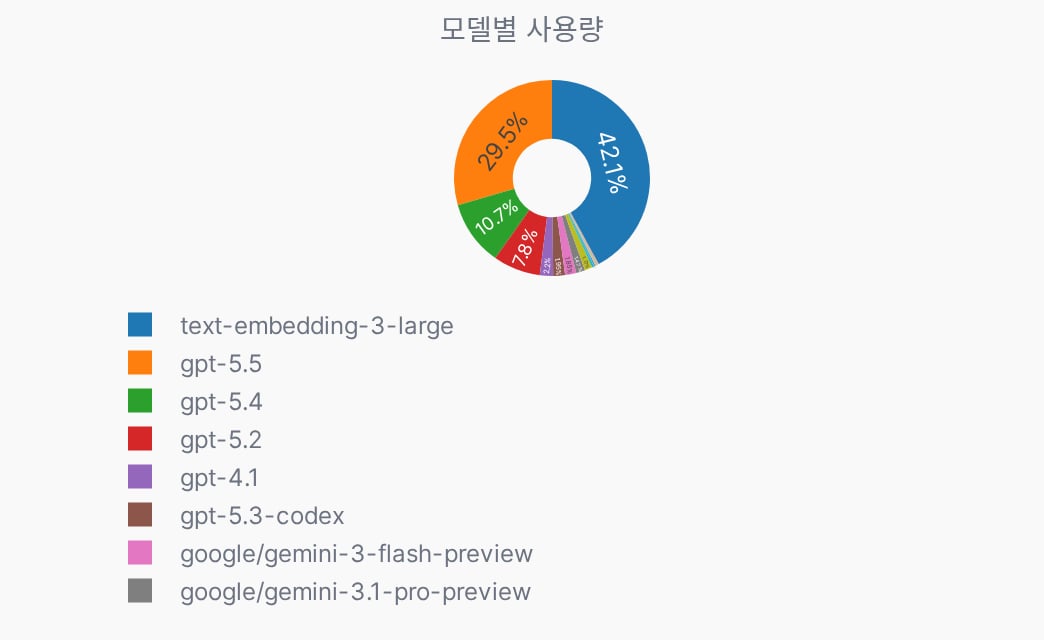 어떤 AI 모델이 얼마나 사용되는지 토큰 비중으로 확인합니다.
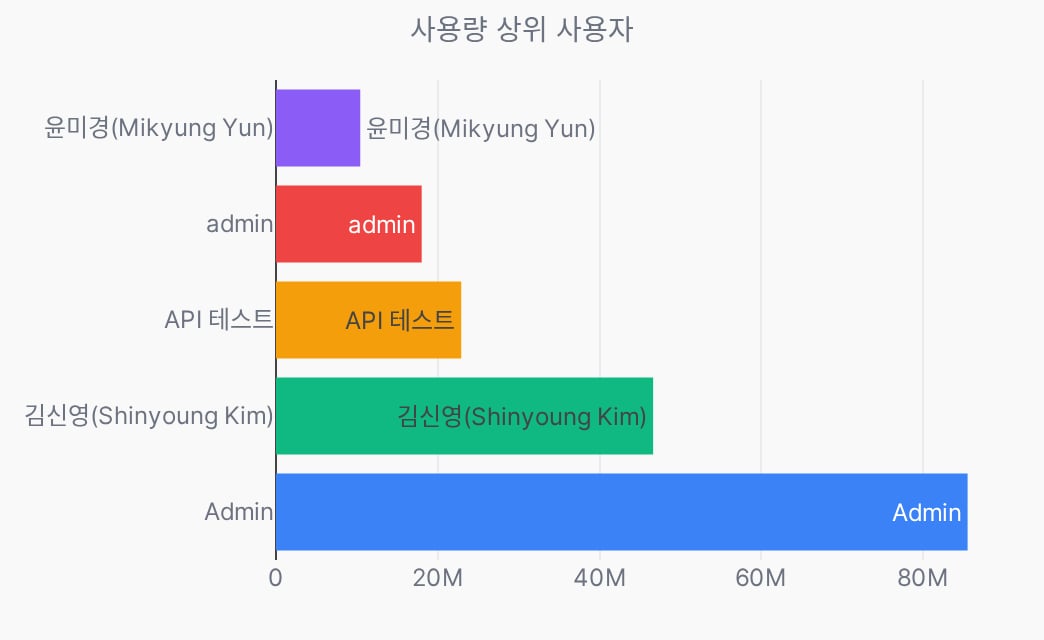 토큰 사용량이 많은 사용자를 순위로 보여줍니다.
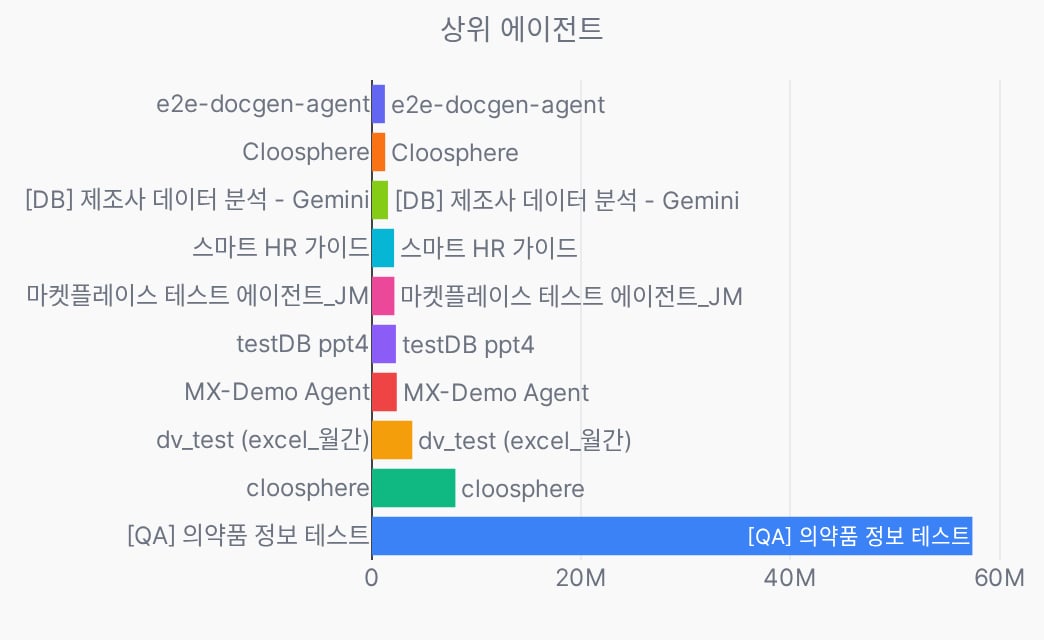 토큰 사용량이 많은 워크스페이스 에이전트를 순위로 보여줍니다.
에이전트별 비교로 비효율적인 에이전트를 식별하고 프롬프트를 최적화하세요.
토큰 사용량이 많은 워크스페이스 에이전트를 순위로 보여줍니다.
에이전트별 비교로 비효율적인 에이전트를 식별하고 프롬프트를 최적화하세요.
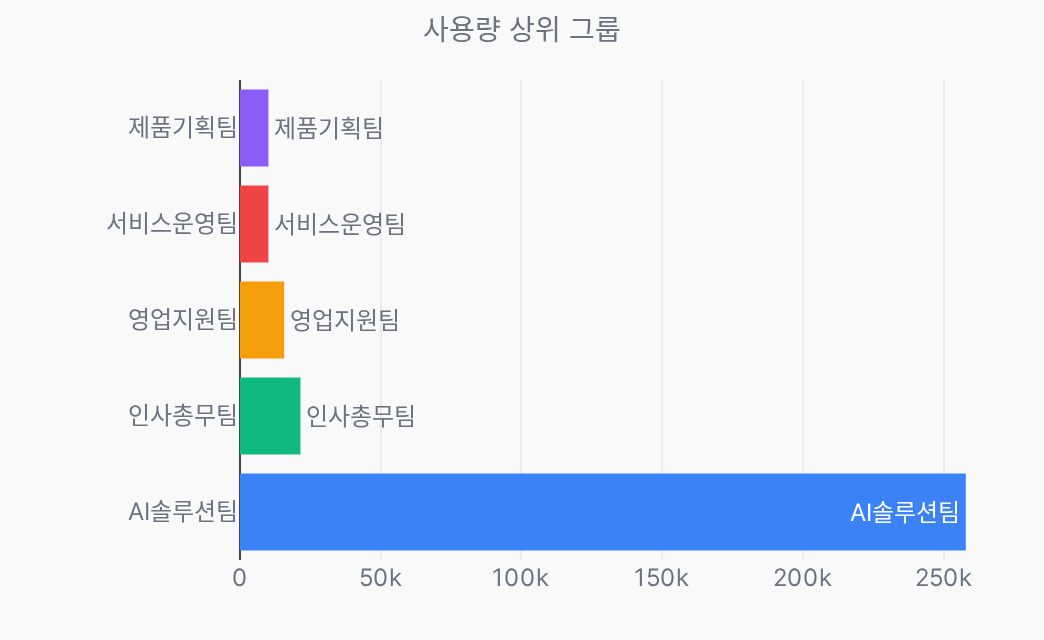 권한 그룹별 토큰 사용량을 순위로 보여줍니다. 선택 기간에 그룹 사용 기록이 없으면 "그룹별 사용량 데이터가 없습니다"가 표시됩니다.
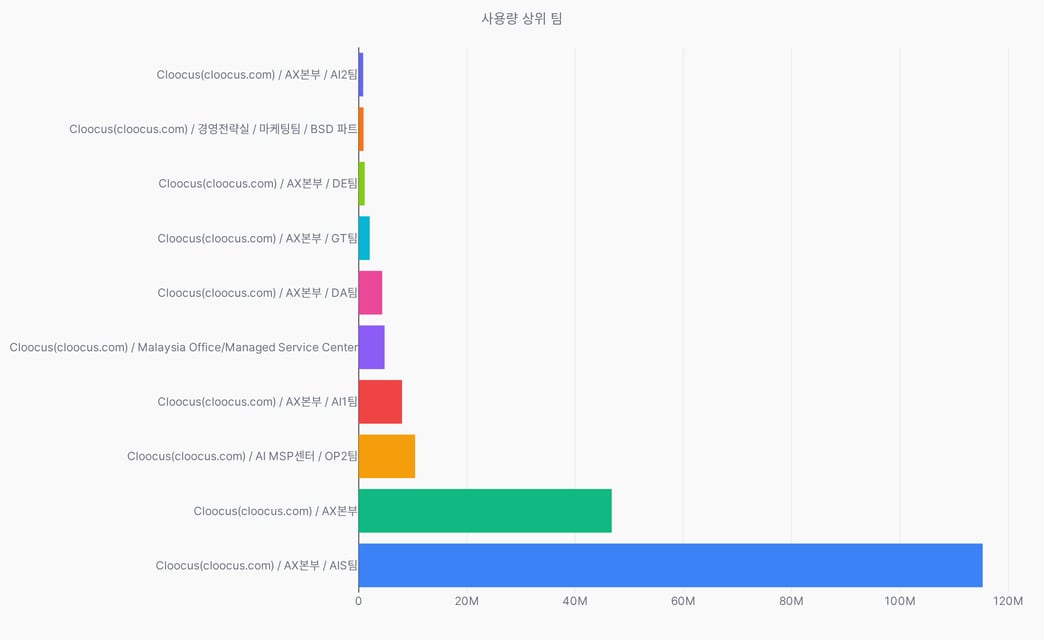 팀(Teams) 단위별 토큰 사용량을 순위로 보여줍니다.
***
## 사용 유형별 분류
토큰이 어떤 작업에 사용되었는지 유형별로 분류합니다.
* 차트에는 **해당 기간에 사용 기록이 있는 유형만** 표시됩니다.
팀(Teams) 단위별 토큰 사용량을 순위로 보여줍니다.
***
## 사용 유형별 분류
토큰이 어떤 작업에 사용되었는지 유형별로 분류합니다.
* 차트에는 **해당 기간에 사용 기록이 있는 유형만** 표시됩니다.
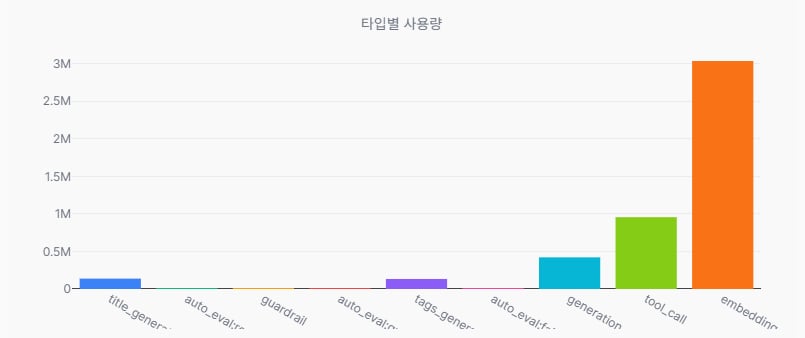 차트에는 해당 기간에 **실제로 발생한 유형만** 나타납니다.
**사용자 활동 (일일 한도 집계 대상)**
| 유형 | 설명 |
| ----------------------------- | ---------------------------- |
| **chat** | 일반 채팅 응답 생성 |
| **generation** | 에이전트·RAG 응답 생성 |
| **agent\_state** | 에이전트 상태·다음 단계 판단 |
| **reasoning** | 추론(reasoning) 단계 |
| **tool\_call** | 도구 호출 |
| **function\_calling** | 함수 호출 |
| **embedding** | 문서·검색 임베딩 처리 |
| **image\_generation** | 이미지 생성 |
| **code\_gateway** | 코드 게이트웨이 실행 |
| **moa\_response\_generation** | MoA(Mixture-of-Agents) 응답 생성 |
**백그라운드 작업 (한도 미집계)**
| 유형 | 설명 |
| ----------------------------- | --------------- |
| **title\_generation** | 채팅 제목 자동 생성 |
| **tags\_generation** | 채팅 태그 자동 생성 |
| **emoji\_generation** | 채팅 이모지 자동 생성 |
| **query\_generation** | 검색용 질의 생성 |
| **image\_prompt\_generation** | 이미지 생성용 프롬프트 보강 |
| **autocomplete\_generation** | 입력 자동완성 제안 |
| **follow\_up\_generation** | 후속 질문 제안 |
**시스템·모니터링**
| 유형 | 설명 |
| ------------------------------------------------- | ------------------------ |
| **guardrail** | 가드레일 LLM 판정 |
| **schema\_extraction** | 구조화 데이터(스키마) 추출 |
| **scheduled\_task** | 예약 작업 실행 |
| **trace\_analysis** | 트레이스 분석 리포트 생성 |
| **external\_service** | 외부 서비스의 게이트웨이 직접 호출 |
| **auto\_eval:{retrieval, faithfulness, quality}** | 자동 평가 LLM 판정 (평가 유형별 세분) |
***
## 필터링
다양한 조건을 조합하여 데이터를 필터링할 수 있습니다.
* 모든 필터는 동시 적용됩니다.
| 필터 | 설명 |
| -------- | ----------- |
| **기간** | 시작/종료 날짜 범위 |
| **모델** | 특정 모델 선택 |
| **사용자** | 특정 사용자 선택 |
| **그룹** | 특정 그룹 선택 |
| **팀** | 특정 팀 선택 |
| **에이전트** | 특정 에이전트 선택 |
필터 드롭다운에는 실제 사용 기록이 있는 항목만 표시됩니다.
개별 요청 단위 내역은 [모니터링 > 대화 로그](/ko/monitoring/conversation-logs)에서 확인할 수 있습니다.
***
## 관련 페이지
사용량 제한 및 초과 동작 설정
개별 요청의 토큰 사용 내역 추적
응답 품질 평가 결과 확인
차트에는 해당 기간에 **실제로 발생한 유형만** 나타납니다.
**사용자 활동 (일일 한도 집계 대상)**
| 유형 | 설명 |
| ----------------------------- | ---------------------------- |
| **chat** | 일반 채팅 응답 생성 |
| **generation** | 에이전트·RAG 응답 생성 |
| **agent\_state** | 에이전트 상태·다음 단계 판단 |
| **reasoning** | 추론(reasoning) 단계 |
| **tool\_call** | 도구 호출 |
| **function\_calling** | 함수 호출 |
| **embedding** | 문서·검색 임베딩 처리 |
| **image\_generation** | 이미지 생성 |
| **code\_gateway** | 코드 게이트웨이 실행 |
| **moa\_response\_generation** | MoA(Mixture-of-Agents) 응답 생성 |
**백그라운드 작업 (한도 미집계)**
| 유형 | 설명 |
| ----------------------------- | --------------- |
| **title\_generation** | 채팅 제목 자동 생성 |
| **tags\_generation** | 채팅 태그 자동 생성 |
| **emoji\_generation** | 채팅 이모지 자동 생성 |
| **query\_generation** | 검색용 질의 생성 |
| **image\_prompt\_generation** | 이미지 생성용 프롬프트 보강 |
| **autocomplete\_generation** | 입력 자동완성 제안 |
| **follow\_up\_generation** | 후속 질문 제안 |
**시스템·모니터링**
| 유형 | 설명 |
| ------------------------------------------------- | ------------------------ |
| **guardrail** | 가드레일 LLM 판정 |
| **schema\_extraction** | 구조화 데이터(스키마) 추출 |
| **scheduled\_task** | 예약 작업 실행 |
| **trace\_analysis** | 트레이스 분석 리포트 생성 |
| **external\_service** | 외부 서비스의 게이트웨이 직접 호출 |
| **auto\_eval:{retrieval, faithfulness, quality}** | 자동 평가 LLM 판정 (평가 유형별 세분) |
***
## 필터링
다양한 조건을 조합하여 데이터를 필터링할 수 있습니다.
* 모든 필터는 동시 적용됩니다.
| 필터 | 설명 |
| -------- | ----------- |
| **기간** | 시작/종료 날짜 범위 |
| **모델** | 특정 모델 선택 |
| **사용자** | 특정 사용자 선택 |
| **그룹** | 특정 그룹 선택 |
| **팀** | 특정 팀 선택 |
| **에이전트** | 특정 에이전트 선택 |
필터 드롭다운에는 실제 사용 기록이 있는 항목만 표시됩니다.
개별 요청 단위 내역은 [모니터링 > 대화 로그](/ko/monitoring/conversation-logs)에서 확인할 수 있습니다.
***
## 관련 페이지
사용량 제한 및 초과 동작 설정
개별 요청의 토큰 사용 내역 추적
응답 품질 평가 결과 확인