
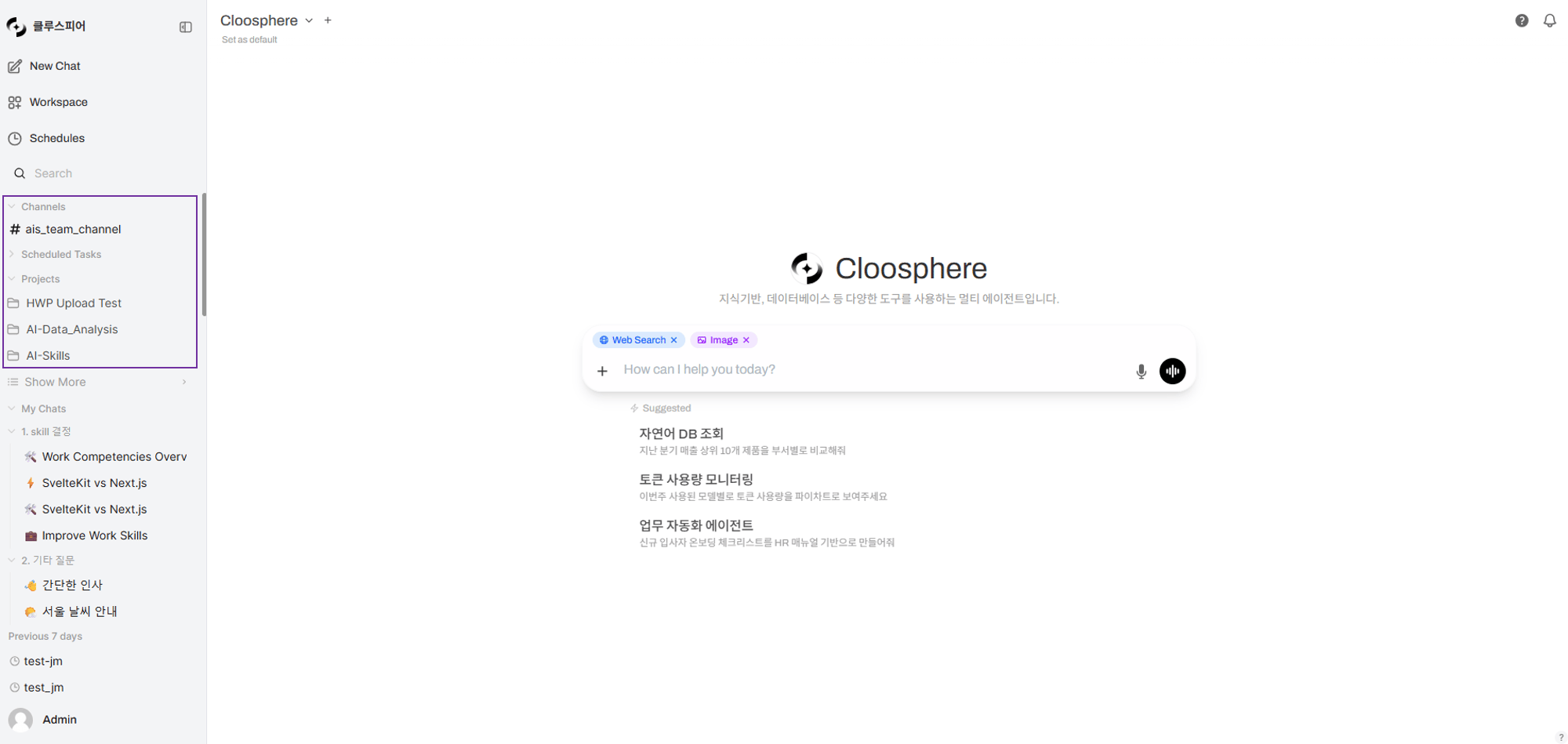
Cloosphere extends AI use beyond individual work to team-level collaboration. Bundle documents and chats into Projects, communicate in real time with teammates in Channels, and safely share resources with fine-grained access control.
Collaboration sidebar

Collaboration Features

Projects

Bundle Knowledge Bases + chats into one space and share with teammates. The AI references project documents to answer.

Channels

Team messaging space. Slack-style communication with threads, reactions, and real-time typing indicators.

Sharing & Permissions

Granular control over resource read/write permissions by group, organization, or individual.

Collaboration Flow

The flow: bundle documents and chats from individual work into projects, communicate with the team in channels, and safely share via access permissions.

Feature Comparison

FeatureProjectsChannelsSharing & Permissions
PurposeUnified doc + chat managementReal-time team messagingResource access control
AudienceIndividual / small teamWhole team / departmentAll workspace resources
AI integrationProject-doc-based RAG chat--
Real-time-Socket.IO real-time messaging-
Sharing modelCopy-basedAccess-permission-basedGroup/Org/User assignment
Creation permissionAll usersAdmins onlyAdmins set per group

Sharing Model Comparison

Cloosphere offers two sharing models depending on resource type.
Add groups/organizations/users to the original resource. Edits to the original are reflected immediately to all sharees.Applies to: Agents, Knowledge Bases, channels, tools, guardrails, prompts, glossaries
ProCon
Real-time syncNo personalization
Storage-efficientOriginal changes affect everyone

Example Setup: Marketing Team Collaboration

ResourceSharing ModelAudience
Marketing AgentAccess permission (read)Entire marketing group
Campaign KBAccess permission (read)Entire marketing group
Q1 ProjectCopy shareIndividual copy per member
#marketing channelAccess permissionMarketing group

Get Started

1

Create a project

Create a project from the sidebar and upload documents. Talk to the AI in the project context.
2

Join channels

Join team channels from the channel list in the sidebar. Send messages and discuss in threads.
3

Set permissions

Configure access permissions for workspace resources (agents, Knowledge Bases, etc.) per group to share with the team.
Projects are personal document spaces using copy-based sharing, while channels and workspace resources use access-permission-based sharing. Pick the right model for your use case.

Per-Role Guide

RoleMain ActivitiesReference
Regular userCreate projects, join channels, send messagesProjects, Channels
Team leadShare projects, manage resource permissionsSharing & Permissions
AdminCreate/manage channels, set up groups/organizationsUser Management, Organization Management