
Admin › Monitoring › KMS Audit
- Each entry is chained to the previous one via a hash chain, so altering or deleting even a single past entry breaks the chain and is exposed immediately by an integrity check.
- Where the Audit Log tracks “who changed which resource”, KMS Audit records “what operations happened on encryption keys”.
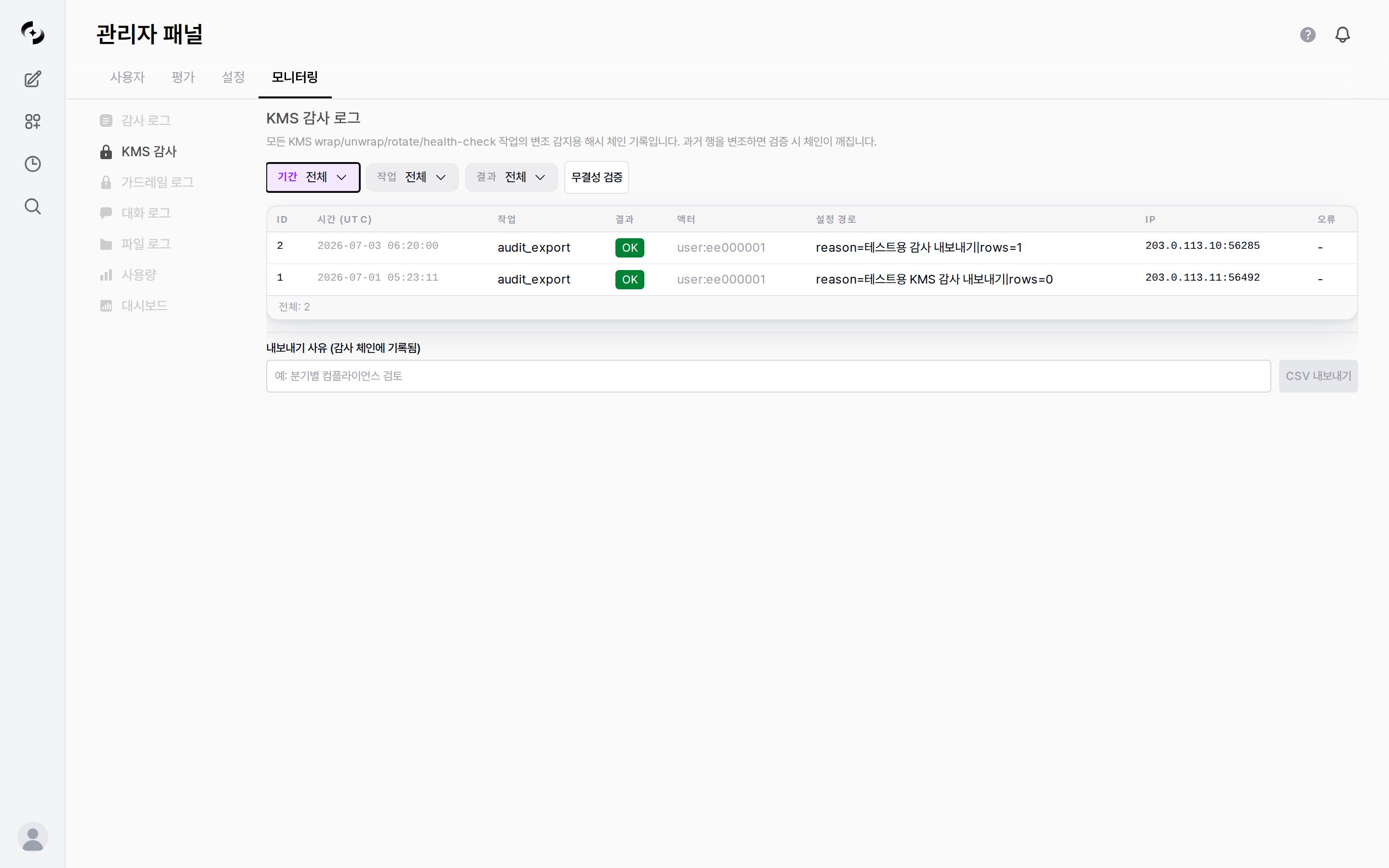
KMS Audit log — operation/result filters, integrity check, log table, CSV export
KMS Audit is a licensed feature. Requires a license with
encryption feature enabled.KMS Audit pairs with the KMS provider in Admin › Settings › Encryption.
On the default Local (Fernet) provider, rows appear only when you run a provider switch (
provider_change), a migration (migrate), or a CSV export (audit_export).
In such environments Total: 0 is normal and does not mean no encryption work took place.Audit Log Structure
Two views of the KMS audit log: which operations are recorded and what fields make up each row.- Recorded operations
- Log entry structure
Which operations get recorded depends on the KMS provider in use.
wrap · unwrap · rotate · health_check are recorded only on the Azure Key Vault (envelope) provider, and not on the default Local (Fernet) provider.The target secrets are the system’s sensitive values — config secrets, DbSphere database connection details, tool connection keys, and user API keys.
License and feature tokens are intentionally excluded from KMS encryption because their authenticity is already guaranteed by their signature.
The encrypted values themselves are never recorded; only “which operation happened on which configuration path’s value” is kept.
Integrity Check
Clicking the Integrity Check button walks the records in order to confirm no link is broken. It checks up to 100,000 rows per run, and the number of rows actually checked appears in the result message.1
Run the check
Click the Integrity Check button at the top of the screen.
2
Review the result
If the chain is intact, a success message appears with the number of rows checked, like
Chain OK (N rows checked).
If someone altered or deleted an entry in the middle, the chain breaks at that point and verification fails.In environments with more than 100,000 audit rows, compare N in the
Chain OK (N rows checked) message with Total: N at the bottom of the screen to confirm every row was checked.Viewing Logs
Filter Options
This differs from the Audit Log tab’s default (last 1 hour), so widen the period first when looking for older records.
Once there are more than 25 rows, page number buttons and left/right arrow buttons appear at the bottom; click them to move between pages.
- The bottom of the screen shows
Total: N, the total count matching the current filter. The current page is the highlighted page number button.
CSV Export
You can export audit records for external retention or analysis.- Unlike a normal download, you must enter an export reason.
1
Enter a reason
Type a reason in the Export reason (recorded in the audit chain) field at the bottom. (e.g.,
Quarterly compliance review)2
Export CSV
Click the CSV Export button to download the records matching the current filter as CSV.
Up to 100,000 rows are exported per run; split the period into several exports beyond that.
The export action itself is added to the chain as a new entry with the
audit_export operation.
The reason you typed and the row count appear in that row’s Config path column as reason=your reason|rows=count, so you can confirm “who exported the audit log, when, and for what reason”.Difference from the Audit Log
KMS Audit is a separate tab from the Audit Log.- They differ in what they track and how they guarantee it.
Use Cases
Tracking key rotation history
Tracking key rotation history
- Select
rotatein the Operation filter - Set a time range to confirm key rotation ran on the policy cycle
- Narrow the Result filter to
Failure onlyto check for any failed rotations
Diagnosing encryption operation failures
Diagnosing encryption operation failures
- Set the Result filter to
Failure only - Use the Config path and Error columns to identify which secret had the problem — the Error column is a short code rather than a full explanation, so check the server logs for details
- Verify KMS status with the provider connection test in Encryption settings
Securing compliance evidence
Securing compliance evidence
- Run Integrity Check first to confirm the chain is intact
- Filter to the reporting period
- State your review purpose in the export reason and export to CSV
- Confirm the export entry (
audit_export) was added to the chain to evidence the extraction history
Best Practices
- Regular integrity checks: During compliance reviews, run Integrity Check first to confirm the chain is intact
- Failure monitoring: Periodically check for encryption operation errors with the
Failure onlyfilter — an early signal of KMS connection problems - Clear reasons: Write specific CSV export reasons, since they are used for later audit trails
- Provider transition review: Use
provider_changeandmigraterecords to confirm encryption provider switches and re-encryption completed as intended