
Admin › Settings › Marketplace
- Set, test, and activate the URLs for the document generator (code execution engine), the external integrations (Google Workspace/Microsoft 365 MCP), and drawing analysis.
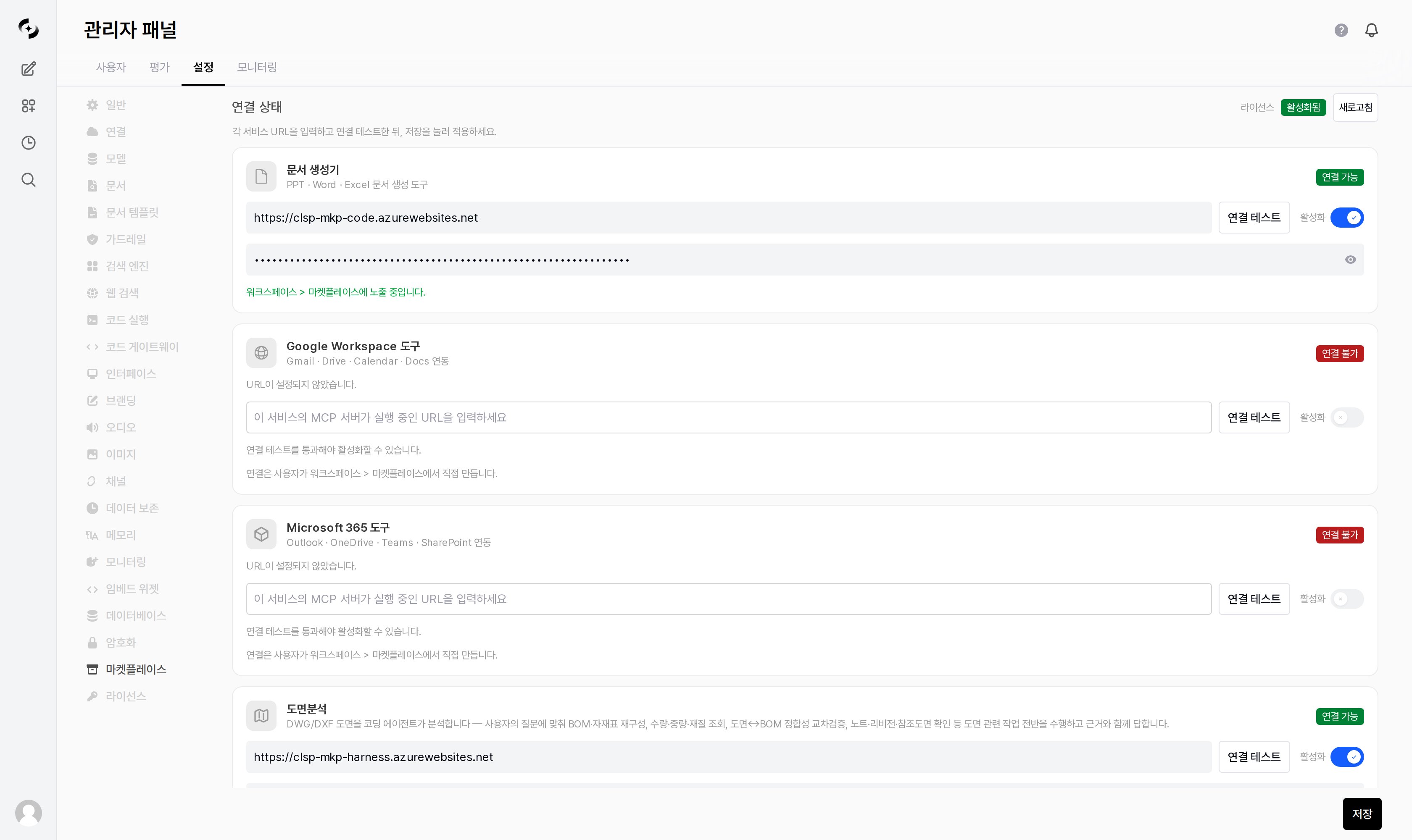
Admin > Settings > Marketplace — connection status (service URL · test connection · activate)
Overall architecture
The Marketplace stores only catalog metadata and connection config.- The containers (sidecars) that do the actual work are deployed separately by the administrator, and this screen just points at their URLs.
Images are distributed from the private ACR
acrcloosphere.azurecr.io. Customer-VM deployment uses docker compose + .env (ACR token required, JUPYTER_TOKEN recommended). If you only use document generation, the Jupyter sidecar alone is sufficient.Document generator (code execution)
The PPT/Word/Excel/HTML document-generation skills run bundled scripts in the Jupyter code execution engine to produce files.1
Enter Jupyter URL and token
On the document-generator card, enter the Jupyter service URL (e.g.
http://jupyter:8888) and auth token (JUPYTER_TOKEN).2
Test connection
Click Test connection to verify Jupyter responds. It must succeed before you can activate.
3
Activate and save
Turn on the Activate switch and save to enable the code execution engine. Internally this writes
ENABLE_CODE_EXECUTION, CODE_EXECUTION_ENGINE=jupyter, and the URL/token.This setting shares the same engine as the Code Execution settings. Enabling Jupyter on either side lets both the document-generation skills and the user code interpreter use it.
External integrations (MCP services)
Expose Google Workspace/Microsoft 365 as agent tools.1
Enter the service URL
On each MCP service card, enter the container URL (e.g.
http://gws-mcp:8000/mcp, http://m365-mcp:8001/mcp). Do not add a trailing slash.2
Test connection
Use Test connection to check reachability. For an auth-gated MCP server, a 401/403 on a token-less probe is normal and is treated as “reachable.”
3
Activate
Activating creates the marketplace connection for that service, so it appears in Workspace ▸ Marketplace and the agent’s Marketplace Tools section.
MCP sidecars use passthrough authentication — they don’t run their own OAuth but trust each user’s SSO token directly. So the Google OAuth client must be the same one Cloosphere signs in with, and each service category’s availability is determined by the OAuth scopes granted to the user.
Drawing analysis
A first-party service where a coding agent analyzes DWG/DXF drawings. It rebuilds BOM/material tables to match the question, looks up quantity·weight·material, cross-checks drawing↔BOM consistency, verifies notes·revisions·reference drawings, and answers with its evidence. It connects the same way as the other services — enter the service URL and token, run Test connection, then Activate.A capability such as Drawing Analysis is licensed separately from the Marketplace add-on itself. Without its capability key the card shows
Not Licensed and cannot be activated — see License.Status badges
Each service card shows real-time status.
Each card also shows a hint describing its current state.
A badge only reflects whether the URL the admin entered is reachable right now. Whether the tools actually work is confirmed when a connection is created in Workspace ▸ Marketplace and its tool list is fetched.
Granting permissions
After an administrator connects the services, users need group permission to use the Marketplace.- In Admin Settings > Users > Groups, grant groups the Marketplace Access permission (none/read/write). The default is locked.
- Write permission is required to create connections/capabilities.
- For users who use document generators (skills), also grant Skills Access permission if needed.
Related pages
Marketplace (user)
How users create document capabilities and MCP integrations and attach them to agents
Code Execution
Configure the code execution engine (Jupyter) the document generators share
License
Register the Marketplace add-on feature key
Skills (user)
The concept of reusable playbooks and executable skills