
Admin › Settings › General
- Changes made here take effect for all users immediately on save.
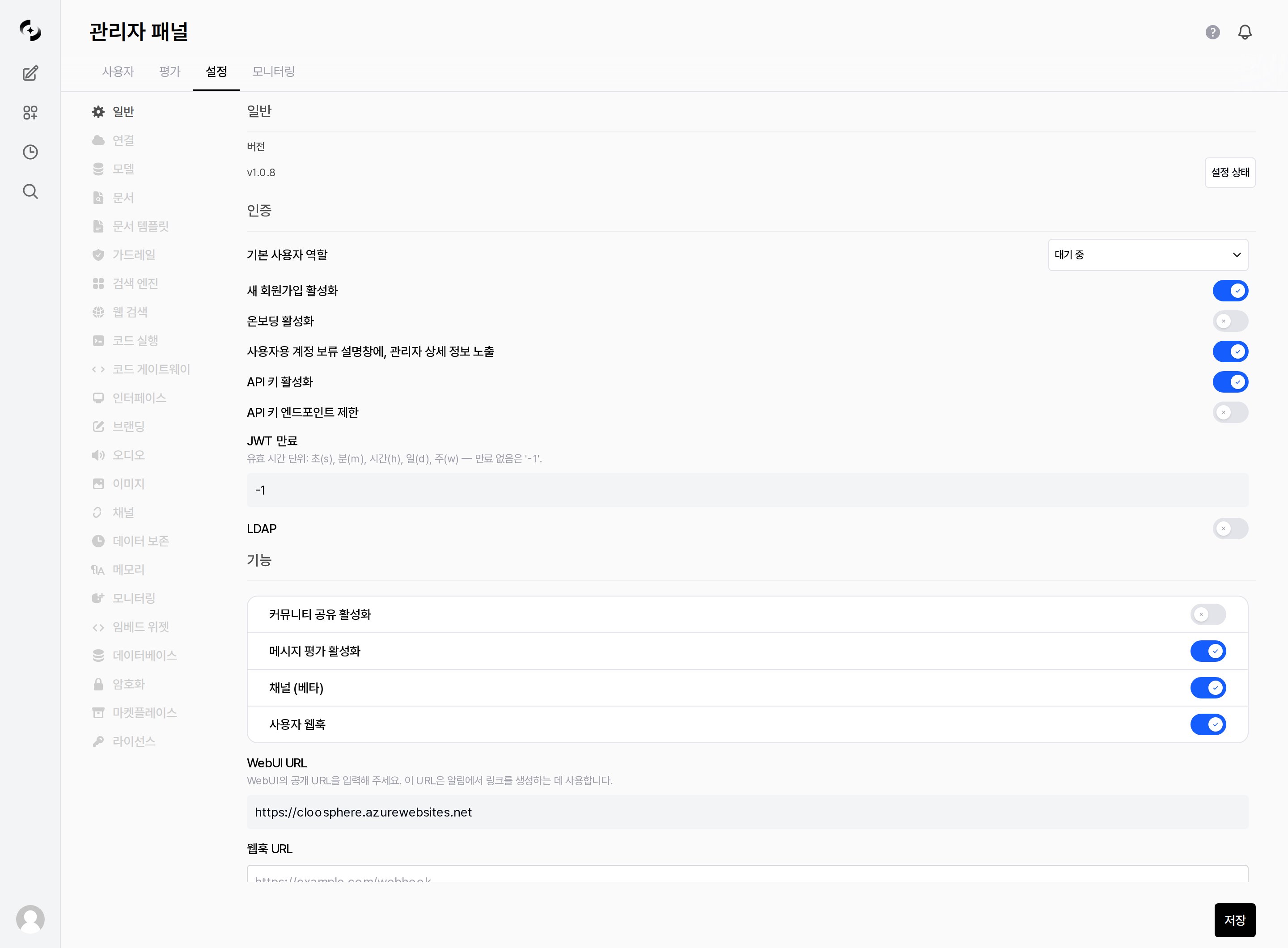
Manage authentication policy and feature toggles in Admin > Settings > General
General
The General section at the top of the tab shows the current Version, with a Settings Status button on the right. Settings Status opens a single screen that checks whether the main components are actually connected and configured.What Settings Status checks
What Settings Status checks
LLM Connections · Embedding Engine · Extraction Engines · Document Processing Profiles · Search Engine · Web Search ·
Code Execution · Code Gateway · Notifications Webhook · Speech (STT/TTS) · Image Generation · Encryption · LicenseExtraction Engines, Document Processing Profiles, Code Gateway and Image Generation list each registered item; when there are none,
Not configured is shown.This screen tells you whether settings are filled in. For infrastructure health checks such as DB, Redis, and the task queue, see the Deployment checklist.
Authentication Settings
Set policies for user signup, sign-in, and sessions.Default User Role
The role automatically assigned to new sign-ups.- Whether a user can use the service right after signup hinges on this value.
After the three roles above, the dropdown lists the groups that currently exist as
Group: name.
Authentication Toggles
JWT expiration format:
30s (seconds), 30m (minutes), 1h (hours), 10d (days), 1w (weeks), -1 (no expiration). -1 is convenient but makes a token hard to revoke if leaked, so in enterprise environments 8h to 1d is recommended.Email De-identification
When theENABLE_EMAIL_DEIDENTIFY=true environment variable is set, the @ domain part is removed from user email addresses, storing only the ID portion.
Use this when privacy protection requirements dictate not storing full email addresses in DB in SSO/LDAP environments. Same applies to OAuth sign-in users.
SSO/OIDC integration (Keycloak, Entra ID, Google) is configured through server environment variables (
OPENID_PROVIDER_URL, OAUTH_CLIENT_ID/SECRET, etc.), not the GUI → see the Deployment checklist.LDAP Settings
Integrate with corporate LDAP / Active Directory servers for unified authentication.- When enabled, an LDAP option appears on the sign-in screen and a form for server connection details expands.
- When an LDAP user signs in for the first time, an account is auto-created with the Default user role above applied.
LDAP integration settings
LDAP integration settings
Feature Toggles
Control whether specific features are enabled system-wide.- When disabled, the related menus and buttons disappear from the user’s screen and the corresponding API calls are also blocked.
Notification URLs
Below the feature toggles, configure the two URLs used for notifications.- The three similarly named items below serve different roles.
A newly signed-up user can log in but can't use any features
A newly signed-up user can log in but can't use any features
This is normal when the Default user role is ‘Pending’ (the default). Until an admin approves them, a sign-up only sees the “Account pending approval” screen. Change that user’s role to User in User Management to let them use the service right away. If approving each time is cumbersome, change the Default user role itself to User — but since anyone can then sign up and use the service immediately, only open sign-ups in a trusted environment.
Can I use LDAP and local accounts simultaneously?
Can I use LDAP and local accounts simultaneously?
Yes. Even with LDAP enabled, you can sign in with existing local accounts (email/password). When an LDAP user signs in for the first time, an account is auto-created. The default role is the Default user role under “Authentication Settings”.