
Admin › Settings › Code Gateway
- GitHub Copilot CLI and other OpenAI-compatible clients can also connect via the OpenAI endpoint.
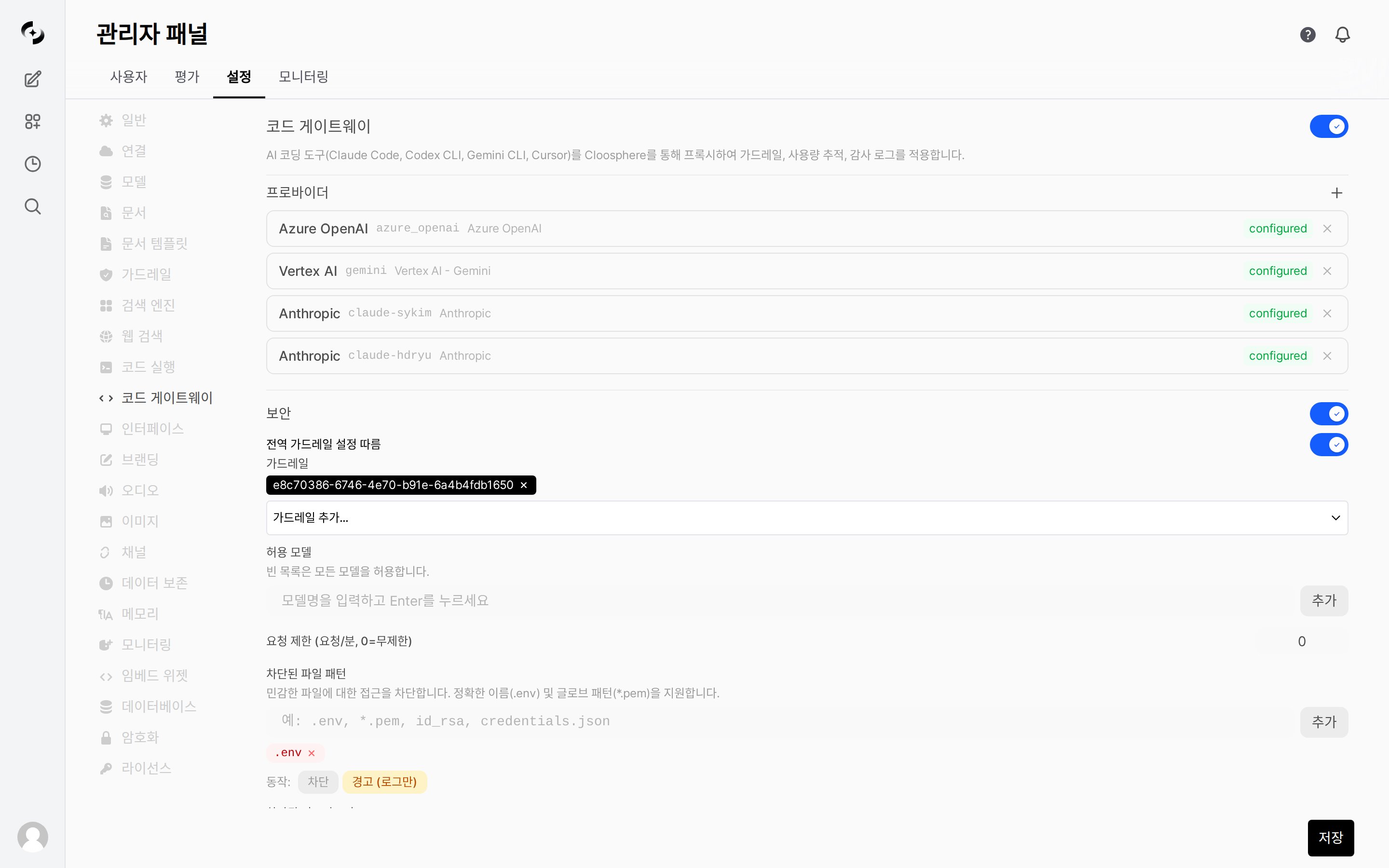
Code Gateway settings main screen
Concept
Code Gateway is backend-API-dedicated and operates separately from chat in the Cloosphere web UI. Configure only in admin settings — users set Cloosphere API keys in their coding tools.
Activation and Setup
Enabling Code Gateway
1
Open admin settings
Navigate to the Code Gateway settings page in the admin panel.
2
Activate the gateway
Toggle on Enable Code Gateway.
3
Add Provider
Click + Add Provider to register an LLM Provider.
4
Security settings
Configure allowed models, rate limits, guardrails, file pattern blocks.
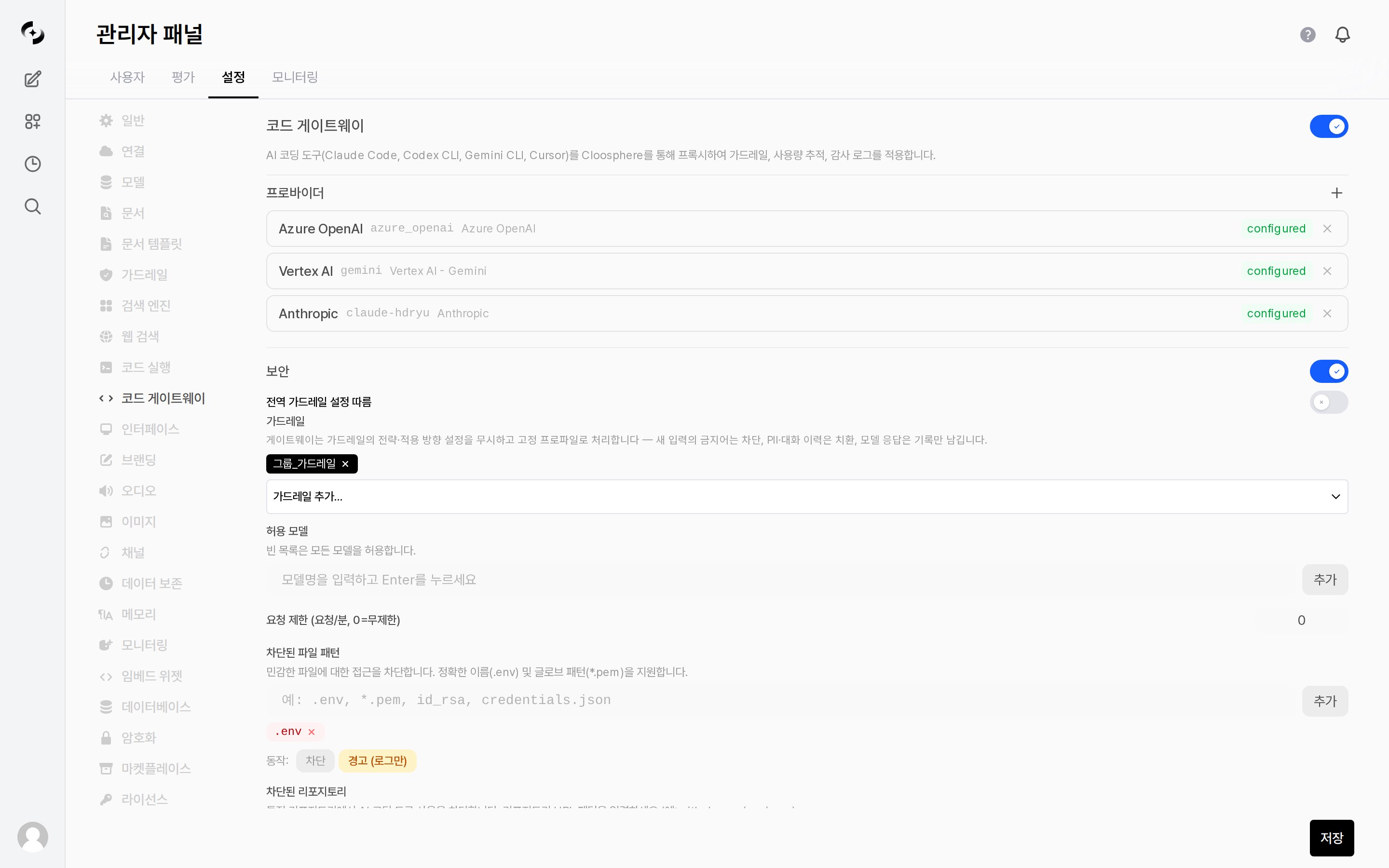
Code Gateway activation and full settings
Global Settings
Global settings (10 items)
Global settings (10 items)
The gateway ignores each guardrail’s strategy and direction settings and applies a fixed profile instead — banned words in new input are blocked, PII and conversation history are substituted, and model responses are logged only. The same guardrail can therefore behave differently here than it does in chat, so review it against this fixed behavior before attaching it to Code Gateway.
Provider Settings
A Provider is the upstream LLM service Code Gateway forwards requests to.- Multiple Providers can be registered simultaneously, each identified by a unique
provider_id.
Supported Providers
Provider Presets
Picking a preset when adding a Provider auto-sets the type and base URL.Azure AI Foundry has two sub-presets:
- Azure AI Foundry - OpenAI: For OpenAI-compatible models (
openaitype). Use with Cursor, Codex CLI, GitHub Copilot. - Azure AI Foundry - Claude: For Claude models (
azure_ai_foundrytype). Use with Claude Code, Cursor.
Adding a Provider
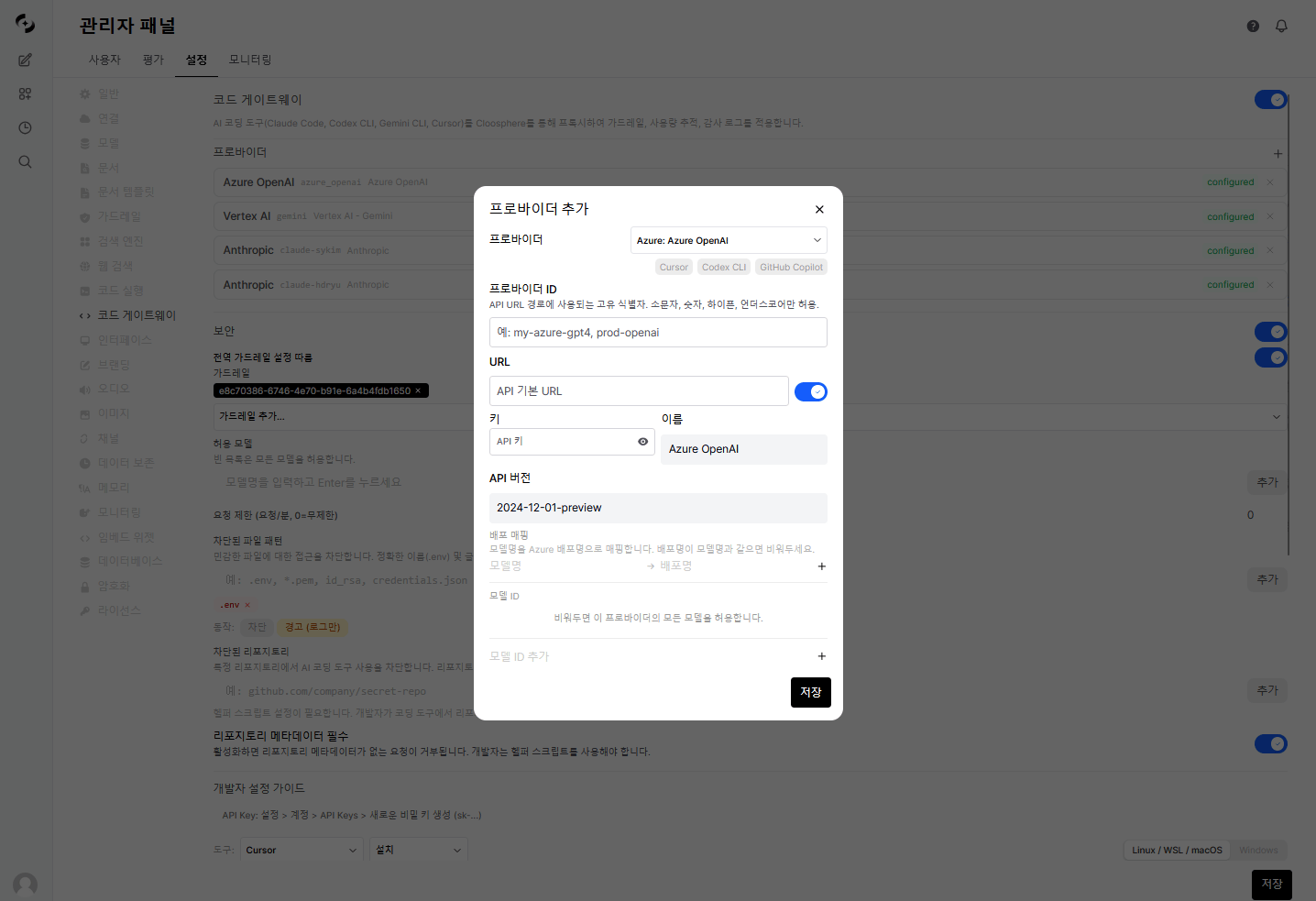
Add Code Gateway Provider
- OpenAI / Anthropic / Gemini
- Azure OpenAI
- Vertex AI
Developer Usage
Developers set the BASE_URL of their AI coding tools to Cloosphere Code Gateway and use a Cloosphere API key.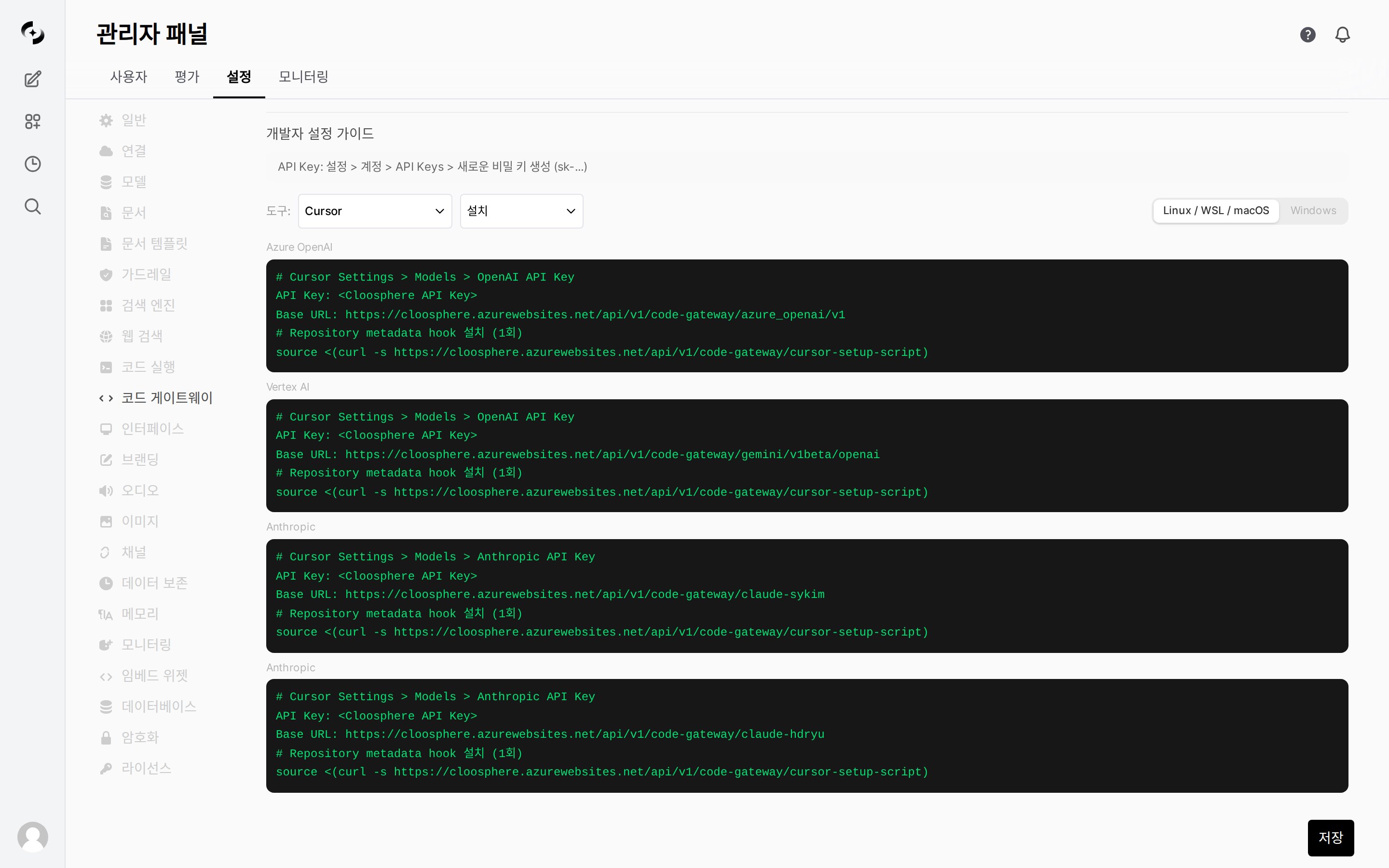
Developer setup guide — per-tool BASE_URL and API key
Endpoint Structure
- OpenAI Provider:
https://cloosphere.company.com/api/v1/code-gateway/openai/v1/chat/completions - Anthropic Provider:
https://cloosphere.company.com/api/v1/code-gateway/anthropic/v1/messages
Authentication
Code Gateway accepts API keys in four ways (in priority order).Per-Tool Setup Examples
- Claude Code
- Cursor
- Codex CLI
- Gemini CLI
- GitHub Copilot
Claude Code Setup Script
An auto-setup script is provided for Claude Code users.- It auto-installs the helper script and configures
~/.claude/settings.json.
- Linux / macOS
- Windows (PowerShell)
- Install helper script (
~/cloosphere-helper.shor~/cloosphere-helper.ps1): Auto-attach repository metadata (Git remote URL, working directory) to API keys - Configure
~/.claude/settings.json: Auto-setANTHROPIC_AUTH_TOKEN,ANTHROPIC_BASE_URL,apiKeyHelper
Security Features
The Security master toggle enables or disables the security checks below (guardrails, allowed models, file patterns, repository blocking) in bulk.- It is off in the initial state where no sub-setting is configured, and appears on as soon as any of guardrails, allowed models, rate limit, file patterns, or blocked repositories has a value.
- Turning on Follow global guardrail settings applies the global guardrail settings directly to Code Gateway without separate configuration.
Guardrails
Apply guardrails to Code Gateway for PII detection, content filtering, etc., on coding tool inputs.- Pick guardrails by name from the Add guardrail… dropdown — they are the ones you created in Guardrail Management — and each added guardrail shows up as a name chip.
Allowed Models
Restrict to specific models.- Configurable at both global and Provider levels.
When both
allowed_models (global) and model_ids (per Provider) are set, only models allowed by both are usable. allowed_models is the Code Gateway-wide policy; model_ids adds per-Provider restriction.Rate Limit
Limit max requests per minute per user.- Operates on a 60-second sliding window.
File Pattern Block
Block files matching specific patterns in coding tool requests.- Specify patterns in glob format.
Blocked Repositories
Block AI coding tool usage in specific Git repositories.- Matching is based on repository metadata (repo URL, working directory) passed via the helper script.
Patterns are case-insensitive substring matched against repository URL and working directory path. Git SSH URLs (
git@github.com:org/repo.git) are auto-normalized for matching.
Blocked repository access is auto-recorded in the guardrail log.
Require Repository Metadata
Enablingrequire_repo_metadata blocks requests without repository metadata via the helper script.
- This forces all Code Gateway users to set up the helper script.
Usage Tracking
All requests through Code Gateway are auto-logged for usage.- Admins can review usage logs to see per-team, per-user, per-model usage.
Usage Statistics
View per-period usage statistics to analyze cost and trends.Filters
Proxy Processing Flow
The full flow Code Gateway uses to process requests:Troubleshooting
403 Forbidden: Code Gateway is disabled
403 Forbidden: Code Gateway is disabled
Code Gateway is disabled in admin settings. Ask an admin to enable it.
403 Forbidden: Code Gateway access not permitted
403 Forbidden: Code Gateway access not permitted
The user’s feature permissions don’t include Code Gateway access. Admin must enable
features.code_gateway in group permission settings.404 Not Found: Provider not found
404 Not Found: Provider not found
The
provider_id in the request URL doesn’t match a registered Provider. Verify Provider ID.403 Forbidden: Model not allowed
403 Forbidden: Model not allowed
The requested model isn’t in the global allowed models or the Provider’s allowed models list. Ask an admin to add the model.
429 Too Many Requests: Rate limit exceeded
429 Too Many Requests: Rate limit exceeded
You’ve exceeded the per-minute request limit. Wait briefly and retry.
403 Forbidden: Repository metadata is required
403 Forbidden: Repository metadata is required
require_repo_metadata is enabled but the helper script isn’t configured. Run the Claude Code setup script to install the helper script.403 Forbidden: AI coding tool usage is blocked for repository
403 Forbidden: AI coding tool usage is blocked for repository
The request’s repository URL or working directory matches a
blocked_repos pattern. Ask an admin for unblock.