
Admin › Evaluation › Auto-Evaluations
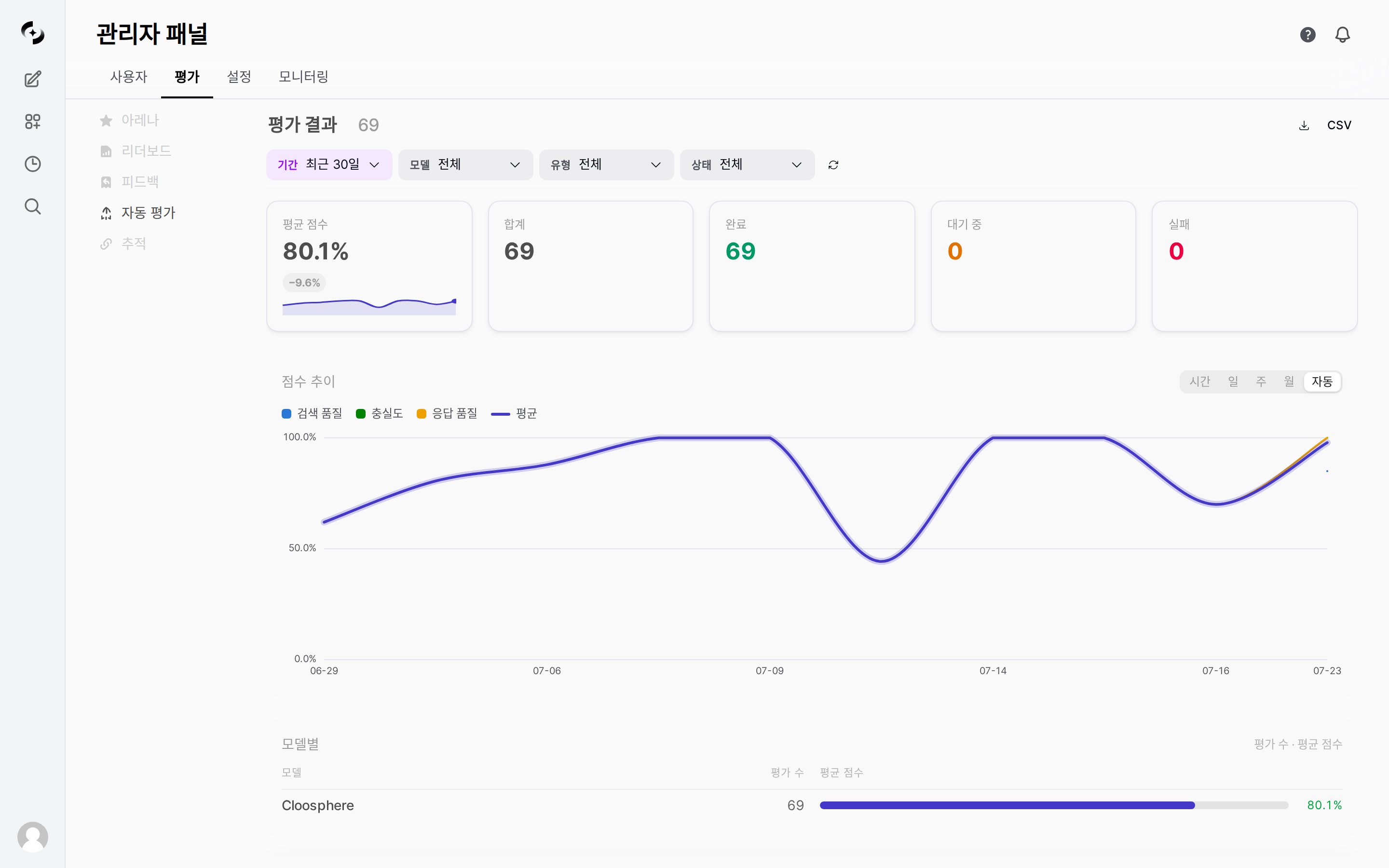
Auto-evaluation results screen — summary cards, score trend chart, per-model summary
Auto-evaluation is a licensed feature. Requires a license with the
evaluation feature enabled.Evaluation Types
Retrieval Quality and Faithfulness are evaluated only when the response has retrieved context. In conversations that never go through a Knowledge Base, those two types are skipped and only Response Quality is recorded. Files a user uploads during the conversation are not the agent’s retrieval results, so they are excluded from Retrieval Quality while still being included in Faithfulness.
Evaluation Process
Enabling Auto-Evaluation (Activate on the Agent)
Auto-evaluation is turned on per agent. However, the enable toggle alone does not run any evaluation — you also have to set a judge model and at least one evaluation type. If any of the three is missing, the agent still saves but no results accumulate (the settings screen shows ‘Please select a judge model’ · ‘Please select at least one evaluation type’). Only once all three are in place does each response go through the sampling rate to decide whether it is evaluated.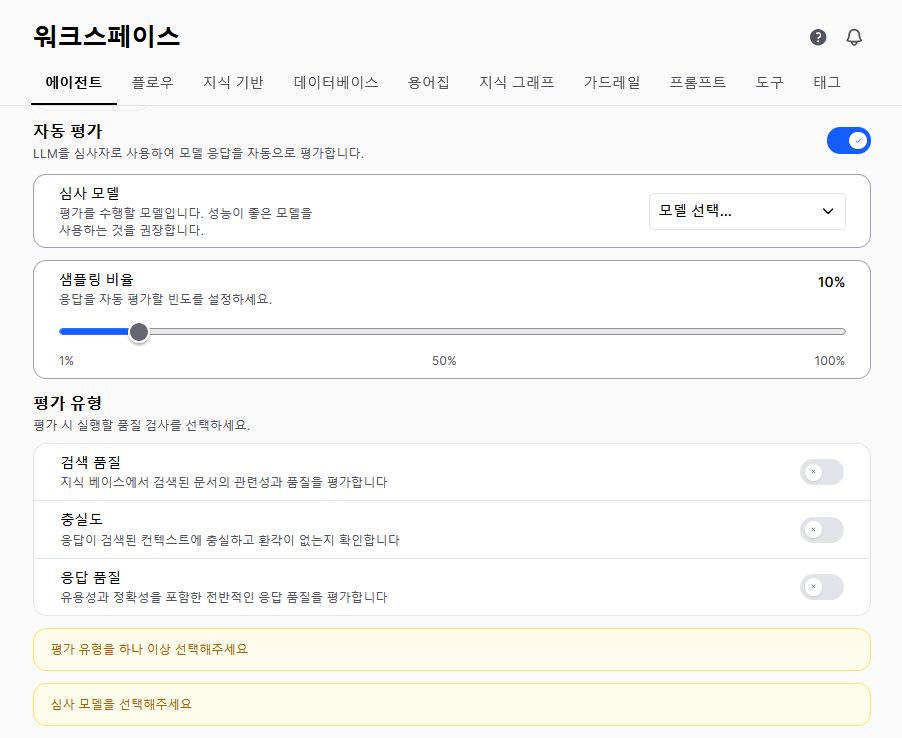
Workspace > Agents > Auto-evaluation — judge model, sampling rate, evaluation type settings
1
Edit the agent
Open the target agent’s edit screen in Workspace > Agents.
2
Activate auto-evaluation
Activate it in the Auto-evaluation section of the agent settings.
Sampling rate guidance:
Judge model calls consume tokens too. They are aggregated under Monitoring › Usage as per-type task types (
auto_eval:...), and the trace detail for that response also records the evaluation run.3
Save
Once you save the agent, auto-evaluation runs on that agent’s subsequent responses.
Evaluation Results
Individual results accumulate in the table at the bottom of the screen. Click a row to expand it and review the evaluation reasoning together with the inputs used (the arrow on the right only indicates the expanded state), or delete a single result with the trash icon. Deletion asks for confirmation once.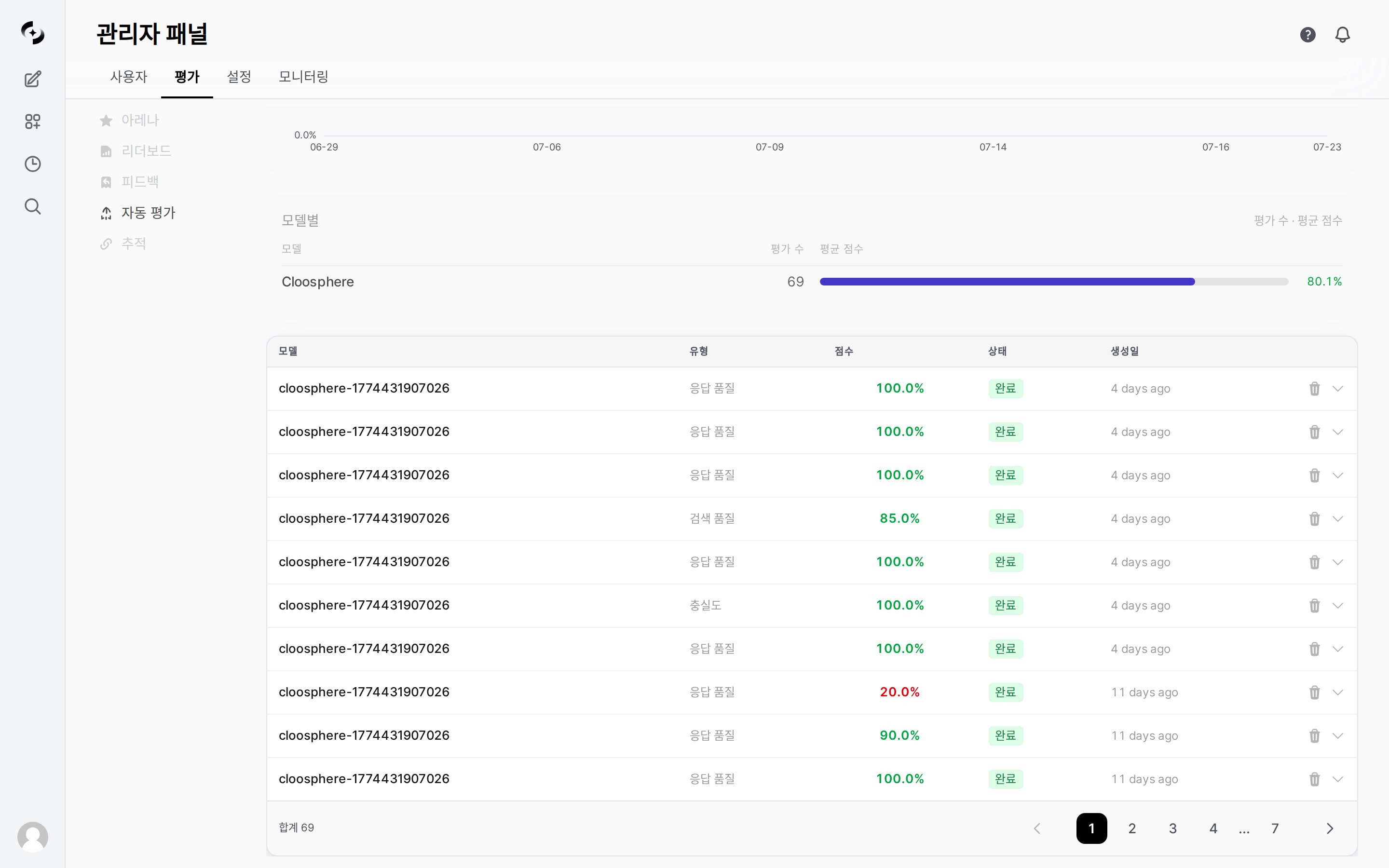
Auto-evaluation results table — model, type, score, status, created
Items shown in the results table and detail
Items shown in the results table and detail
The results table columns are Model · Type · Score · Status · Created. Expanding a row shows the items below, and each item appears only when it has a value.
Chat and message identifiers are not shown on screen; they are included only in the export file.
Score Trend Chart
Shows how the average score changes over the selected period. The legend lists the evaluation types that have data (Retrieval Quality · Faithfulness · Response Quality), and the overall Average baseline (gray dashed line) is drawn only when there are two or more types. Only completed evaluations that have a score are reflected, and intervals with no evaluations appear as breaks in the line.- Use the toggle at the top right of the chart to change the aggregation unit.
To narrow down by model or type, use the top filters (model / type).
When the selected period contains a very large number of completed evaluations (roughly 1,000 or more), the chart draws only the earlier (older) part of that period and the most recent stretch may be missing. To read recent trends accurately, narrow the period or reduce the range with the model / type filters. The Average score card at the top aggregates the whole period regardless of this limit, while the sparkline under the card follows the same range as the chart.
By Model
Below the chart, the By Model area lists each model’s (agent’s) evaluation count and average score in a table. Rows are sorted by evaluation count, and the average score is shown as a bar together with its percentage (- when there is no score). The area scrolls when there are many models. Use it to compare which model scores lower.
The counts and averages in this table cover completed evaluations only, so they can be lower than the Total card at the top.
Filter Options
Use the filters at the top of the screen to narrow by period, model, type, and status. Apart from the period, the three filters are multi-select checkboxes and default to selecting everything. When only some options are selected, a Clear Filters button appears next to them, and the Refresh button re-runs the query.The Status filter applies only to the results table below. The summary cards, score trend chart, and By Model table reflect period, model, and type only, so narrowing by status does not change their values.
Auto-Evaluation Statistics
Summary cards appear at the top of the results screen.Export
There are two export buttons at the top right of the results screen — the download icon (Export as JSON) and the CSV button. They save asauto-evaluations-<date>-<time>.json and .csv. The CSV carries columns for the evaluation ID, chat and message identifiers, user, evaluated model, judge model, evaluation type, score, status, evaluation reasoning, error message, created time, and completed time. The JSON exports every item as-is, including retrieved contexts and additional details. Both formats cover all results regardless of the filters applied on screen.
Use Cases
Monitoring Response Quality
Monitoring Response Quality
- Check daily/weekly score trends in the Score Trend chart
- When a specific model’s score drops, check that period’s traces
- Click a low-scoring evaluation row to review its evaluation reasoning
- Adjust prompt, Knowledge Base, and tool settings
Troubleshooting
What if auto-evaluation fails (failed)?
What if auto-evaluation fails (failed)?
When auto-evaluation is in the failed state:
- Check the error message: Review the error content for that item in the results table
- Common causes: Judge model API errors, timeouts, token limit exceeded
- Re-run: Automatic re-run is not currently supported. Re-enabling auto-evaluation in the agent settings resumes evaluation from subsequent responses.
Related Pages
Evaluation
Full overview of evaluation — manual feedback, Arena, Leaderboard, and more
Tracing
Trace the cause of low evaluation scores
Agent Settings
Configure auto-evaluation on an agent