
Admin › Monitoring › Conversation Logs
- Where Usage aggregates and summarizes tokens and cost, Conversation Logs let you inspect “who · which agent/model · when · how many tokens” at the level of a single message.
- They are the source rows for the user-conversation portion (chat, agent, code gateway) of what the usage charts aggregate. Non-conversational internal calls — automatic title/tag generation, document embedding, guardrail decisions, automatic evaluation — and requests that call the gateway directly with an API key without a chat context are counted in Usage but never appear as rows here, so the totals on the two screens may not match.
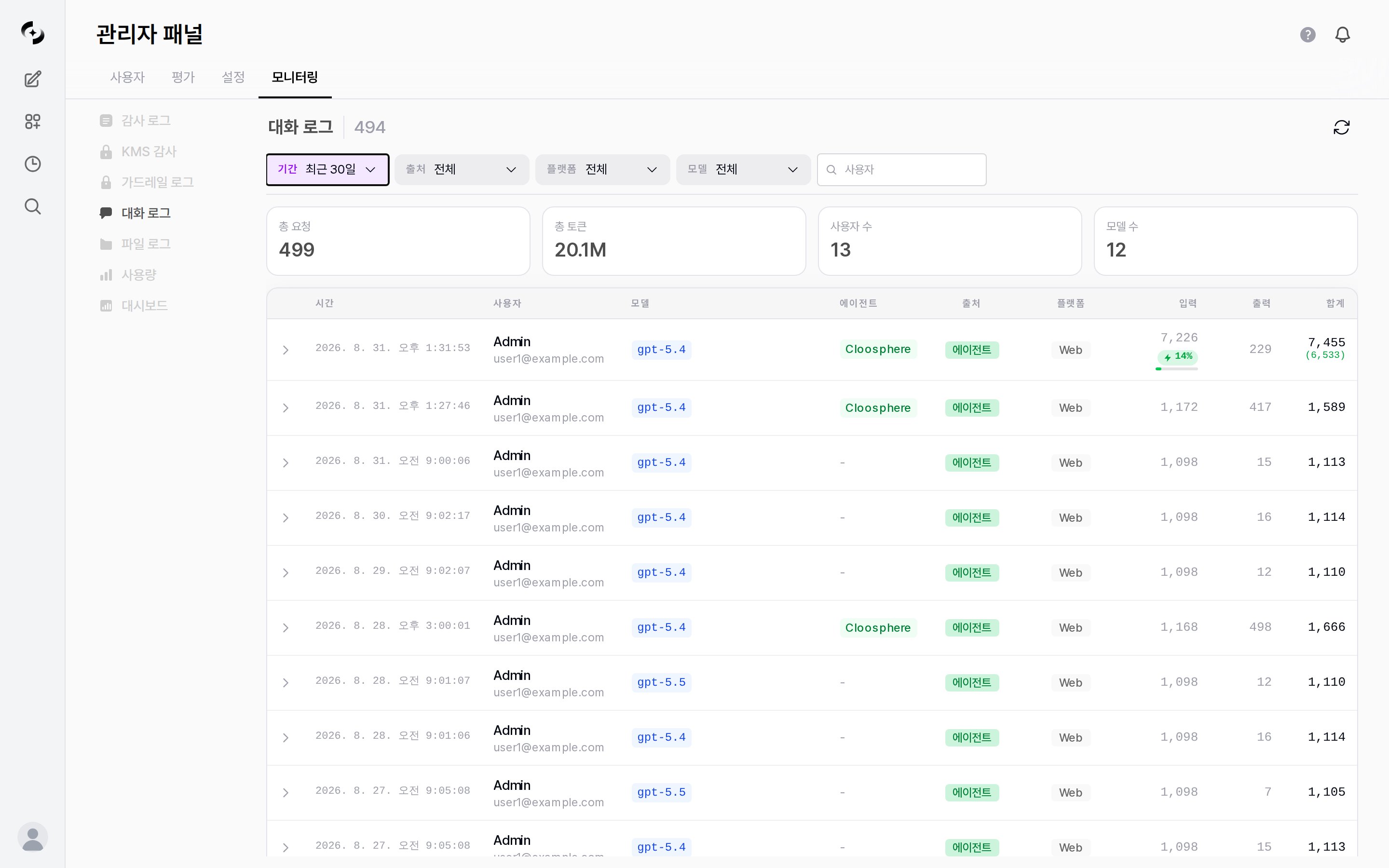
Conversation Logs — period/source/model/user filters, statistics cards, per-message log table
Conversation Logs include actual user names and emails. Only admins with access permission can view them.
Statistics Summary
The top of the screen shows aggregate cards based on the current period and filters.Total requests is counted per internal call, so it can differ from the number of rows in the table — the table groups a message (turn) into a single row, so when one question triggers several executions (an agent deep run, for example) total requests is larger than the row count. Total tokens also includes the tool calls, agent internal steps, and document embedding tokens of each conversation.
Log Entry Structure
Each row is a single message (turn) — token counts include the tool calls and agent internal steps that happened in that turn. The table consists of the following columns.All columns (9)
All columns (9)
The 10% in the cache-adjusted total is a rough weighting for gauging cost — cache pricing differs by model provider, so it is not the actual billed amount.
Row Detail
Click a row to expand its detail — request preview (message count), response preview (finish reason), per-model token usage breakdown, prompt cache (hit rate, cache hit, new input, cache write), token details, function calls (name, arguments), and Chat ID. If there is nothing to show, “No detail data available” appears. Requests that have a Chat ID also show a Trace button; clicking it opens the Evaluations › Tracing screen in a new tab (see Tracing). Code gateway requests have no Chat ID, so no Trace button appears.Filtering and Viewing
The source, platform, and model filters accept multiple selections — every item has a checkbox, and Select All at the top turns them all on or off at once. The chip showsAll when everything is selected, the item name when exactly one is selected, and N selected otherwise; closing the dropdown runs the search. Selecting everything and selecting nothing both behave as an unfiltered query.
For requests that came in with an API key, pick
API in the Platform filter rather than looking under Source.
Candidates for the model and platform filters are built automatically from the values that actually exist in the records (independent of the selected period; model candidates are narrowed further by the selected source). The source filter has a fixed set of three items, so it always shows the same list regardless of whether records exist. The user filter is a search box, not a candidate list.
Difference from Usage
Conversation Logs view the same token data as Usage, but the unit you look at differs.
When you spot an anomaly in Usage (e.g., a token spike for a specific user or model), you filter Conversation Logs by the same user or model to drill down to the source message level and check — they’re used together in that flow.
Use Cases
Tracking a specific user's usage history
Tracking a specific user's usage history
- Type part of a name or email in the User filter and press Enter to view only that user
- Narrow the Period to find requests at the point you want to check
- Use Model, Agent, and Total tokens to identify which requests consumed the most tokens
Identifying high-cost requests
Identifying high-cost requests
- Select a high-priced model with the Model filter
- Look at rows with large Total tokens to find token-heavy requests
- Compare against the overall trend for the same model in Usage
Reviewing agent and code gateway usage
Reviewing agent and code gateway usage
- Use the Source filter to see only agent or code gateway requests
- Use the Agent column to check which agents are called
- Use the Platform column to see which client the requests come from
Related Logs
- Aggregate trends: Usage — summarizes tokens and cost by period, model, and user
- Activity audit: Audit Logs — records resource changes, sign-ins, and other activity
- Retention period: Accumulated logs are cleaned up per the Data Retention setting